
About this Page
In this page, you’ll find a detailed listing of the key capabilities supported by the Command Center for Jira solution.
Detailed Listing of Key Capabilities
Capability
|
Command Center for Jira
|
Information Security & Compliance
|
|
|
Encryption |
Data is Encrypted in-motion and at-rest In-Motion | TLS 1.2 At-Rest | AES 256 bit key, AES-GCM mode, HKDF-512 bit key derivation and commitment, ECDSA with P-384 and SHA-384 More information here - https://support.revyz.io/legal-security/revyz-security-compliance-overview |
|
Qualys SSL Labs |
A+ https://www.ssllabs.com/ssltest/analyze.html?d=jira-app.revyz.io |
|
SOC 2 |
Revyz is a SOC2 Type 2 compliant organization check out our Trust Center for more information - https://trust.revyz.io |
|
ISO 27001 |
Revyz is a SOC2 Type 2 certified - ISO 27001 certification is driven by customer needs and it is currently gathering interest! |
|
Personal Information Treatment |
Revyz does not access a customers personal information directly and neither does it process that information. Any information that is present in Jira that was added in by the customer is pulled into the Revyz data store for backup puroposes and the information is encrypted - in-motion and at rest - learn more about our encryption methodology here - https://support.revyz.io/legal-security/revyz-security-compliance-overview |
|
Immutable App Audit Logs |
The Revyz App maintains a detailed access log of administrators accessing the Revyz app as well as maintaining any actions taken with the app including app setting changes, data restores etc.. |
|
Role Based Access Control |
The Revyz App utilizes Atlassian native roles based access control scheme |
|
Data Residency |
🌐 Data Residency options: AWS US East 🇺🇸 Frankfurt 🇩🇪 Sydney 🇦🇺 Canada Central 🇨🇦 Reference data residency support - https://support.revyz.io/legal-security/data-residency |
|
Immutable, air-gapped backups |
|
Support
|
|
|
Support Operations time & process |
We have customers across the globe - hence we offer 24x5 support during weekdays, we are just a zoom call away! The Revyz team operates out of 3 countries:
To request a call at anytime reach out to our support desk here - https://revyz.atlassian.net/servicedesk/customer/portal/1 someone will respond to schedule a zoom meeting if need be |
|
Phone Support |
|
Data Protection (Backup & Restore)
|
|
|
Easy setup |
Native to Atlassian App installation process - you never have to go outside of your Jira console |
|
Automatic daily backups |
|
|
Cloud Storage |
Please reference our Fair Use Policy, for most Jira and Confluence objects there is no limit. |
|
On-Demand backups |
|
|
3 Years of backup data retention |
|
|
On-demand restores |
|
|
Granular/item-level restores |
|
|
Attachment backups |
|
|
Detailed backup analytics and logs |
|
|
Supported items |
As Supported by Atlassian API's - See detailed list below |
|
Cross site data restore support |
|
|
Maintain parent child relationships when restoring your issue data |
|
|
Access to original timestamps of restored Jira Issues |
|
|
Backup & Restore support for JSM Assets |
|
Restore Use Cases Supported
|
|
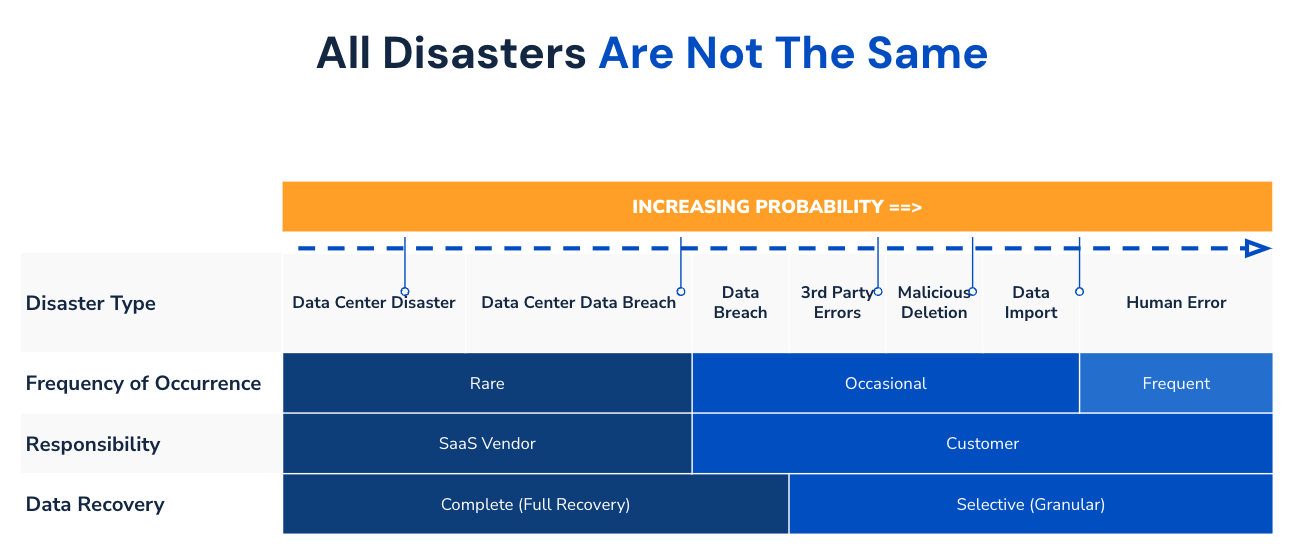
Couple of points to note from the above:
With the above in mind who is responsible for data loss in SaaS for the various scenarios? The answer depends on the cause of data destruction - simple rule of thumb, if the data loss is due to infrastructure failure / non-availability of infra then it is the SaaS vendor on the other hand if the data destruction is due to a data breach or human error on the customer side then it is the customer who is responsible for the data. References
|
|
|
Granular & Bulk Recovery of Issues and related data such as attachments |
|
|
Bulk Recovery of configuration objects |
|
|
Space level recovery |
|
|
Cross site data & configuration restore |
|
|
Site level recovery of data (issues + configuration)
|
Multiple steps to recover:
We are working on a simplified way to recover entire site data with just a few clicks - awaiting release of specific backup & restore related API’s from Atlassian |
|
Alternate console for accessing backup data |
The Command Center for Jira User Interface is embedded within Atlassian’s Jira console - We do not support a separate console outside of the Jira console at this point of time. |
Configuration Management
|
|
|
Configuration Rollback |
|
|
Configuration Diff |
|
|
Sandbox to Production (Cross-site) Data Transfer |
|
Jira Site Analytics
|
|
|
Issue Deletion Log |
A very critical feature - Enables the admin to understand who is deleting what and when |
|
Jira Site Summary |
|
|
Attachment Analytics |
|
Jira Site Optimization
|
|
|
Configuration Usage Analysis |
|
|
Bulk Configuration Deletion |
|
|
Accidental config deletion prevention |
Check to see if a config object is present in your backup before deleting |
|
Log of all deletion actions |
|
Additional Features
|
|
|
Detailed Error Logging |
|
|
Notifications via Jira Space integration (Email / Slack / Teams) |
|
|
Selective Data Export (JSON / CSV) |
|
|
Bulk Data Export (JSON / CSV / Parquet) |
Roadmap |
|
Free plan |
We do not offer a free plan at this point of time, although we offer a free trial which ranges between 30 - 59 days and is extendable on a case by case basis |
Detailed listing of the specific objects within Jira that are supported for backup and restore operations
Jira Object Support
|
|||
Spaces
|
Backup |
Restore |
Comments |
|
Spaces |
|
|
|
|
Space details |
|
|
|
|
Space categories |
|
|
|
|
Space components |
|
|
|
|
Space features |
|
|
JSM Space features backup & restore is not supported due to Atlassian API limitations. |
|
Space versions |
|
|
|
|
Space Access |
|
|
|
|
Space associations to schemes |
|
|
Priority Scheme backup and restore is not supported, currently on roadmap. |
|
Filters |
|
|
|
|
Boards |
|
|
|
|
Sprints |
|
|
|
|
Space properties |
|
|
Backup runtime consideration |
|
Space avatars |
|
|
Backup runtime consideration |
|
Space issue layout |
|
|
Atlassian API not available |
|
Dashboard |
Roadmap |
Roadmap |
Gathering Interest |
Work Items
|
Backup |
Restore |
Comments |
|
Work items |
|
|
Restricted work items are not accessible to the marketplace vendor. Hence no app can support of restricted work items backup. |
|
Work items field values |
|
|
|
|
Work items linking |
|
|
|
|
Work items attachments |
|
|
|
|
Work Item worklogs |
|
|
|
|
Work Items comments |
|
|
|
|
Work Items Forms |
Roadmap |
Roadmap |
Gathering Interest |
|
Work Items votes |
|
|
Backup runtime consideration |
|
Work Items watchers |
|
|
Backup runtime consideration |
|
Work item properties |
|
|
Backup runtime consideration |
|
Work item remote links |
Roadmap |
Roadmap |
Gathering Interest |
Jira Configurations
|
Backup |
Restore |
Comments |
|
Work types |
|
|
|
|
Work type schemes |
|
|
|
|
Sub tasks |
|
|
|
|
Workflows |
|
|
|
|
Workflow schemes |
|
|
|
|
Work item type screen schemes |
|
|
|
|
Work item link types |
|
|
|
|
Screens |
|
|
|
|
Screen schemes |
|
|
|
|
Work type screen schemes |
|
|
|
|
Workflow scheme drafts |
|
|
|
|
Workflow transition properties |
|
|
|
|
Fields |
|
|
|
|
Field configurations |
|
|
|
|
Field configuration Scheme |
|
|
|
|
Priorities |
|
|
|
|
Priority schemes |
|
|
|
|
Data connections |
|
|
|
|
Time tracking |
|
|
|
|
Work item linking |
|
|
|
|
Statuses |
|
|
|
|
Resolutions |
|
|
|
|
Work item security schemes |
|
|
|
|
Notification schemes |
|
|
|
|
Permission schemes |
|
|
|
|
Screen tabs |
|
|
|
|
Screen tab fields |
|
|
|
|
System Fields |
|
|
System fields cannot be overwritten |
|
Custom fields |
|
|
|
Issue attributes and features
|
Backup |
Restore |
Comments |
|
Status(es) |
|
|
|
|
Resolutions |
|
|
|
|
Priorities |
|
|
|
|
Work item security schemes |
|
|
|
|
Notification schemes |
|
|
|
|
Permission schemes |
|
|
|
|
Priority schemes |
Roadmap |
Roadmap |
|
|
Issue linking |
|
|
|
System Settings
|
Backup |
Restore |
Comments |
|
Jira audit logs |
|
|
|
|
Space roles |
|
|
|
|
Automation rules |
|
|
Restoration is currently a manual process. Please share your feedback with us as we look to automate this in the future. |
Atlassian admin Settings
|
Backup |
Restore |
Comments |
|
Groups |
|
|
|
|
Users |
|
|
If a user is associated to any Jira configuration, only then it is backed up. |
Jira Service Management
|
Backup |
Restore |
Comments |
|
Service desks (as spaces) |
|
|
|
|
Requests (as issues) |
|
|
|
|
Request type |
|
|
|
|
Request type/Portal groups |
|
|
|
|
Form templates |
|
|
|
|
Service desk queues |
Roadmap |
Roadmap |
Gathering Interest |
|
Organization |
Roadmap |
Roadmap |
Gathering Interest |
|
Customers |
Roadmap |
Roadmap |
Gathering Interest |
Assets
|
Backup |
Restore |
Comments |
|
Assets object schema |
|
|
|
|
Assets object types |
|
|
|
|
Assets object type sttributes |
|
|
|
|
Assets object schema statuses |
|
|
|
|
Inbound and outbound references in Jira assets |
|
|
Limited to certain scenarios |
|
Linked issues in Jira assets |
|
|
Limited to certain scenarios |
|
Assets object schema reference types |
|
|
|
|
Assets fields |
|
|
|
|
Assets field context |
|
|
|
|
Configuration map |
|
|
|
|
Assets Object Schema Roles |
|
|
API Limitations |
|
Internal Assets Custom Field |
|
|
API Limitations |
|
Assets Objects Attachments |
|
|
API Limitations |
|
External Assets Custom Field |
|
|
API Limitations |
|
Third-party app |
Backup |
Restore |
Comments |
|
XRay global configuration |
|
|
Access snapshot-specific data through the Configuration Explorer. |
|
Xray space configuration |
|
|
Access snapshot-specific data through the Configuration Explorer. |
|
Xray attachments |
|
|
Access snapshot-specific data through the Configuration Explorer. |
|
Tempo timesheets |
|
|
|
|
Tempo settings |
|
|
|
|
Scriptrunner
|
|
|
|
|
Approval Path for Jira
|
|
|
Access snapshot-specific data through the Configuration Explorer. |
Additional
|
Backup |
Restore |
Comments |
|
Automation Rules |
|
|
Restore is manual at this point of time, we would love your feedback |
|
Advance Roadmap |
Roadmap |
Roadmap |
Gathering Interest |
|
Third party app data is not backed-up as that data is not available in Atlassian Cloud. Our app is dependent on the API’s that are published by Atlassian. Thus far no other third-party app vendor has been open to providing a mechanism for backing & restoring up third party app data that is stored in their own cloud. |
|||
If you think we are missing something or we do not support something that you think is critical for you, please open a support request and we will get on a call with you to discuss your specific requirements!