
About this Page
This feature is a Site Optimization tool that scans your Jira instance and provides a complete list of all configured custom fields. It analyzes each field to determine if it is unused and can be safely deleted.
What is the use case?
Use this to identify and clean up "orphaned" or legacy custom fields that are not associated with any screens or project contexts. This simplifies your Jira configuration, reduces clutter, and can improve instance performance.

This feature is applicable to:
command center for jira *Advanced config manager for jira *Advanced
Optimization Tools
1. Fields
-
Optimize your Jira instance by identifying and cleaning up unused Fields.
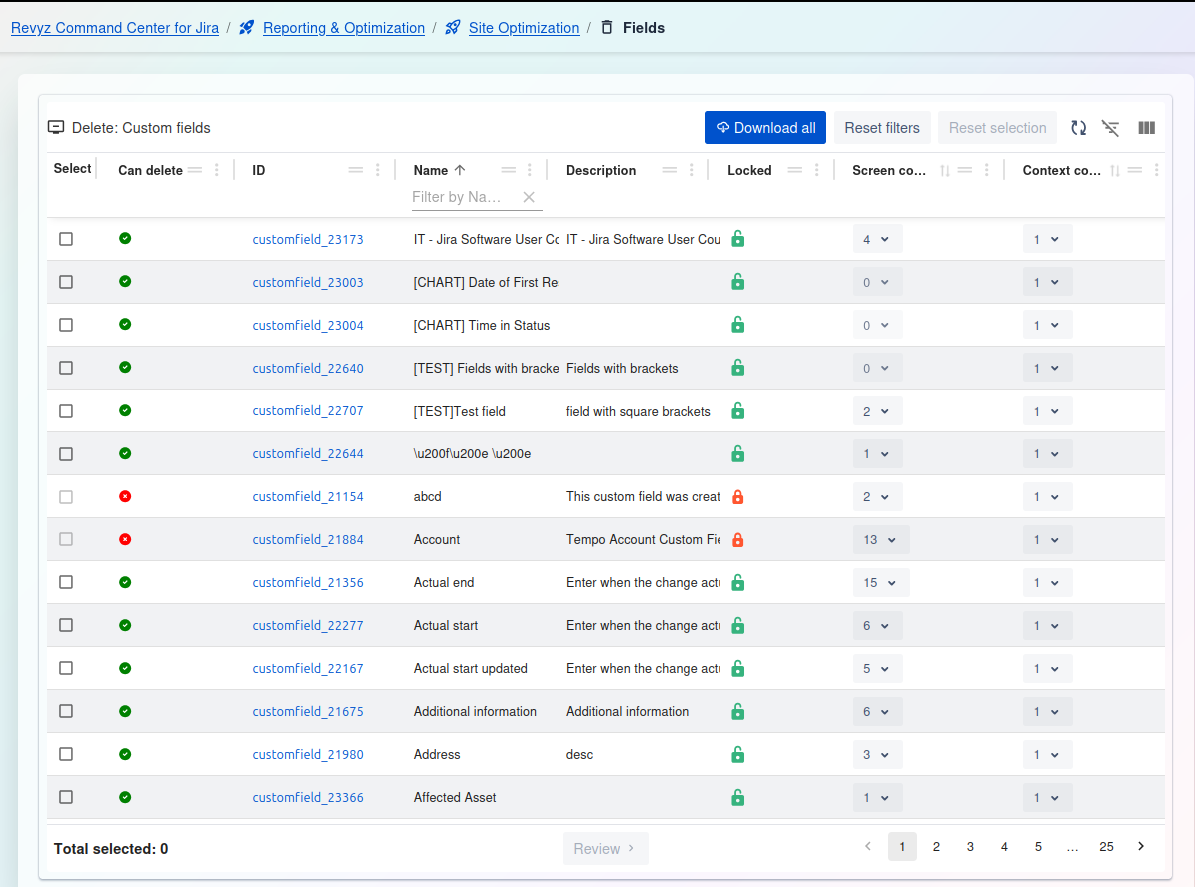
Delete: Custom fields
This page displays a comprehensive list of all Custom Fields in your Jira instance. It provides details on their usage (on screens and in contexts) and whether they are "locked" (managed by an app), allowing you to identify fields that are safe to be deleted.
Management and Filtering:
-
Download all: Exports a complete list of all custom fields shown in the table.
-
Reset filters: Clears any filters you have applied to the table.
-
Reset selection: Un-checks any custom fields you have selected in the list.
-
Table tools (right side): Use these icons to toggle the filter row or customize the visible columns.
Custom Fields Table:
-
Select: A checkbox to select one or more fields for review and deletion.
-
Can delete: A status icon indicating if the field is eligible for deletion.
-
Green Checkmark: The field is a standard custom field and is not locked. It can be deleted if it is not in use.
-
Red Circle (Dash): The field is locked (see
Lockedcolumn) and cannot be deleted, regardless of its usage.
-
-
(ID Column): The blue text (e.g.,
customfield_23173) is the unique internal ID for the field. -
Name: The name of the custom field (e.g.,
[CHART] Time in Status). You can filter this column by name. -
Description: The description associated with the field.
-
Locked: An icon indicating the field's lock status.
-
Green Unlocked Padlock: The field is not locked and is a standard custom field.
-
Red Locked Padlock: The field is locked (e.g., it's a "managed" field from an app like Tempo or Charts) and cannot be deleted.
-
-
Screen co... (Screen associations): Shows the number of screen schemes or other configurations this field is associated with. A value of
0(or blank) suggests it is not on any screens. -
(Last column - Contexts): Shows the number of contexts this field is associated with. A value of
0would indicate it is not in use.
2. Delete: Field configurations
Field configurations: Optimize your Jira instance by identifying and cleaning up unused Field configurations.
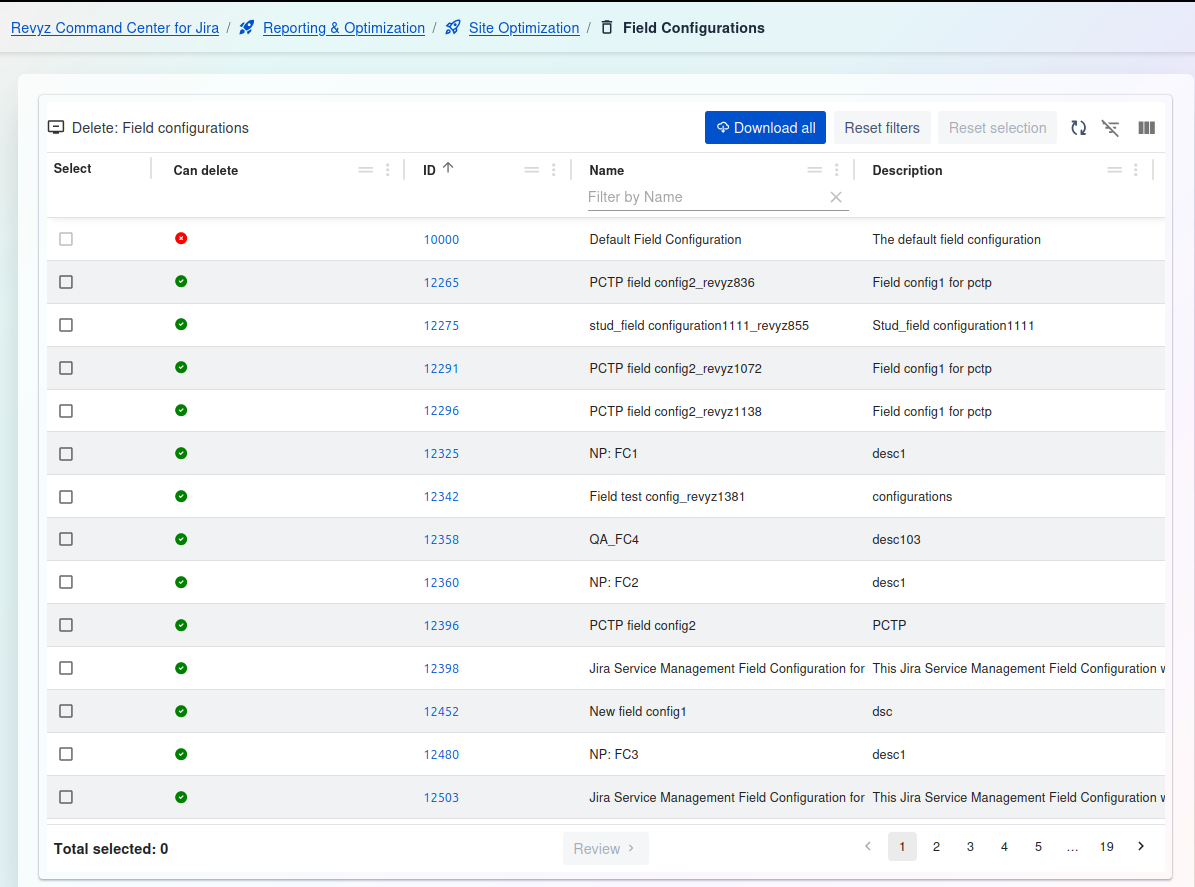
This page displays a comprehensive list of all Field Configurations in your Jira instance. It highlights which ones are not in use by any scheme and are therefore safe to be deleted.
Management and Filtering:
-
Download all: Exports a complete list of all field configurations shown in the table.
-
Reset filters: Clears any filters you have applied to the table.
-
Reset selection: Un-checks any field configurations you have selected in the list.
-
Table tools (right side): Use these icons to toggle the filter row or customize the visible columns.
Field Configurations Table:
-
Select: A checkbox to select one or more field configurations for review and deletion.
-
Can delete: A status icon indicating if the configuration can be safely deleted.
-
Green Checkmark: The field configuration is not associated with any field configuration schemes and is safe to be deleted.
-
Red Circle (Dash): The field configuration (like the "Default Field Configuration") is in use and cannot be deleted.
-
-
ID: The unique internal ID for the field configuration (e.g.,
10000). -
Name: The name of the field configuration (e.g.,
PCTP field config2_revyz836). You can filter this column by name. -
Description: The description associated with the field configuration.
3. Field Configuration Schemes
Field configurations schemes: Optimize your Jira instance by identifying and cleaning up unused Field configuration schemes.
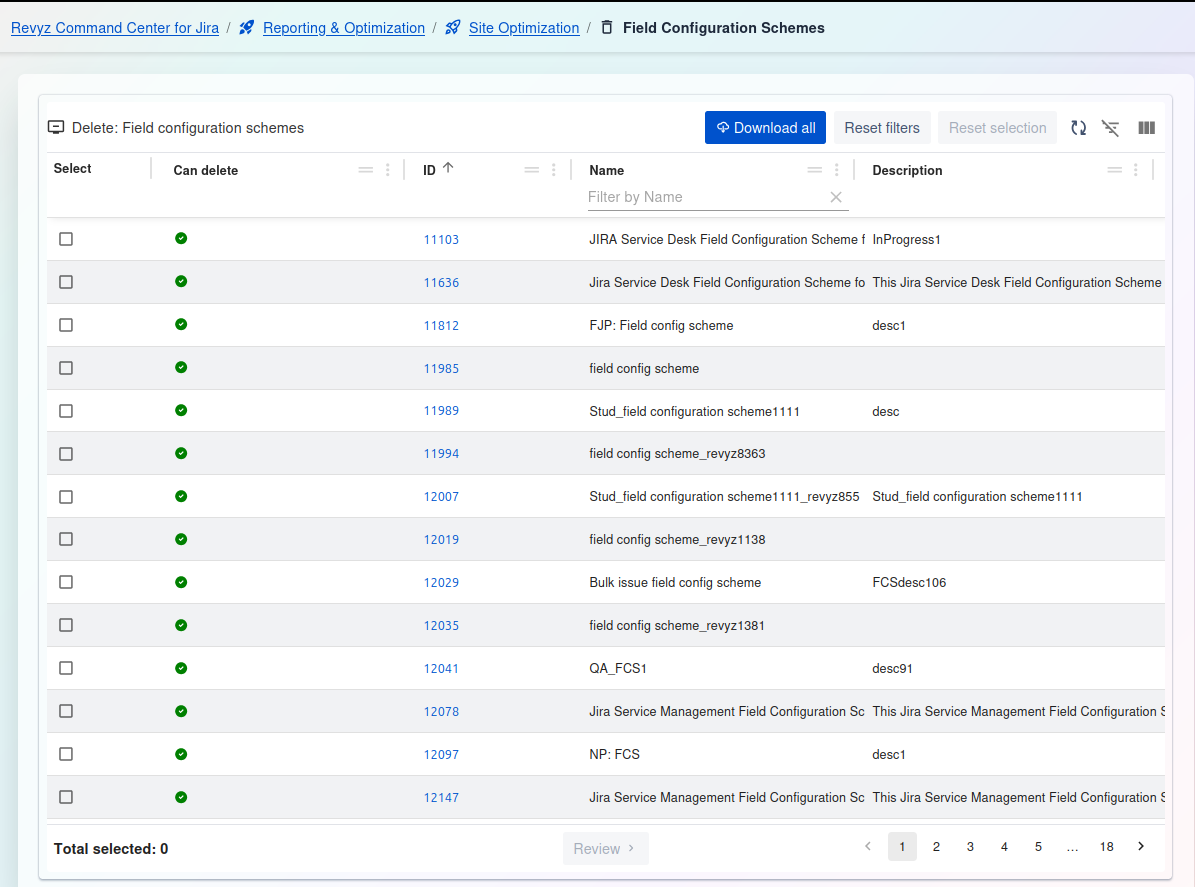
Delete: Field configuration schemes
This page displays a comprehensive list of all Field Configuration Schemes in your Jira instance. It highlights which ones are not in use by any projects and are therefore safe to be deleted.
Management and Filtering:
-
Download all: Exports a complete list of all field configuration schemes shown in the table.
-
Reset filters: Clears any filters you have applied to the table.
-
Reset selection: Un-checks any field configuration schemes you have selected in the list.
-
Table tools (right side): Use these icons to toggle the filter row or customize the visible columns.
Field Configuration Schemes Table:
-
Select: A checkbox to select one or more schemes for review and deletion.
-
Can delete: A status icon indicating if the scheme can be safely deleted.
-
Green Checkmark: The scheme is not associated with any projects and is safe to be deleted.
-
(Other Icon/No Icon): The scheme is currently in use by one or more projects and cannot be deleted.
-
-
ID: The unique internal ID for the field configuration scheme (e.g.,
11103). -
Name: The name of the scheme as it appears to users (e.g.,
FJP: Field config scheme). You can filter this column by name. -
Description: The description associated with the scheme.