
Skip table of contents

Analytics Insights

About this Page

This page talks about “Analytics Insights”, a powerful comparison tool that allows you to analyze your Jira and Assets configurations between two different backup snapshots. It provides a detailed, item-by-item report of all changes.

What is the use case?

Use this to identify "configuration drift," which are unintended changes that have occurred over time. It's perfect for comparing your production site against a "golden" baseline snapshot or for comparing a staging site to production to ensure consistency.

Note:

Check the product tags on the respective pages to see which features are relevant to your product.
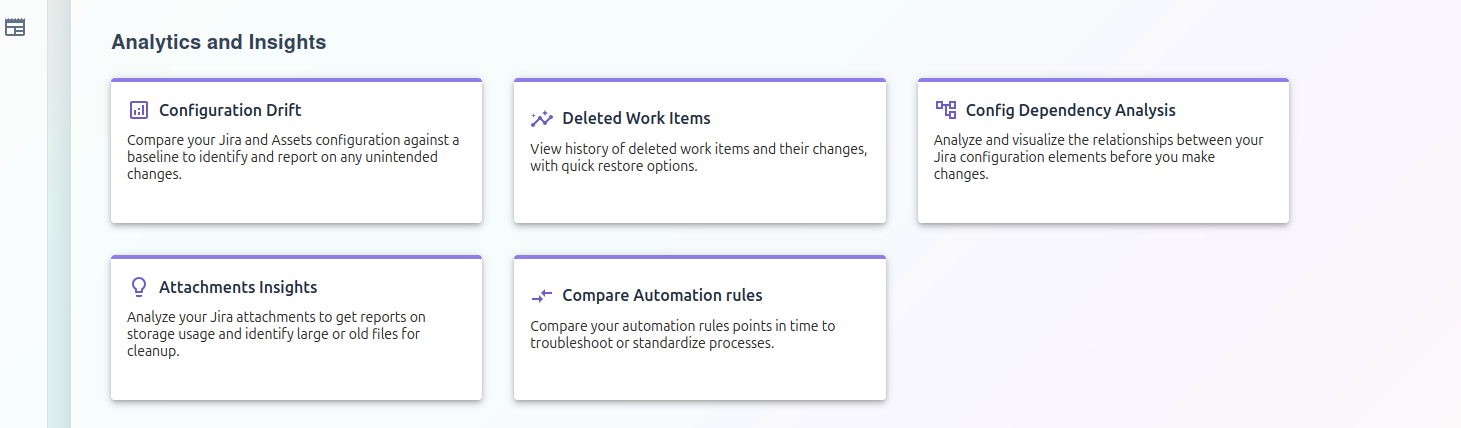
image-20251023-063428.png

Analytics & Insights

1. Configuration Drift

This feature acts as a "change detector" for your Jira and Assets configurations. You select a "baseline" snapshot (a backup from a time you know the configuration was correct), and the tool compares it against your live instance or another snapshot.

  • Use Case: A workflow suddenly stops working. You can run a drift report to see if any of its settings were changed since yesterday's backup.

For more information, visit: https://support.revyz.io/revyz-data-manager/configuration-drift-analysis-tool

2. Deleted Work Items

This tool provides a complete and searchable audit trail of all issues, tasks, and other work items that have been deleted from your instance.

  • Use Case: A user accidentally deletes a critical bug report. Instead of running a full-site restore, you can find the specific issue in this log and restore it in seconds.

For more information, visit: https://support.revyz.io/revyz-data-manager/deleted-work-items

3. Config Dependency Analysis

This is a crucial planning tool for any administrator. It scans your Jira configuration elements (like custom fields, screens, or statuses) and creates a visual map of all their relationships and dependencies.

  • Use Case: You want to delete an old custom field, but you're not sure if it's still used. This tool will show you every workflow, screen, and project that references that field, preventing you from breaking your instance.

For more information, visit: https://support.revyz.io/revyz-data-manager/config-dependency-analysis

4. Attachments Insights

This feature scans your entire Jira instance and provides detailed reports on attachment storage usage.

  • Use Case: Your Atlassian storage bill is increasing. You can use this report to find and delete large, unnecessary attachments (like old video files) from test projects to free up space and reduce costs.

For more information, visit: https://support.revyz.io/revyz-data-manager/attachment-insights

5. Compare Automation rules

This feature scans your entire Jira instance and provides detailed reports on attachment storage usage.

  • Use Case: Your Atlassian storage bill is increasing. You can use this report to find and delete large, unnecessary attachments (like old video files) from test projects to free up space and reduce costs.

For more information, visit: https://support.revyz.io/revyz-data-manager/compare-automation-rules

JavaScript errors detected

Please note, these errors can depend on your browser setup.

If this problem persists, please contact our support.