
About this Page
This page is a comprehensive troubleshooting guide that lists and explains the various Restore Status Codes you might encounter in Revyz.
It details specific error codes (e.g., R_01001, R_10001) related to restoring Jira Issues, Workflows, Screens, and Assets. For each code, it provides the Category, the Reason for the failure or partial success, and a recommended Resolution to help you fix the issue.
Jira Work Items
R_01001
Category: Failed to create work items while restoring it
Reason:
-
Revyz internal issue: Failure could be due to one of the following reasons:
-
Missing Required Fields:
This occurs when older work items lack data for fields that were recently marked as mandatory (via workflow transitions or configuration updates). These items will fail validation during creation as the work items have no values against the mandatory fields. -
Atlassian API failure:
Failures caused by API rate limits, structural constraints, or temporary transient errors.
-
2. Resolution:
-
Missing Required Fields: Temporarily change the configuration on the destination site to remove the mandatory field requirement and trigger a new restore.
-
Atlassian API failure: Reach out to Revyz support.
R_01002
Category: Work item has been created successfully, however, failed to update a value for a certain field.
Reason: Field values for work items may fail to set due to:
-
Invalid user: The specified user (such as for the field reporter or any other user field) is deactivated, suspended, or missing from the site.
-
Atlassian API errors: Failures stemming from rate limits, structural constraints, or transient network issues.
Resolution:
Following actions are recommended based on the reasons of failure:
-
Invalid: Ensure all users are present and active on the site and trigger another restore.
-
Atlassian API failure: Reach out to Revyz support.
R_01003
Category: Failed to create sub-task
Reason: Failed to create sub-task independently.
For example, the user selected a sub-task work item to restore, but its parent work item is
missing. In such cases, the sub-task cannot be created independent.
Resolution: Select both the parent work item and the sub-task work item to restore.
R_01004
Category: Restoring the work-items failed to update the status.
Reason: Failed to Restore Work Item Status
Revyz cannot restore work item status if validations or post-functions are required during work item transition. Workflow status restrictions may require user intervention during work item transition, depending on the configuration.
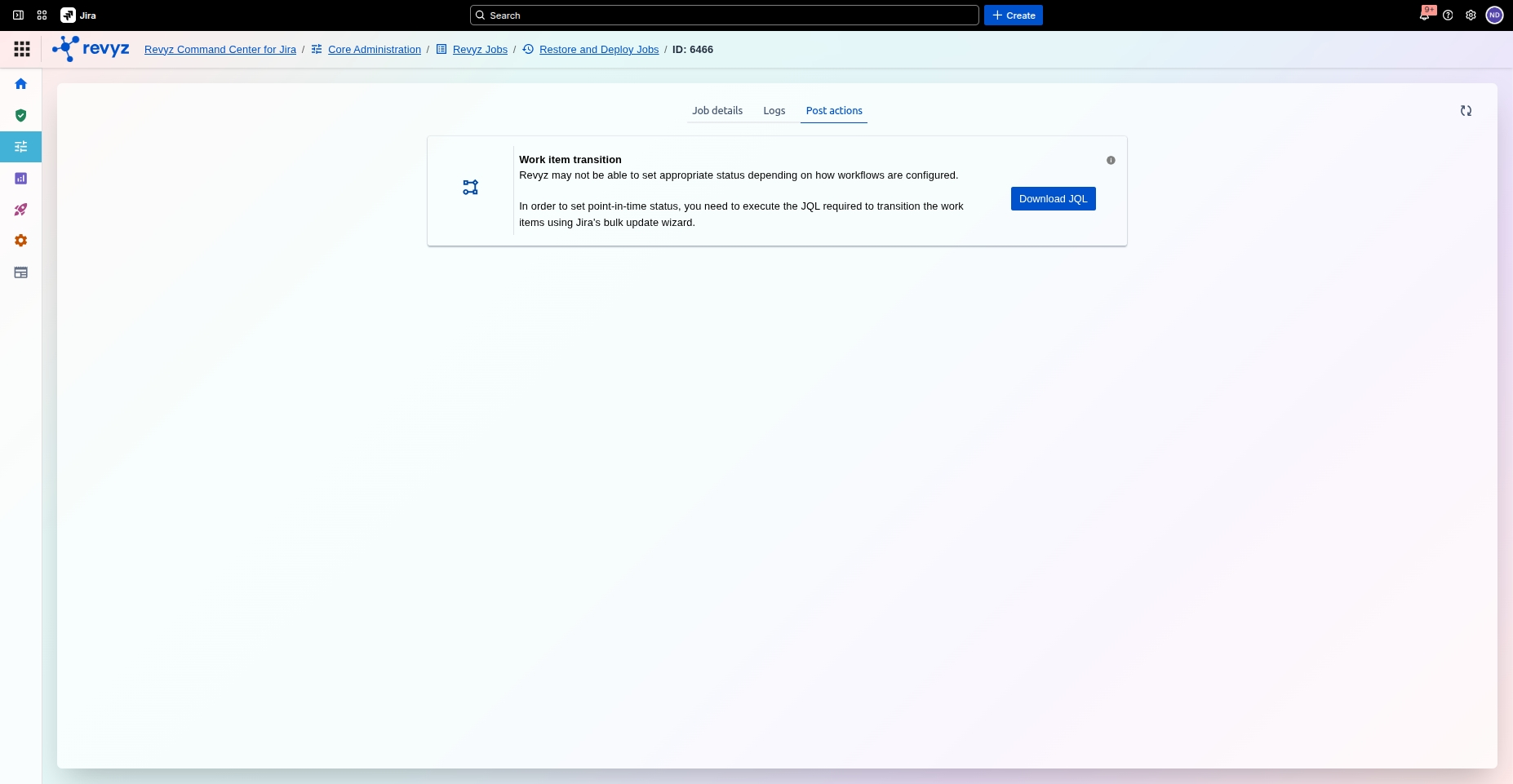
Resolution: User should follow these steps:
-
Navigate to Revyz Jobs → Restore jobs
-
Select the restore job ID
-
Select the “Post actions“ tab
-
Download the JQL file, which provides a filter to bulk edit and transition work items to their statuses.
-
R_01005
Category: Create Issue
Reason: Failure setting intended status of restored issue either due to workflow restrictions or Jira API limitations
Resolution: Check 'Post actions' in job details to fix it
R_01006
Category: While restoring a work item failed to add a comment.
Reason: Failures from Atlassian API rate limits, structural constraints, or temporary errors can cause comment creation to fail.
Resolution: Customer is advised to check the restore logs. If they can fix an Atlassian error, resolve it and retry the restore. Otherwise, contact Revyz support.
R_01007
Category: While restoring a work item, failed to add attachment (s).
Reason: Restoring an attachment can fail for these reasons:
-
Attachment size exceeds the allowed limit
-
Attachment creation can fail due to Atlassian API rate limits, structural constraints, or temporary errors.
Resolution: We recommend following actions based on the reasons of failure:
Attachment size exceeds limit: Increase the attachment size in the site global settings and retry
work item restore.
Atlassian API failure: Reach out to Revyz support.
R_01008
Category: Failed to add worklogs while restoring a work item
Reason: Worklogs creation can fail due to Atlassian API rate limits, structural constraints, temporary errors or worklogs limit
Resolution: Recommended to contact Revyz support.
R_01009
Category: Failed to add original work item backed up data as an JSON attachment.
Reason: Revyz adds original backup work item as an attachment to restored issue, so that user can have original copy with them. It can be used for:
-
Work item history
-
Reconciling missing field values
Reason for failure;
-
Atlassian API failure
-
Revyz internal issue
Resolution: Recommended to contact Revyz support.
R_01010
Category: Failed to add original work item backed up data in the form of CSV as an attachment
Reason: Failed to add original work item backup data as CSV attachment
Revyz attaches the original backed-up work item to the restored issue, ensuring users always have access to the original copy.
It can be used for following purpose:
-
Work item history
-
Reconcile missing field values
Reason of failure:
-
Atlassian API failure
-
Revyz internal issue
Resolution: Recommended to contact Revyz support.
R_01011
Category: Issue_worklog_partial
Reason: Failure restoring one of the worklogs.
Resolution: Check logs. Collect information about cause if available and share it with Revyz.
R_01012
Category: Failed to add Work item links
Reason: Revyz might fail to link work items due to one of the following scenarios:
-
Linked work item is not present or might’ve been deleted.
-
Linked work item was not selected for restore and is not present on the site.
-
Atlassian API rate limits, structural constraints or temporary errors
Resolution: We recommend following actions based on the reasons of failure:
-
Missing linked work items: Select the linked work items as well for restore in the same restore job.
-
Atlassian API failure: Reach out to Revyz support.
Issue Comments and worklogs
R_01013
Category: Failed to add a comment to the restored work item on behalf of the original author.
Reason: If the user who added the comment is absent, deactivated, suspended, or deleted, impersonating them to add a work item comment in the restored work item will fail.
Resolution: No action required.
R_01014
Category: Issue_Comments_Connect_App_User
Reason: The issue comment was restored using the Connect app user as an error occurred while attempting to restore.
Resolution: The comment with the original comment owner.
R_01015
Category: Issue_worklog_deactivated_user
Reason: Issue worklog restored with connect app user as deactivated user.
Resolution: Check logs. Collect information about cause if available and share it with Revyz.
R_01016
Category: Issue_worklog_connect_app_user
Reason: The issue worklog was restored using the Connect app user as an error occurred while attempting to restore.
Resolution: The worklog with the original comment owner.
R_01017
Category: Failed to upload the original work item history as a CSV attachment to the restored work item.
Reason: Atlassian API rate limits, structural constraints or temporary errors
Resolution: Contact Revyz support
R_01018
Category: Failed to upload the original work item worklogs as a CSV attachment to the restored work item
Reason: Atlassian API rate limits, structural constraints, or temporary errors
Resolution: Contact Revyz support
Issue update
R_02001
Category: Failed to update a work item
Reason: When updating a work item, the API fails. It could fail due to one of the following reasons:
-
A field custom might be mandatory as per the latest configurations.
-
Atlassian API rate limits, structural constraints or temporary errors
Resolution: Contact Revyz support.
R_02002
Category: Failed to update a work item
Reason: When updating a work item, the API fails. It could fail due to one of the following reasons:
-
A field custom might be mandatory as per the latest configurations.
-
Atlassian API rate limits, structural constraints or temporary errors
Resolution: Contact Revyz support
Issue Link
R_04001
Category: Failed to add Work item links
Reason:
When restoring a work item, the associated work items are also linked. However, the associated work items may fail to be linked to the restored work item, if:
-
Linked work item is not present or might've been deleted.
-
Linked work item was not selected for restore and is not present on the site.
-
Atlassian API rate limits, structural constraints or temporary errors
Resolution:
Following actions are recommended on the basis of reasons of failure:
-
Missing linked work items: Select the linked work items as well for restore in the same restore job.
-
Atlassian API failure: Reach out to Revyz support.
Jira Workflows
R_10001
Category: Workflows
Reason: Failed to restore the workflow contains validators, post-functions can be skipped based on various conditions
Resolution: Contact Revyz support.
R_10002
Category: Workflows
Reason: Failed to restore sub-configurations of the workflow
Resolution: Check restore job logs from job details.
R_26001
Category:
Failed to create workflow rules (conditions, validators, post function)
Reason:
It could fail due to one of the following reasons:
-
Broken or non-functional rules.
-
Dependencies (field, status, groups, resolution, space roles, security level) used to create rules not available on site.
-
Plugin specific rules- Plugin not installed on the site.
Resolution:
We recommend following actions based on the reasons of failure:
-
Broken or non-functional rules: No Action Required: Since the original source rule was already broken and non-functional (pointing to a deleted field), it is of no use. You do not need to take any manual steps.
-
Missing dependencies: Identify the required dependency and investigate why it was not generated during the workflow creation phase.
-
Dependency Analysis: During a restore, Revyz identifies and creates the required dependencies for your workflow. If a dependency fails to create, the associated workflow rule will be skipped.
-
Resolution Steps: Review the error logs to determine why the dependency creation failed. If the issue is resolvable, apply the fix and retry the restore process.
-
Plugin-specific rules:
-
Install the missing plugin on the instance and retry the restore process.
-
Identification: Identify which third-party app the rule belongs to (e.g., ScriptRunner, JMWE, etc.)
-
Installation & Licensing: Ensure the corresponding plugin is installed and licensed on your destination site, then retry the restore.
-
Other errors: Please contact Atlassian Support for further assistance.
R_26002
Category: Failed to create workflow
Reason: It could fail due to one of the following reasons:
-
Duplicate workflow: Workflow with the same name already exists
-
Workflow name is too long
-
Atlassian API rate limits, structural constraints, or temporary errors
Resolution:
We recommend following actions based on the reasons of failure:
-
Duplicate Workflow name: Rename the workflow name that failed and retry the restore.
-
Workflow name is too long : Rename the workflow name by reducing the text length and retry the restore.
-
Any other reason: Reach out to support.
R_26003
Category: Failed to create request body to create workflow
Reason:
It could fail due to one of the following reasons:
-
Duplicate status found on destination site
-
Duplicate transition name
Resolution:
We recommend following actions based on the reasons of failure:
-
Duplicate status: Check which one is unused and delete it or else rename it and retry the restore
-
Duplicate transition name: No action require as Revyz creates all the transition by appending_revyz<job ID> to duplicate transition, but still you want to change it then go to the
destination restored workflow and change the transition name
R_26004
Category: The workflow is created with the suffix '_revyz<restore_job_id>'
Reason:
Jira restricts certain modifications (such as adding statuses or rules) to active workflows, Revyz creates a new workflow with a suffix.
The workflow is created with the suffix _revyz'<restore_job_id>' appended to the original name. Revyz adds this suffix when it cannot update the active workflow due to an Atlassian limitation.
Resolution:
-
Workflows with a Suffix (Optional): Check if your original workflow is still needed. If not, you can safely rename or delete it. If desired, you can then remove the suffix from the newly restored workflow name.
See detailed instructions.
To clean up your site and start using your newly created workflow, follow these steps on your destination site:
-
Deactivate the old workflow: Remove the original workflow (the one without the _Revyz suffix) from its workflow scheme. This will move it to an inactive status.
-
Associate the new workflow: Assign the newly created workflow (the one with _Revyz<job
-
ID>) to the appropriate workflow scheme.
-
Clean up: Delete the old, inactive workflow if you no longer need it.
2. Any other reason: Reach out to support.
R_26005
Category: Failed to create workflow with duplicate name
Reason: This error occurs because the source site has two workflows with duplicate names. One of the workflows contains an accidental leading or trailing space in its name.
Failed to create workflow because a workflow with the same name exists on the destination. This error occurs when an extra space is at the start or end of the workflow name. In this case the job is marked as 'Action needed'
Resolution: We recommend following actions based on the reasons of failure:
-
Duplicate workflow: Locate the two workflow and rename the workflow with extra space at the start or end or the workflow name.
-
Any other reason: Reach out to support.
R_26006
Category: Workflow global transition created with the appended suffix _revyz< JobID>
Reason:
Workflow global transition created with the appended suffix _revyz
It could fail due to one of the following reasons:
-
The workflow contains multiple global transitions with the same name.
Resolution:
We recommend following actions based on the failure reason found in your restore job logs:
-
If duplicate global transitions exist: Open the workflow in Jira, remove or rename the duplicate global transitions, and retry the restore again.
-
Any other reason: Reach out to support.
Jira Screens
R_11001
Category: Screens
Reason: Failed to restore the screen
Resolution: Contact Revyz support.
R_11002
Category: Screen
Reason: Failed to restore sub-configurations of the screen
Resolution: Check restore job logs from job details.
R_10403
Category: Screen tab
Reason: Locked fields can't added/associated in the screen tab if it is not available on destination site. Locked fields are not meant to be created or modified in that way due to Atlassian API limitation.
Jira Filters
R_12001
Category: Filters
Reason: Failed to restore the filter
Resolution: Contact Revyz support.
R_12002
Category: Filters
Reason: Failed to restore sub-configurations of the filter
Resolution: Check restore job logs from job details.
Jira Work Type
R_29001
Category: Failed to create Sub-Tasks
Reason:
Subtasks are not created as Subtask is disabled on the destination site.
Resolution: We recommend following actions based on the reasons of failure. Check restore job logs from job details.
-
Sub-Task Disabled: The admin should enable sub-task on the destination site, then retry the restore job.
Step-by-step instructions:
Go to: https://<your-destination-site-name>/secure/admin/subtasks/ManageSubTasks.jspa
-
Enable Sub-Tasks.
-
Retry restore of Sub-Tasks.
-
Any other reason: Reach out to support.
Jira Issue Type Scheme
R_13001
Category: Failed to create work type scheme
Reason: It could fail due to one of the following reasons:
-
Duplicate work type scheme: Work type scheme with the same name already exits.
-
Work type scheme name is too long.
-
Atlassian API rate limits, structural constraints or temporary errors
Resolution:
-
Duplicate Work type scheme: Rename the work type scheme that failed and retry the restore.
-
Work type scheme name is too long: Rename the work type scheme by reducing the text length and retry the restore.
-
Any other reason: Reach out to support
R_13003
Category: Failed to create work type
Reason:
-
Duplicate work type: Work type with the same name already exits.
-
Work type name is too long.
-
Atlassian API rate limits, structural constraints or temporary errors
Resolution:
-
Duplicate Work type name: Rename the work type name that failed and retry the restore.
-
Work type name is too long : Rename the work type name by reducing the text length and retry the restore.
-
Any other reason: Reach out to support
R_13004
Category: Failed to add avatar to the work type
Reason:
-
Avatars are not backed up by Revyz. If the work type is restored and the avatar is missing on the restored site, failure occurs.
-
Atlassian API rate limits, structural constraints, or temporary errors
Resolution: No action required.
R_13005
Category: Work type of hierarchy level 1 cannot be created
Reason:
-
If the names on the two sites for hierarchy level 1 differ, Revyz treats the two work types as the same. Atlassian API does not allow creating another work type with hierarchy level 1.
-
Work type of epic creation failed due to Jira restrictions.
Resolution: Update the work type name on the destination site manually.
R_13006
Category: Failed to update Work type description
Reason: It may fail for one of these reasons:
-
Description is longer
-
Atlassian API rate limits, structural constraints, or temporary errors
Resolution:
-
Work type description is too long : Reduce the length of the description and retry update.
-
Any other reason: Reach out to support
R_13007
Category: Updating the work type scheme fails to disassociate the work type.
Reason:
-
Work items are linked to the work types to be disassociated. Atlassian requires transitioning these work items to another work type first.
-
Atlassian API rate limits, structural constraints, or temporary
Resolution: Work items are linked: Transition the work items to another work type then retry the update.
-
Any other reason: Reach out to support
Step-by-Step User Action Required
-
Open your Job Details page and download the Work Type Scheme CSV Report.
-
Open the CSV file and filter the Status Code column by R_13007.
-
Look at the filtered list to find the exact work type that failed to remove (dissociate) from its scheme.
-
Log into your destination Jira site and go directly to this URL: https://<your-destination-site-url>/jira/settings/issues/issue-type-schemes
-
Find the failed scheme from your report and click Edit.
-
Try to manually remove the work type from the scheme.
-
Jira will pop up a window asking you to choose a new work type. Select an alternative work type to safely move (transition) the existing tickets into, then save your changes.
R_13008
Category: Failed to create/update a Work type scheme that has no work types in it, i.e., the Revyz app could not create an empty Work Type Scheme.
Reason: If a work type scheme has no associated work types, the restore will fail. Jira's system does not allow you to create a completely empty Work Type Scheme (one that has zero work types inside it).
-
How did an empty scheme exist on your old site? Jira allows users to delete individual work types without checking where they are being used. If a user previously deleted every single work type attached to a scheme, that scheme became an "empty shell" on your source site. The app cannot recreate this empty shell because Jira's system blocks it.
Resolution:
No Action Required: Since this scheme is completely empty, it is not being used by any project (space). You can safely ignore this error.
R_13009
Category: Failed to create a work type scheme that does not have at least one standard work type in it.
Reason: Work type scheme must have at least one standard work type, so the Atlassian Jira API failed to create if there is no standard work type in the source.
Jira requires every scheme to have at least one Standard Work Type (like a Story, Task, or Bug). It cannot be created with only Sub-tasks.
-
How did this happen on your old site? Similar to the error above, a user likely deleted all the standard work types from this scheme on your old site, leaving only Sub-tasks behind. Jira's system will bock the app from creating a scheme like this on the new site.
Resolution:
No Action Required: A scheme containing only sub-tasks cannot by Jira projects anyway. You can safely ignore this error.
Jira Field Context
R_30001
Category: Failed to create field context as associated project linked to another context on destination
Reason for Failure: It could fail due to the following reasons:
-
The field context failed to create because its associated project is already linked to another context on the destination site.
-
The project cannot be removed from the existing destination context because doing so would convert it into a second global context, which violates Jira's rule allowing only one global context per custom field.
Resolution: We recommend following actions based on the failure reason found in your restore job logs:
-
Go to your restored custom field on the destination site and evaluate whether you need the destination project context or the source project context:
-
a. If you prefer the destination context: No further action is required.
-
b. If you need the source context: Manually delete or modify the conflicting destination context associated with that project, then retry the restore for the failed context. Refer detailed instructions below.
-
If you encounter such a failure, you can follow either step from the following 2 options to resolve the issue:
Option 1: Choose Between Source and Destination Configurations
Follow these steps if you only need one version of the context (either the source configuration or the existing destination configuration) to apply to your project.
-
Review the Configurations: Navigate to the restored custom field and its context settings on the destination site. Evaluate whether your project requires the source context layout ("US Offices & Remote Locations") or the current destination context layout ("Indian Offices & Remote Locations").
-
If You Prefer the Destination Context: No further action is required. You can leave the existing destination context as it is.
-
If You Require the Source Context: Manually delete or modify the conflicting destination context that is currently linked to the target project, then retry the restore operation for the failed context.
Option 2: Create a Shared Context
Follow these steps if you want to preserve both context options (US and India) within the same project.
-
Locate the Field: Go to your destination site's Custom Fields configuration and open the settings for the Location field.
-
Select the Destination Context: Find the existing Indian Offices & Remote Locations context.
-
Merge the Options: Edit the options for this context and manually add the missing source options (New York, San Francisco Office).
-
Generalize the Name: Rename the context to something broader and inclusive, such as International Corporate Offices.
-
Verify Project Link: Ensure the target project (Backup & Restore) remains assigned to this newly renamed context.
Expected Outcome: The target project remains cleanly linked to a single context, allowing users within that project to dynamically select either US or Indian office locations from the same dropdown menu.
-
Any other reason: Reach out to support.
Jira Field Configuration Scheme
R_14001
Category: Field configuration scheme
Reason: Creating field configuration scheme failed
Resolution: Check restore job logs from job details.
R_14003
Category: Field configuration scheme
Reason: Restoring field configuration failed
Resolution: Check restore job logs from job details.
R_14004
Category: Field configuration scheme
Reason: Restoring field configuration items failed
Resolution: Check restore job logs from job details.
R_14005
Category: Failed to create field
Reason:
It could fail due to one of the following reasons:
-
Duplicate field: Field with the same name already exists.
-
Field name is too long.
-
Atlassian API rate limits, structural constraints or temporary errors
Resolution: Check restore job logs from job details.
We recommend following actions based on the reasons of failure:
-
Duplicate field: Rename the field that failed and retry the restore.
-
Field is too long : Rename the field by reducing the text length and retry the restore.
-
Any other reason: Reach out to support.
R_14006
Category: Failed to create field context
Reason: It could fail due to one of the following reasons:
-
Duplicate field context option: Field context option with the same name already exists.
-
Field context option name is too long.
-
Atlassian API rate limits, structural constraints or temporary errors
Resolution: We recommend following actions based on the reasons of failure:
-
Duplicate field context: Rename the field context option that failed and retry the restore.
-
Field context name is too long: Rename the field context by reducing the text length and retry the restore.
-
Any other reason: Reach out to support
R_14007
Category: Failed to create field context option
Reason: Restoring field context options failed
It could fail due to one of the following reasons:
-
Duplicate field context option: Field context option with the same name already exists.
-
Field context option name is too long.
-
Atlassian API rate limits, structural constraints or temporary errors
Resolution: We recommend following actions based on the reasons of failure:
-
Duplicate field context option: Rename the field context option that failed and retry the restore.
-
Field context option name is too long: Rename the field context option by reducing the text length and retry the restore.
-
Any other reason: Reach out to support.
R_14008
Category: Failed to create field
Reason:
-
Failed to create/update Field due to Jira restrictions The system field cannot be created. Only custom fields can be created.
Reason of failure: Jira limitation
Resolution: No action required.
R_14009
Category: Failed to create/up date locked field
Reason: Failed to create/update Locked Field due to Jira restrictions
The locked field cannot be created, updated or deleted. Only custom fields can be created.
Reason of failure: Jira limitation
Resolution: No action required.
R_14010
Category: Failed to create plugin generated field
Reason: Plugin-generated fields can only be created if the corresponding plugin is installed on the site.
Failed to create plugin-generated field due to missing plugin on destination site. The field created by a plugin on the source site cannot be restored because the required plugin is not installed on the destination site.
Reason of failure: Destination site does not have the required plugin installed.
Resolution:
We recommend the following actions based on the reasons of failure:
-
Install the plugin: Install the corresponding plugin and then check if the field is auto-created else retry the restore of that field again. Follow the instructions below:
This field is an App or Plugin-specific field. It is automatically generated when the corresponding app is installed on your source/primary site. If that app/plugin is missing on your destination (secondary) site, the field creation will fail. In this scenario, the status for the Field is "Action Required".
Step-by-Step User Action Required
If you encounter this type of failure, follow these steps to resolve the issue:
-
Identify the Errors: Download the CSV report and look for fields marked with an Error status.
-
Verify the Root Cause: Check the error status codes. Revyz uses status code R_14010 to specifically indicate that a field creation failed due to a missing plugin on the destination site.
-
Assess Business Impact: Evaluate whether this specific field is necessary for your current business processes.
-
If it is NOT useful: You can safely skip any further action.
-
If it IS useful: Proceed to the next steps.
-
Install the Missing Plugin: Install the required app/plugin on your destination site.
-
Verify Field Creation: Once the installation is complete, search for the field on your destination site to confirm it has been successfully created.
-
Add the Field to the Screen: Review the Screen CSV report to see where the field belongs, and manually add the newly created plugin field to the relevant screen.
-
Any other reason: Reach out to support.
Field Scheme
R_34001
Category: Failed to create Field Scheme
Reason for Failure: It could fail due to one of the following reasons:
-
Duplicate Field Scheme: Field Scheme with the same name already exists.
-
Field Scheme name is too long.
-
Atlassian API rate limits, structural constraints or temporary errors.
Resolution:
User Action: We recommend following actions based on the failure reason found in your restore job logs:
-
Duplicate Field Scheme name: Rename the Field Scheme name that failed and retry the restore.
-
Field Scheme name is too long: Rename the Field Scheme name by reducing the text length and retry the restore.
-
Any other reason: Reach out to support.
R_34002
Category: Failed to associate a field to a field scheme
Reason for Failure:
-
It could fail due to the following reasons:
-
Failed to add the custom field to the field configuration scheme because the field is locked or plugin-generated, and is missing from the destination site.
-
Reason of failure:
-
Field is a locked field
-
Field is Plugin-generated field
-
Atlassian API failure
-
Revyz internal issue
-
-
Resolution:
User Action: We recommend following actions based on the failure reason found in your restore job logs:
-
Locked field: No action required.
-
Plugin-generated field: Unable to add field. Install the corresponding plugin and retry the restore.
-
Atlassian error: If the error can be resolved on your end, fix it and retry the restore.
-
Any other reason: Reach out to support.
R_34003
Category: Failed to dissociate a field from a field scheme.
Reason for Failure:
Failed to dissociate the field from the field scheme because the field is locked.
Field cannot be dissociated from the field scheme because the field is locked and it is unable to remove parameters to a field in a field scheme.
It could fail due to the following reason:
-
Field is a locked field
-
Atlassian API failure
-
Revyz internal issue
Resolution
User Action: We recommend following actions based on the failure reason found in your restore job logs:
-
Locked field: No action required.
-
Atlassian error: If the error can be resolved on your end, fix it and retry the restore.
-
Any other reason: Reach out to support.
Notification Scheme
R_35001
Category: Notification scheme created without specified event type.
Reason for Failure:
It could fail due to following reason:
-
The event type has been deleted or no longer exists on the site.
-
Atlassian API failure.
-
Revyz internal issue.
Resolution
We recommend following actions based on the failure reason found in your restore job logs:
-
If you still need this event type, recreate it in Jira and retry notification scheme clone.
-
Any other reason: Reach out to support.
R_35002
Category: Failed to create the Notification scheme because a configuration with the exact same name (with or without spaces) already exists.
Reason for Failure:
It could fail due to following reason:
-
Duplicate name:
-
a. An item with the exact same name already exists on the site.
-
b. An item with a nearly identical name (differing only by extra spaces) exists, causing a naming conflict.
-
Resolution:
We recommend following actions based on the failure reason found in your restore job logs:
-
If a duplicate name exists: Check your Jira site for an existing item with the same name. Either rename the existing item or use a unique name for the new configuration, then retry the restore again.
-
For any other reason: Reach out to Revyz support.
Priority Scheme
R_36001
Category: Failed to create Priority scheme
Reason: Duplicate Priority Scheme name already exists, scheme name is too long, or Atlassian API rate limits/structural constraints/temporary errors occurred.
Resolution:
-
Duplicate name: Rename the Priority Scheme that failed and retry the restore.
-
Name too long: Rename the scheme by reducing the text length and retry the restore.
-
Other reasons: Reach out to Revyz support.
R_36002
Category: Failed to associate a priority scheme to a project
Reason: Unable to associate an existing or new priority scheme to the newly created project on the destination site.
Resolution
-
Atlassian error: If the error can be resolved on your end, fix it and retry the restore.
-
Other reasons: Reach out to Revyz support.
R_36004
Category: Failed to Remove Priorities from Priority Scheme
Reason for Failure: The priority scheme is currently associated with an active project on the destination site.
Resolution:
-
Manual Resolution: Manually dissociate or remove the priorities from the destination priority scheme. See detailed instructions below:
-
Note: Manual removal is optional, keeping existing priorities won't cause adverse effects. Follow these steps only if an exact replica of the scheme is required:
-
Step 1: Identify the Affected Priorities
-
Open the completed restore job in the Revyz app and navigate to Job Details.
-
If the status displays "Action Required", download the CSV Report.
-
Filter the Status Code column by
R_36004to view the list of priorities.
-
-
Step 2: Manually Dissociate Priorities
-
Navigate to the Priority Schemes section on your destination Jira instance.
-
Locate the corresponding scheme and manually remove the affected priorities.
-
-
Other reasons: Reach out to Revyz support
Jira Issue Type Screen Scheme
R_17001
Category: Failed to create work type screen scheme
Reason:
It could fail due to one of the following reasons:
-
Duplicate work type screen scheme: Work type screen scheme with the same name already exists.
-
Work type screen scheme name is too long.
-
Atlassian API rate limits, structural constraints or temporary errors
Resolution:
We recommend following actions based on the reasons of failure:
-
Duplicate Work type screen scheme: Rename the work type screen scheme that failed and retry the restore.
-
Work type screen scheme name is too long: Rename the work type screen scheme by reducing the text length and retry the restore.
-
Any other reason: Reach out to support.
R_17002
Category: Failed to create screen scheme
Reason:
-
It could fail due to one of the following reasons:
-
Duplicate screen scheme: Screen scheme with the same name already exists.
-
Screen scheme name is too long.
-
Atlassian API rate limits, structural constraints or temporary errors.
-
Resolution: We recommend following actions based on the reasons of failure:
-
Duplicate Screen scheme name: Rename the screen scheme name that failed and retry the restore.
-
Screen scheme name is too long: Rename the screen scheme name by reducing the text length and retry the restore.
-
Any other reason: Reach out to support.
R_17003
Category: Failed to create screen
Reason:
It could fail due to one of the following reasons:
-
Duplicate screen: Screen with the same name already exists.
-
Screen name is too long.
-
Atlassian API rate limits, structural constraints or temporary errors.
Resolution:
We recommend following actions based on the reasons of failure:
-
Duplicate Screen name: Rename the screen name that failed and retry the restore.
-
Screen name is too long: Rename the screen name by reducing the text length and retry the restore.
-
Any other reason: Reach out to support
R_17004
Category: Failed to add a field to the screen tab as well as when we fail to create a tab
Reason: Failed due to one of the following reasons:
-
Screen tab name is too long.
-
Atlassian API rate limits, structural constraints or temporary errors
Resolution:
User Action: following actions based on the reasons of failure:
-
Screen tab name is too long: Rename the screen tab name by reducing the text length and retry the restore.
-
Any other reason: Reach out to support.
R_10403
Category: Failed to add Locked field to screen tab
Reason: A locked field is missing on the destination site. Because locked fields cannot be created or edited, it could not be added to the screen tab.
Resolution:
The source field is locked and absent on the destination, so Revyz failed to add it to the destination screen tab. Note: Locked fields cannot be created or modified
-
Log Reason of Failure: 1. Jira limitation
-
User Action: We recommend following actions based on the reasons of failure:
-
Locked field addition: No action required
-
Any other reason: Reach out to support.
-
Jira Workflow Scheme
R_16001
Category: Failed to create workflow scheme
Reason: It could fail due to one of the following reasons:
-
Duplicate workflow scheme: Workflow scheme with the same name already exists.
-
Workflow scheme name is too long.
-
Atlassian API failure: Atlassian API rate limits, structural constraints, or temporary errors.
Resolution:
We recommend following actions based on the reasons of failure:
-
Duplicate Workflow scheme: Rename the workflow scheme that failed and retry the restore.
-
Workflow scheme name is too long: Rename the workflow scheme by reducing the text length and retry the restore.
-
Any other reason: Reach out to support.
R_16002
Category: Workflow scheme
Reason: Creating workflow failed
Resolution: Check restore job logs from job details.
R_16004
Category: Workflow scheme
Reason: Restoring workflow rule failed
Resolution: Check restore job logs from job details.
R_16005
Category: Workflow scheme updated but left unpublished as a draft.
Reason: It could fail due to one of the following reasons:
1. The workflow scheme already exists on the destination site and it is active state. Revyz successfully updated the scheme but was unable to publish it.
Step-by-step instructions:
To make your updates live and apply them to your project, you must manually publish the draft workflow scheme by following these steps:
-
Find the affected workflow schemes: Open your restore job CSV report and filter by status code R_16005 to see the list of schemes left in draft mode.
-
Locate the scheme in Jira: Navigate to the workflow schemes page on your destination site using this URL (replace with your actual site name):
https://<your-destination-site-name>/secure/admin/ViewWorkflowSchemes.jspa. -
Find the draft: Search for the workflow scheme name you found in the report. You will see it listed with a Draft status.
-
Publish the changes: Click on the draft workflow scheme and select Publish to make the updates active.
Resolutions
-
We recommend following actions based on the reasons of failure:
-
Publish the workflow scheme: Navigate to your destination site, locate the newly restored/updated workflow scheme, and manually publish the draft. Click the link for detailed instructions.
-
Any other reason: Reach out to support.
-
Jira Permission Scheme
R_18001
Category: Failure to create permission scheme
Reason:
It could fail due to one of the following reasons:
-
Duplicate permission scheme: Permission scheme with the same name already exists.
-
Permission scheme name is too long.
-
Atlassian API rate limits, structural constraints or temporary errors.
Resolution:
We recommend following actions based on the failure reason found in your restore job logs:
-
Duplicate Permission scheme: Rename the Permission scheme that failed and retry the restore.
-
Permission scheme name is too long: Rename the Permission scheme by reducing the text length and retry the restore.
-
Any other reason: Reach out to support.
R_31001
Category: The permission scheme is created with suffix '_revyz'
Reason:
It could fail due to the following reasons:
-
The permission scheme exists on the destination. Revyz will not update the existing scheme and will instead create a new one with a suffix.
To prevent security risks -such as unauthorized users gaining access if a permission scheme is linked to multiple destination projects- Revyz never overwrites existing permission schemes. Instead, a new permission scheme is always created and appended with a suffix.
Resolution:
We recommend following actions based on the failure reason found in your restore job logs: Click the link for detailed instructions, below:
Note: Your project is already safely migrated. If you are happy with the new name, no action is required. However, if you want to use the original name, follow these steps carefully:
Step 1: Security Check (Crucial)
-
Log in to your destination Jira site.
-
Go to Jira Settings > Issues > Permission Schemes.
-
Open the newly restored scheme (the one ending in
_revyz<jobID>). -
Carefully verify the permissions: Double-check that only the correct users, groups, and roles have access. Ensure no unwanted users have been granted permissions.
Step 2: Clean Up the Old Scheme
-
Locate the old permission scheme (without suffix) on the destination site:
https://<your-destination-site-name>/secure/admin/ViewPermissionSchemes.jspa
-
Either Delete it (if it is no longer linked to any projects) or Rename it to something else (e.g.,
IN software permission scheme_OLD).
Step 3: Rename the New Scheme
-
Open the new permission scheme (
IN software permission scheme_revyz<jobID>). -
Edit the name to remove the
_revyz<jobID>suffix so it matches your original source name.
You're all set! Your permissions are now up-to-date and correctly named.
-
For Space Clones: The newly restored permission scheme (appended with the suffix
_revyz<jobID>) is already associated with your new project. If desired, you can manually rename the permission scheme to remove this suffix. -
For Jira Configuration Clones: The permission scheme was created with the suffix
_revyz<jobID>. However, it will not take effect until it is linked to a project. Please manually associate this scheme with your target project.
Jira Space Role
R_18002
Category: Failed to restore Space role
Reason:
It could fail due to one of the following reasons:
-
Duplicate Space roles: Space role with the same name already exists.
-
Work type name is too long.
-
Atlassian API rate limits, structural constraints or temporary errors.
Resolution:
We recommend following actions based on the failure reason found in your restore job logs:
-
Duplicate Space role name: Rename the space role name that failed and retry the restore.
-
Space role name is too long: Rename the space role name by reducing the text length and retry the restore.
-
Any other reason: Reach out to support.
Jira Project/Space
R_19001
Category: Failed to create Project/Space
Reason: Project creation failed
It could fail due to one of the following reasons:
-
Duplicate Project/Space name OR Project/Space key: Project/Space with the same name or same key already exists.
-
Insufficient Permissions: Specified space owner does not have permissions to create Project/Space.
-
Invalid Project Key Format
-
Licensing Limitations: e.g., trying to create a JSM project without a Jira Service Management license.
-
Atlassian API rate limits, structural constraints or temporary errors
Resolution:
We recommend following actions based on the failure reason found in your restore job logs:
-
Duplicate Project/Space: Rename the failed Project/Space and retry the restore.
-
Insufficient Permissions: Grant the required permissions to the space owner and retry. Alternatively, attempt the restore using a different owner who has project creation permissions on the destination site.
-
Invalid Project Key Format: Update the source project key to a valid format and retry the restore.
-
Licensing Limitations: Add licenses for Jira Service Management (JSM), Jira Work Management (JWM), and Jira Product Discovery (JPD) to your destination site.
-
Any other reason: Reach out to support.
R_19002
Category: Failed to create Project (Space) Category
Reason:
It could fail due to one of the following reasons:
-
Duplicate Project/Space Category: Project/Space Category with the same name already exists.
-
Project Category is too long.
-
Atlassian API rate limits, structural constraints or temporary errors.
Resolution:
User Action: We recommend following actions based on the failure reason found in your restore job logs:
-
Duplicate Project/Space Category name: Rename the Project/Space Category name that failed and retry the restore.
-
Project/Space Category name is too long: Rename the Project/Space Category name by reducing the text length and retry the restore.
-
Any other reason: Reach out to support.
R_19003
Category: Failed to create Project (Space) Feature
Reason: It could fail due to any of the below reasons:
-
Atlassian API failure
-
Revyz internal issue
Resolution: We recommend following actions based on the failure reason found in your restore job logs:
-
Temporary Server Error: This may be due to a temporary server error. Please wait a few moments and try the restore again.
-
Any other reason: Reach out to support.
R_19005
Category: Failure creating project feature due to Jira restrictions (Project Features).
Reason:
This is expected behavior, as these features cannot be created using Jira REST APIs.
-
Jira limitation
Resolution:
-
No action required.
-
Alternatively, check the app license on the destination site, otherwise contact Revyz support
R_19006
Category:
-
Failed to create Project as Project Key is longer than allowed limit / Failed to restore project due to project key length limits
Reason:
It could fail due to the following reason:
-
Project Key length limit exceeded: The project could not be created because the project key from the source site exceeds the maximum character limit currently allowed on the destination site.
-
Reason of failure: Destination site configuration limit
Detailed instructions
-
Step 1: Identify the Failed Spaces
-
Open your completed restore job inside the Revyz app.
-
Click Download CSV Report.
-
Open the CSV file and filter the Status Code column by R_19006 to see the list of failed spaces.
-
-
Step 2: Increase the Key Length Limit in Jira
-
Log into your destination Jira site.
-
Navigate directly to your general settings URL (replace with your actual site name):
https://<your-destination-site-name>/jira/settings/system/general-configuration -
Click Edit Settings (if applicable) and scroll down to the Options section.
-
Locate the Maximum space key size field and change the value to 255.
-
Save your changes and retry the restore for the failed space.
-
Resolution
We recommend following actions based on the failure reason found in your restore job logs:
-
Project Key Limit exceeds: Reduce the length of Project Key and retry the restore. Click the link for detailed instructions.
-
Any other reason: Reach out to support.
💡 Pro Tip: Prevent These Issues Before You Restore
To save time and prevent R_19006 and R_19007 errors from ever happening, always update your destination Jira settings before running a migration or restore job:
-
Go to Settings > System > General Configuration.
-
Under the Options section, update these two fields:
-
Set Maximum space name size to 150.
-
Set Maximum space key size to 255.
-
R_19007
Category: Failed to create Project as project name is longer than allowed limit / Failed to restore project due to project name length limits
Reason for Failure: It could fail due to the following reason:
-
Project Name length limit exceeded: Project Name length is more than allowed limit on destination site.
-
Configuration Constraint: Destination site configuration limit.
Detailed Instructions
Step 1: Identify the Failed Spaces
-
Open your completed restore job inside the Revyz app.
-
Click Download CSV Report.
-
Open the CSV file and filter the Status Code column by R_19007 to see the list of failed spaces.
Step 2: Increase the Name Length Limit in Jira
-
Log into your destination Jira site.
-
Navigate directly to your general settings URL (replace with your actual site name):
https://<your-destination-site-name>/jira/settings/system/general-configuration -
Scroll down to the Options section.
-
Locate the Maximum space name size field and change the value to 150.
-
Save your changes and retry the restore for the failed space.
Resolution:
We recommend following actions based on the failure reason found in your restore job logs:
-
Project Name Limit exceeds: Either increase the maximum allowed limit on the destination site and retry the restore (Recommended) , or rename the project to reduce its length and retry restore of failed project.
Any other reason: Reach out to support.
💡 Pro Tip: Prevent These Issues Before You Restore
To save time and prevent R_19006 and R_19007 errors from ever happening, always update your destination Jira settings before running a migration or restore job:
-
Go to Settings > System > General Configuration.
-
Under the Options section, update these two fields:
-
Set Maximum space name size to 150.
-
Set Maximum space key size to 255.
-
R_19008
Category: Failed to update Project (Space) Features
Description / Reason for Failure:
Failed to update project feature due to Jira restrictions. The project feature state could not be restored because Jira has locked this feature, preventing it from being enabled or disabled.
-
Reason of Failure: Jira limitation (Jira has locked the some feature)
-
User Action: No action required
Project/Space Data
R_32001
Category: Failed to create Project/Space Component
Reason for Failure: It could fail due to one of the following reasons:
-
Duplicate Project Component: Project Component with the same name already exists.
-
Project component name is too long.
-
Atlassian API rate limits, structural constraints or temporary errors.
User Action: We recommend following actions based on the failure reason found in your restore job logs:
-
Duplicate Project Component name: Rename the Project Component name that failed and retry the restore.
-
Project component name is too long: Rename the Project Component name by reducing the text length and retry the restore.
-
Any other reason: Reach out to support.
R_32003
Category: Project/space component creation failed as component lead does not exist.
Reason for Failure:
Component lead does not exist on the destination site. As a result, the project component failed to restore
User action:
We recommend following actions based on the failure reason found in your restore job logs:
-
Add the missing user to the destination site and retry the restore for the failed components.
R_32004
Category: Project/space component update failed as project not found on destination
Reason for failure: The component could not be updated because the corresponding project/space is not available on the destination site
User action:
We recommend following actions based on the failure reason found in your restore job logs:
-
Create the Project: Create the project on the destination site first and then retry the component restore. Alternatively, use the Space Clone feature to migrate the space along with all of its components simultaneously.
-
Any other reason: Reach out to support.
R_20002
Category: Failed to create Project Version
Reason for failure:
-
Duplicate Project Version: Project Version with the same name already exists.
-
Project Version name is too long.
-
Atlassian API rate limits, structural constraints or temporary errors.
User Action: We recommend following actions based on the failure reason found in your restore job logs:
-
Duplicate Project Version name: Rename the Project Version name that failed and retry the restore.
-
Project Version name is too long: Rename the Project Version name by reducing the text length and retry the restore.
-
Any other reason: Reach out to support.
R_20003
Category: Failed to create Board
Reason for Failure: It could fail due to one of the following reasons:
-
Duplicate Boards: Boards with the same name already exists.
-
Board name is too long.
-
Atlassian API rate limits, structural constraints or temporary errors.
User action:
We recommend following actions based on the failure reason found in your restore job logs:
-
Duplicate Board name: Rename the Board name that failed and retry the restore.
-
Board name is too long: Rename the Board name by reducing the text length and retry the restore.
-
Any other reason: Reach out to support
R_20004
Category: Failed to create Sprints
Reason for Failure:
It could fail due to one of the following reasons:
-
Duplicate Sprint: Sprint with the same name already exists.
-
Sprint name is too long.
-
Atlassian API rate limits, structural constraints or temporary errors.
User action:
We recommend following actions based on the failure reason found in your restore job logs:
-
Duplicate Sprint name: Rename the Sprint name that failed and retry the restore.
-
Sprint name is too long: Rename the Sprint name by reducing the text length and retry the restore.
-
Any other reason: Reach out to support.
R_20007
Category: Failed to create Filters
Reason for Failure: It could fail due to one of the following reasons:
-
Duplicate Filters: Project component with the same name already exists.
-
Filters name is too long.
-
Atlassian API rate limits, structural constraints or temporary errors.
Resolution:
User Action: We recommend following actions based on the failure reason found in your restore job logs:
-
Duplicate Filters: Rename the Filters name that failed and retry the restore.
-
Filters is too long: Rename the Filters name by reducing the text length and retry the restore.
-
Any other reason: Reach out to support.
R_20009
Category: Failed to create filter due to insufficient permissions.
Reason for Failure: The permissions that can cause failure are:
-
Filter edit permission
-
Filter share permission
-
Filter owner
Resolution:
We recommend following actions based on the failure reason found in your restore job logs:
-
Insufficient permission: Update the permission and retry the restore.
-
Any other reason: Reach out to support.
R_20012
Category: Created filter using default Revyz app user as the owner.
Reason for Failure: It could fail due to one of the following reasons:
-
User removed from site.
Revyz assigned the default Revyz app user as the new owner and created the filter.
Resolution:
We recommend following actions based on the failure reason found in your restore job logs:
-
Add the filter owner back to the site, then retry the restore.
-
Any other reason: Reach out to support.
R_20013
Category: Failed to attach a space (project) in the filter due to required space (project) not found.
Reason for Failure:
It could fail due to one of the following reasons:
-
Space not available on the destination site.
Detailed Description:
Failed to attach a space (project) in the filter Reason of failure:
-
Space not available on the destination site.
Resolution:
We recommend following actions based on the failure reason found in your restore job logs:
-
Add or restore the required project in the site, then retry the restore.
-
Any other reason: Reach out to support.
Request Type
R_27001
Category: Failed to create Request Type
Reason for Failure: It could fail due to one of the following reasons:
-
Duplicate Request type scheme: Request type with the same name already exists.
-
Request type name is too long.
-
Atlassian API rate limits, structural constraints or temporary errors.
Resolution:
User Action: We recommend following actions based on the failure reason found in your restore job logs:
-
Duplicate Request Type: Rename the Request Type that failed and retry the restore.
-
Request Type name is too long: Rename the Request Type by reducing the text length and retry the restore.
-
Any other reason: Reach out to support.
Form Template
R_28001
Category: Failed to create Data connection linked to Form templates
Reason for Failure:
It could fail due to the following reasons:
-
Due to Jira limitations, the form templates restore successfully, but their associated data connections and links do not recreate.
Resolution:
User Action: We recommend following actions based on the failure reason found in your restore job logs:
-
Manually create the connection: Manually create the data connection on the destination site and link it to your restored form templates. See below for detailed instructions.
-
Any other reason: Reach out to support.
If Form Templates status shows a failure, follow these steps to troubleshoot and resolve the issue:
Step 1: Locate the Failed Form Templates
-
Open your completed restore job in the Revyz app and download the CSV Report.
-
Open the CSV report.
-
Filter the Status Code column for R_28001 to see the exact list of Form Templates whose data connection was not created.
Step 2: Recreate the Global Data Connection (Requires Jira Admin Permission)
-
Go to:
https://<your-destination-site-name>/jira/settings/forms/data-connections. -
Click Add connection.
-
Enter the original connection Name, URL, and Authentication details.
-
Click Next to run the connection test.
-
Map your JSON Schema keys (Items, ID, and Label) to match the source setup.
-
Click Create to save the global connection.
Step 3: Link the Connection to the Form Template (Requires Project Admin)
-
Navigate to the project where your form template was restored.
-
Go to Project settings (or Service desk project settings) > Forms.
-
Locate and click on the restored form template to open the editor.
-
Click on the specific form field (Dropdown, Checkbox, or Radio button) that originally used the live data.
Step 4: Map the Fields and Save (Final Validation)
-
Look at the properties panel on the right-hand side of the form editor.
-
Scroll down to the Data connection section.
-
Select your newly recreated data connection from the dropdown menu.
-
Click Save changes at the top right of the form builder.
Generic for all configuration items
R_20011
Category: Excluded Configurations: Dependencies that already exist on the destination site can be deselected if you don't want to overwrite them. These skipped items are tracked under a specific status code.
Reason for Failure: Configuration excluded by user before initiating the restore.
Resolution: No action required.
See detailed instructions below:
How Configuration Dependencies Work During Restore
-
What Happens First?: When you start a restore, Revyz automatically lists all the dependent configurations required to successfully create your selected item.
-
Can You Deselect Dependencies?: Yes, but only if the following two conditions are met:
-
The dependency already exists on your destination site.
-
You do not want to overwrite or modify it.
-
-
What is an "Excluded Configuration"?: If you uncheck a dependency, it becomes an Excluded Configuration. This means Revyz will leave the existing version on your destination site completely untouched.
-
Status Tracking: To keep your logs clear, we assign a specific status code to these items so you know they were skipped intentionally.
Miscellaneous
R_20001
Category: Miscellaneous (COMPONENTS 001)
Reason: Creating project component failed
Resolution: Check restore job logs from job details.
R_20008
Category: Miscellaneous (FILTERS_PARTIAL 008)
Reason: Creating Filter partial failed
Resolution: Check restore job logs from job details.
R_20009
Category: Miscellaneous (FILTERS_SETTINGS 009)
Reason: Creating filter due to user permissions failed
Resolution: Check restore job logs from job details.
R_20009
Category: Miscellaneous (FILTERS_SETTINGS 009)
Reason: Creating filter due to user permissions failed
Resolution: Check restore job logs from job details.
R_20010
Category: Miscellaneous (UNCHECKED_BY_USER 010)
Reason: Excluded by user
Resolution: Check restore job logs from job details.
Assets Object schema
R_23012
Category: Object schema
The schema Services (default schema) cannot modify or create.
Reason: Due to Jira API limits, Revyz cannot create or update object schema Services on the destination site.
Resolution: The object schema Services is the default schema that Revyz cannot modify or create. We skip it during the clone process and add a status code to inform the customer.
Assets Object Types
R_23002
Category: Position of the object type is not restored.
Failed to update the position of the object type.
Reason: There are multiple things which can affect the position of object type:
-
Failure of few object type
-
User can exclude object type while initiating restore..
-
Order of selection the type while restoring
-
Atlassian API failure
-
Revyz internal failure
Resolution:
We recommend following actions based on the failure reason found in your restore job logs:
-
Check the job logs to identify why updating the object type position failed.
-
Compare the source and destination object type positions, then adjust the destination position manually.
-
If the source object type was deleted, use Revyz's Compare View to view its original position.
R_23011
Category: Object type created but with different icon
Reason: Due to Jira API limits, Revyz cannot create new icons on the destination site. If the original object type icon isn't already available on the destination site, the default icon will be used instead.
Resolution: We recommend following actions based on the failure reason found in your restore job logs:
This step is optional, it does not impact functionality. But if you still want the same missing custom icon then follow the steps. See below for detailed instructions.
If an Object Type shows this error, follow these steps to resolve it:
Step 1: Locate the affected object types
-
Open your completed restore job in the Revyz app and click Download CSV Report.
Step 2: Filter the Status Code column for R_23011 to see the exact list of affected Object type whose icon set as default icon.
Step 3: Set the icon manually
-
Upload Custom Icons (Assets Admin required): In Jira, open Assets → Assets Settings (gear icon) → Global icons. • Click Create an icon, upload your PNG/SVG file, name it, and click Create.
-
Assign Icons to Object Types: Go to Assets → Schemas and select the restored schema and object type. • Click on the icon next to the object type name and select your newly uploaded icon.
Assets statuses
R_24001
Category: Failed to restore Status
Reason:
-
Atlassian API failure
-
Revyz internal failures
Resolution: We recommend following actions based on the failure reason found in your restore job logs:
-
This may be due to a temporary server error. Please wait a few moments and try the restore again.
-
Any other reason: Reach out to support.
R_24002
Category: Status created with suffix '_revyz<restore-job-id>'.
Reason: Status with same name was already present hence status is created adding 'revyz<jobId>' as suffix
Resolution: No action required
Reference types
R_28002
Category: Reference types
Reason: Reference types with same name is failed to restore
Resolution: Reference types with same name was already present hence reference types is created adding 'revyz<jobId>' as suffix
Attributes
R_29002
Category: Attributes
Reason: Attribute with default reference type
Resolution: Attribute is restored with default reference type
R_29003
Category: Failed to update the non-editable attributes.
Reason: Failed to update the non-editable attribute.
-
Non-editable includes:
-
a. System Fields (Read-Only): Key, Created, and Updated are system-managed and cannot be altered.
-
b. Inherited Attributes: Must be modified at the parent object type level, not on the child object type.
-
c. Label Attribute: Cannot change the Type or Type Value of the Label attribute, nor can you delete it, without first assigning the Label designation to a different attribute.
-
Resolution: We recommend following actions based on the failure reason found in your restore job logs:
-
System Fields: No action required
-
Inherited Attributes: Manually modify at the parent object type level.
-
Label Attribute: Reassigning the label designation to other attribute and then edit it manually or retry the restores for this attribute only.
R_29004
Category: Attribute is created without group
Reason: If the group used in the attribute is unavailable on the destination site, the restore process will create only attribute by removing this group.
Use Revyz's assets compare view to compare source and destination attributes and identify missing groups, create it and add it to the attribute.
-
Identify the affected attributes that have assigned group in the source schema.
-
In the destination Jira site, manually create the missing group(s) and assign the appropriate users (matching the source site).
-
Navigate to Jira Assets → Object Type → Attributes, edit the affected attribute, and assign the newly created group
R_29005
Category: Attribute Label
Reason: Failed to update label of the attribute.
Resolution: Check restore logs. If an Atlassian error can be resolved by the user, fix it and retry the restore. Otherwise, contact Revyz support.
Assets Objects
R_25001
Category: Failed to create Asset object
Reason: Missing value for Required / Unique value constraint.
-
Revyz internal issue:
-
Retry mechanism failure
-
-
Assets API failure
Resolution:
We recommend following actions based on the failure reason found in your restore job logs:
-
Missing value for required attribute / Unique value constraint: Go to the destination site and change the attribute setting.
-
Revyz internal issue (Retry mechanism failure): Contact Revyz support.
-
Assets API failure: Check restore logs. If an Atlassian error can be resolved by the user, fix it and retry the restore. Otherwise, contact Revyz support.
R_25002
Category: Failed to restore the object's attribute value
Reason:
-
Some attributes, like 'Created' and 'Updated', are system attributes and cannot be created by Revyz
-
These attributes can cause failure when restoring objects, so Revyz will retry by skipping these types of attributes.
Resolution: We recommend the following actions based on the failure reason found in your restore job logs:
-
Check Restore Logs: Check restore logs. If an Atlassian error can be resolved by the user, fix it and retry the restore. Otherwise, contact Revyz support.
-
Retry Mechanism Note: Revyz's retry mechanism depends entirely on Atlassian's error messages. If these messages change, the retry mechanism will fail. In such cases, the user should contact Revyz support.
Tempo Timesheets Worklogs
R_33001
Category: Failed to create Tempo timesheet worklogs
Reason:
It could fail due to following reasons:
-
The Timesheet app is not installed on the destination site.
-
The Tempo API token added to the destination Revyz app has expired.
-
Both the Original and Default Authors are missing from the destination site.
-
The permissions required to create worklogs are not available on the destination site because:
-
a. Override mode is disabled.
-
b.. The period is closed.
-
c.. The user account associated with the Tempo token on the destination site lacks the required permissions to create worklogs, log work on behalf of others, or set billable hours.
-
-
A destination Work Attribute is required.
Resolution:
We recommend following actions based on the failure reason found in your restore job logs:
-
Timesheet app missing: Install the Tempo Timesheet app on destination. Create tempo api token. Add it on destination Revyz app and retry the restore again.
-
Tempo API Key expired: Create new API key. Add it on destination Revyz app. And retry the restore.
-
Original and Default Author missing: It might be possible that Original author and Default owner both are missing. It might be possible after trying restore, someone remove the default owner from destination site.
-
Permission not available: Based on the logs appeared, take the action
-
a. Override permission- Enabled
-
b. Period closed- Change the setting to Open for all for the specific dates you want to restore worklogs to.
-
c. Permission not available- Grant the following permission access to the user whose tempo token used on destination.
-
i. Work On Issues
-
ii. Log Work for Others
-
iii. Set Billable Hours
-
-
-
Work attribute required on destination: Go to the destination site tempo app, and change the work attribute to optional.
-
Any other reason: Reach out to support.
Step-by-step instructions:
Take the action based on the reason of failure:
I. Missing Tempo Timesheets app
If the logs indicate that the Tempo app is missing:
-
Navigate to the App section > Explore more app
-
Search for the Tempo Timesheet Worklogs
-
Install it
-
Create the tempo token:
-
a. Go to Settings (bottom-left corner) > API Integration.
-
b. Create new token with Full Access.
-
-
Add it on Revyz app:
-
a. Navigate the destination site revyz app.
-
b. Setting > General Setting > Tempo plugin API token.
-
c. Add it.
-
-
Retry the restore
Expired Tempo Token
If the logs indicate that the Tempo Token is expired:
-
Create the new tempo token:
-
a. Go to Settings (bottom-left corner) > API Integration.
-
b. Create new token with Full Access.
-
-
Add it on Revyz app:
-
a. Navigate the destination site revyz app.
-
b. Setting > General Setting > Tempo plugin API token.
-
c. Add it.
-
-
Retry the restore
Missing Original owner or Default Owner:
Retry the restore and Ensure the selected default owner is active on the destination site, make sure no user accounts are modified or removed during the restore process.
Permissions not Available
Enable Override Mode
If the logs indicate that the override mode disabled:
-
Navigate to the Tempo app.
-
Go to Settings (bottom-left corner) > Override Mode. Turn the toggle ON.
-
Verify Period Management
If the logs indicate that the target period is closed:
-
Navigate to the Tempo app.
-
Go to Settings (bottom-left corner) > Period Management.
-
Make sure the status is set to Open for all for the specific dates you want to restore worklogs to.
-
Manage Worklog Permissions (When the whose token used lacks access)
-
Option 1: Grant Global Tempo Permissions (Recommended)
-
Use this instead of changing permissions for each individual project.
-
If you are restoring worklogs for multiple projects -such as a Space Clone (always for both single & multiple space), a multi-project Work Item restore, or a multi-project Tempo Timesheet worklog restore-always update the global settings.
-
a. Navigate to the Tempo app.
-
b. Go to Settings (bottom-left corner) > Permission Roles.
-
c. Add the user whose Tempo token was added to the destination site's Revyz app.
-
d. Assign the Manage Worklogs permission to this user.
-
-
Option 2: Grant Project-Level Permissions (Alternative)
-
If you are only restoring worklogs for a single project (Single Project Work Item/Tempo Timesheet restore), you can update the permissions for that specific project's permission scheme only.
-
a. Navigate to the destination site's Project Settings > Permissions.
-
b. Ensure the user whose token is used has been granted the following four permissions:
-
Work On Issues
-
Log Work for Others
-
Set Billable Hours
-
View All Worklogs (This ensures the user can see and verify all worklogs after they are restored)
-
-
V. Work Attribute Required
-
Open the Tempo app on your destination site.
-
Navigate to Settings (bottom-left corner) > Work Attributes.
-
Review your restoration logs to identify which specific required work attribute caused the failure.
-
Edit that work attribute and change its status from Required to Optional.
-
Retry the restoration job.