
Skip table of contents

Deploy Configurations

About this Page

This is a suite of administrative tools that allows you to copy your core Jira, JSM, and app-specific configurations. You can clone entire instance setups, settings tied to specific projects, or standalone logic like automation rules.

What is the Use Case?

Use this to create standardized project templates, ensure consistency across administrative tasks, or migrate configurations between instances (e.g., from staging to production). It's also used to back up and restore business logic during recovery.
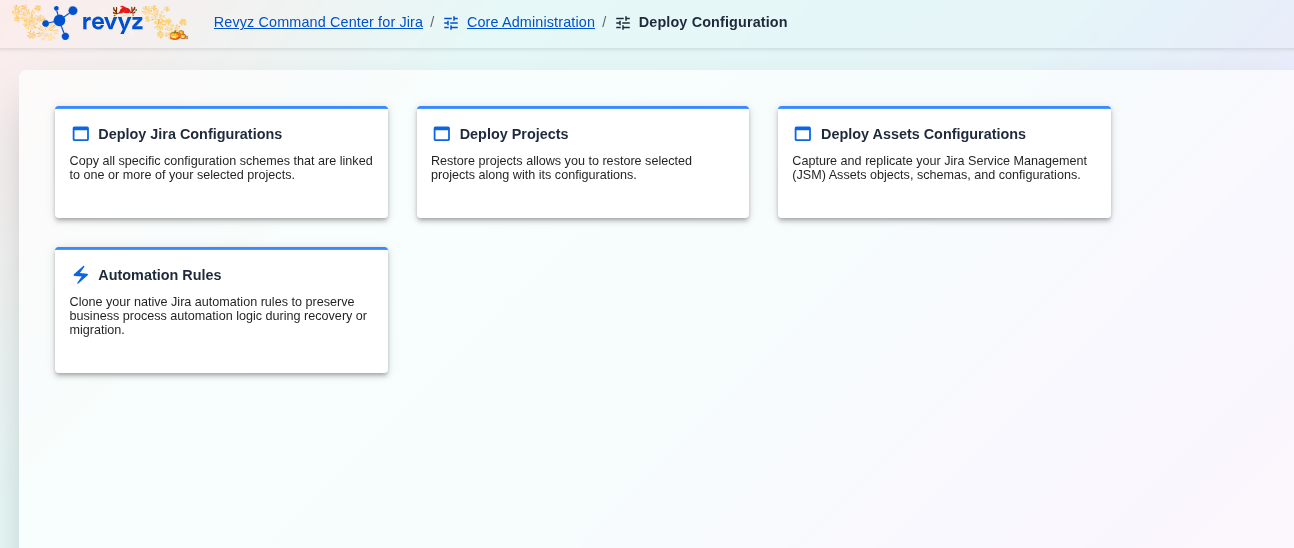
image-20251127-070428.png

Deploy Configurations Dashboard

Note:

Check the product tags on the respective pages to see which features are relevant to your product.

The "Clone Configuration" dashboard provides access to four distinct cloning tools:

Clone Jira configuration

Replicate your core Jira configurations like workflows, custom fields, and permission schemes to another instance.

Use Case: This is for a broad, instance-level migration or standardization of your main Jira settings.

Clone configurations associated to Projects

Copy all specific configuration schemes that are linked to one or more of your selected projects.

Use Case: This is for migrating one or more specific projects, ensuring all their dependent settings (screen schemes, issue type schemes, etc.) are moved with them.

Assets configuration
  • Capture and replicate your Jira Service Management (JSM) Assets objects, schemas, and configurations.

  • Use Case: This allows you to back up, restore, or migrate your entire Assets CMDB, including both the data (objects) and the structure (schemas).

Automation rules
  • Clone your native Jira automation rules to preserve business process logic during recovery or migration.

  • Use Case: This is critical for ensuring your automated processes are not lost or broken when moving to a new instance or recovering from an outage.

JavaScript errors detected

Please note, these errors can depend on your browser setup.

If this problem persists, please contact our support.