
About this Page
This page talks about Jira Configurations feature, a specific health report that scans your core Jira configurations from a selected backup snapshot. It analyzes your setup to find unused, duplicate, orphaned, or inactive items like custom fields, workflows, and groups.
What is the Use Case?
Use this to optimize and declutter your Jira instance. By identifying and removing these unused or problematic configurations, you can improve performance, simplify administration, and make the system easier to manage.
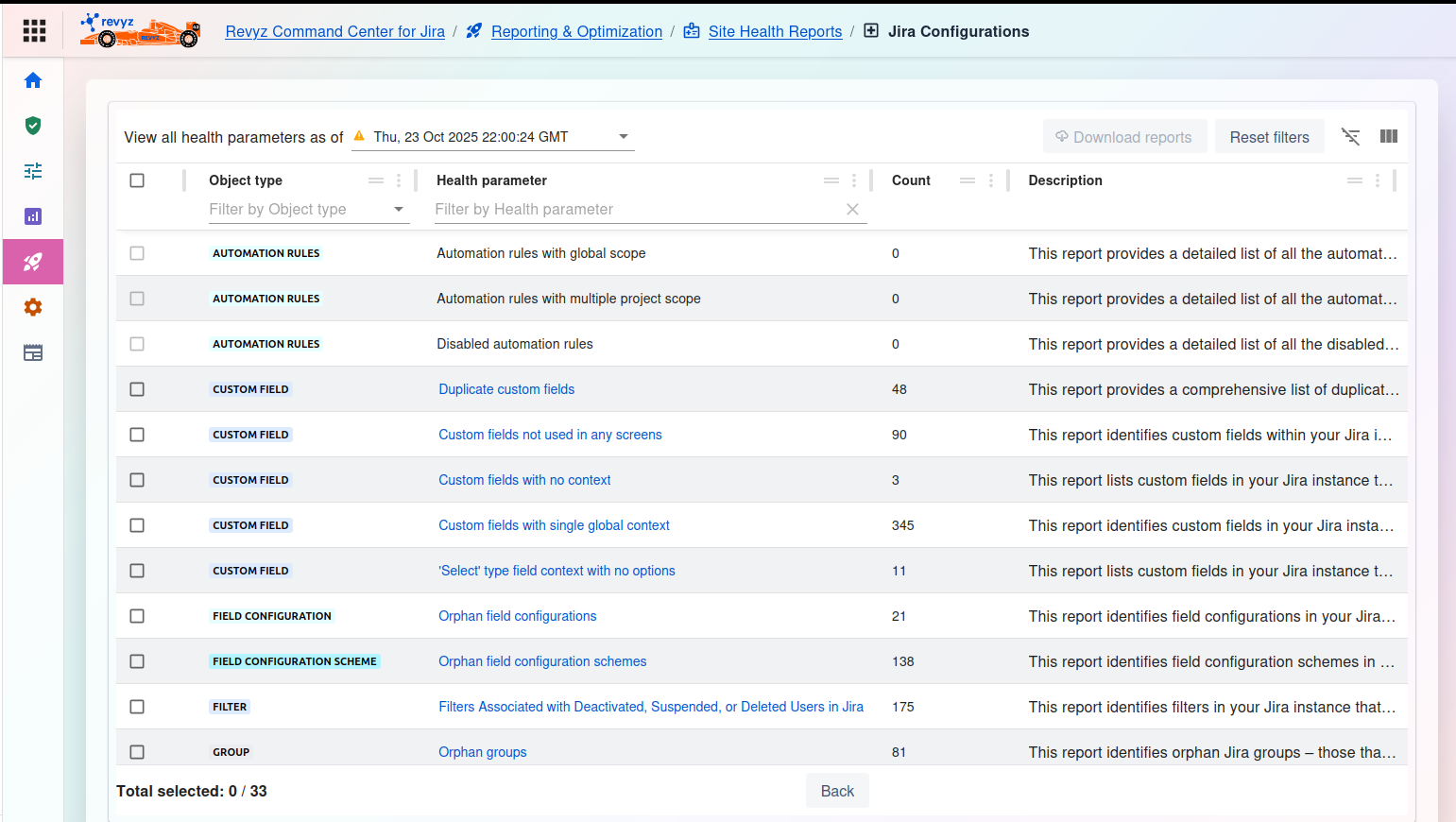
Jira Configurations Health Report
This feature is applicable to:
command center for jira config manager for jira
This page allows you to run a series of health checks against your core Jira configurations from a specific point in time.
1. Select Snapshot
View all health parameters as of *: This is a required first step. Click the dropdown menu to select the specific backup snapshot (e.g., Thu, 23 Oct 2025 22:00:24 GMT) you want to analyze. The table will then populate with the health check results from that snapshot.
2. Manage Reports
-
Download reports: (Currently disabled) This button will allow you to export the detailed reports for any checks you have selected in the table.
-
Reset filters: Clears any filters you have applied to the table below.
-
Table tools (right side): Use these icons to toggle the filter row or customize the visible columns.
3. Health Report Table
The main table lists the available health checks and their results from the selected snapshot.
-
Checkbox: Select one or more rows to download a detailed report for those specific parameters.
-
Object type: The category of the Jira configuration being analyzed (e.g.,
AUTOMATION RULES,CUSTOM FIELD,FILTER,GROUP). -
Health parameter: The specific check being performed.
-
Example:
Duplicate custom fields- Finds custom fields that are duplicates. -
Example:
Custom fields not used in any screens- Identifies "orphaned" custom fields that are not deployed anywhere. -
Example:
Orphan groups- Finds groups that are not used in any permission schemes, filters, etc.
-
-
Count: The result of the scan. This number shows how many items matched the health parameter (e.g.,
48duplicate custom fields,90unused custom fields). -
Description: Explains what the detailed report for that row will provide.
4. Actions
-
Total selected: At the bottom, this shows how many health checks you have selected (e.g.,
0 / 33). -
Back: Click this button to return to the previous "Site Health" dashboard.
Jira configurations health reports
Object types covered
|
Object type |
Health parameter |
Description |
|---|---|---|
|
CUSTOM FIELD |
Duplicate custom fields |
This report provides a comprehensive list of duplicate custom fields within your Jira instance. It identifies custom fields that share the same name or configuration helping you to streamline your field management and avoid redundancy. |
|
CUSTOM FIELD |
Custom fields not used in any screens |
This report identifies custom fields within your Jira instance that are not associated with any screens. It provides a detailed list of these unused custom fields including their names and types. |
|
AUTOMATION RULES |
Automation rules with global scope |
This report provides a detailed list of all the automation rules with global scope. It helps administrators monitor global scope automation rules in a single place. |
|
AUTOMATION RULES |
Automation rules with multiple project scope |
This report provides a detailed list of all the automation rules with multi-projects scope. It helps administrators monitor and track automation rules associated with multiple projects. |
|
AUTOMATION RULES |
Disabled automation rules |
This report provides a detailed list of all the disabled automation rules. It helps administrators track and clean up disabled automation rules. |
|
CUSTOM FIELD |
Custom fields with no context |
This report lists custom fields in your Jira instance that do not have any associated contexts. It includes details such as field names and types. |
|
CUSTOM FIELD |
Custom fields with single global context |
This report identifies custom fields in your Jira instance that have only one global context and no other specific contexts. |
|
CUSTOM FIELD |
Select' type field context with no options |
This report lists custom fields in your Jira instance that are designed to have options (such as select lists) but currently have no options configured. |
|
FIELD CONFIGURATION |
Orphan field configurations |
This report identifies field configurations in your Jira instance that are not associated with any field configuration schemes making them orphaned. |
|
FIELD CONFIGURATION |
Identical field configurations |
This report identifies field configurations in your Jira instance that are identical. It assists in cleaning up and optimizing your Jira setup. |
|
FIELD CONFIGURATION SCHEME |
Orphan field configuration schemes |
This report identifies field configuration schemes in your Jira instance that are not associated with any projects making them orphaned. |
|
FILTER |
Filters Associated with Deactivated, Suspended, or Deleted Users in Jira |
This report identifies filters in your Jira instance that are associated with deactivated suspended or deleted users. It includes details such as filter names and owners. |
|
GROUP |
Orphan groups |
This report identifies orphan Jira groups—those that are not active in any permission schemes or notification schemes. |
|
ISSUE SECURITY SCHEME |
Orphan work item security schemes |
This report provides a list of work item security schemes that are not associated with any projects in Jira. |
|
WORK TYPE |
Issue types only associated to default issue type scheme |
This report provides a comprehensive list of issue types that are exclusively associated with the default issue type scheme in Jira. |
|
WORK TYPE SCHEME |
Orphan issue type schemes |
This report provides a list of orphan work type schemes which are not associated with any projects in Jira. |
|
WORK TYPE SCREEN SCHEME |
Orphan issue type screen schemes |
This report provides a list of orphan issue type screen schemes which are not associated with any projects or workflows in Jira. |
|
NOTIFICATION SCHEME |
Orphan notification schemes |
This report provides a list of notification schemes that are not associated with any projects in Jira. |
|
PERMISSION SCHEME |
Orphan permission schemes |
This report provides a list of permission schemes that are not associated with any projects in Jira. |
|
PERMISSION SCHEME |
Permission schemes with permissions granted to 'Any logged in user' |
This report provides a list of permission schemes that have permissions granted to any logged in user. |
|
PERMISSION SCHEME |
Permission schemes with permissions granted to 'Public access' |
This report provides a list of permission schemes that have permissions granted to public access. |
|
PROJECT |
Spaces with deactivated user as owner |
This report provides a list of spaces in Jira where the space owner is a deactivated user. |
|
PROJECT |
Space with less than 100 work items |
This report provides a list of spaces in Jira that have fewer than 100 work items. |
|
PROJECT |
Spaces inactive since last 6 months |
This report provides a list of spaces in Jira that have been inactive for the past 6 months. |
|
PROJECT |
Spaces with no work items |
This report provides a list of spaces in Jira that currently have no work items. |
|
PROJECT |
More than 5 team managed spaces |
This report provides a list of users or teams in Jira that are managing more than 5 team-managed spaces. |
|
PROJECT |
Spaces with more than 50k work items |
This report provides a list of spaces in Jira that have more than 50 |
|
SCREEN |
Orphan screens |
This report provides a list of orphan screens which are screens not associated with any screen schemes or workflows in Jira. |
|
SCREEN SCHEME |
Orphan screen schemes |
This report provides a list of orphan screen schemes which are not associated with any projects or workflows in Jira. |
|
STATUS |
Statuses unused across all workflow |
This report provides a list of statuses that are not used in any workflows in Jira. |
|
WORKFLOW |
Inactive workflows |
This report provides a list of inactive workflows in Jira which are not currently associated with any active projects. |
|
WORKFLOW |
All Workflows with their transition count |
This report provides a list of workflows along with the count of transitions within each workflow in Jira. |
|
WORKFLOW |
Workflows using third-party plugins in their transitions |
This report provides a comprehensive analysis of workflows that incorporate third-party plugins within their transition processes. |
|
WORKFLOW |
Workflows eligible for deletion |
This report identifies and lists all Workflows that can be deleted from the system because they are not included in any Projects or Workflow Schemes. |
|
WORKFLOW |
Workflows containing draft |
This report provides a comprehensive list of all Workflows containing drafts within the system. |
|
WORKFLOW SCHEME |
Orphan workflow schemes |
This report provides a list of orphan workflow schemes which are not associated with any projects in Jira. |