
About this Page
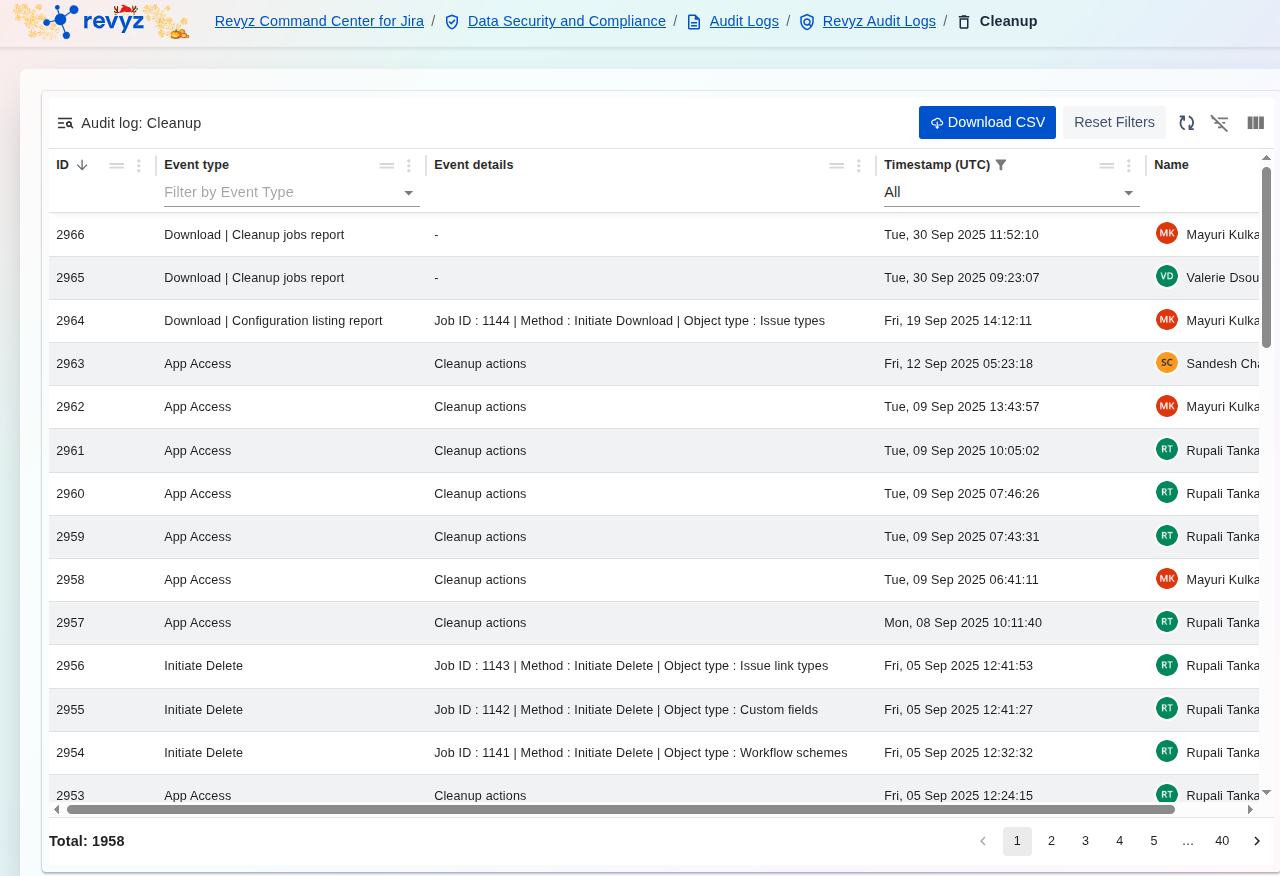
The Cleanup Audit Log provides a comprehensive and immutable record of all data deletion and application access events within the Revyz cleanup tools. This log is crucial for maintaining data integrity and providing a detailed audit trail for compliance purposes.
What is the use case?
Review all cleanup jobs you have initiated, such as archiving old projects or deleting unused configuration.
This feature is applicable to:
Command center for jira config manager for jira assets data manager for jira
How to view “Audit Logs for Site Cleanup Activities”
What is Data Deletion and Configuration (Cleanup Actions)?
These events track permanent data removal and reporting:
-
Initiate Delete: Records explicit deletion commands, detailing the
Job ID, theMethodused, and the specificObject typethat was deleted (e.g.,Issue link types,Custom fields,Workflow schemes). This is vital for undoing accidental deletions and ensuring data retention policies are met. -
Download | Cleanup jobs report: Tracks instances where users exported the summary reports of cleanup actions.
-
Download | Configuration listing report: Tracks exports of reports listing the current application configuration.
Application Access (Security)
These events monitor user interaction with the cleanup module:
-
App Access: Records when a user accessed the cleanup functionality, with the
Event detailsoften listed asCleanup actions. This establishes an audit trail of who was in the system and when they had the ability to initiate cleanup or deletion tasks.
Management Tools
Administrators can utilize the features at the top of the log for efficient review:
-
Filtering: Use Filter by Event Type to quickly view only deletions or only access events.
-
Exporting: Download CSV to export the log for external auditing and record-keeping.
-
Accountability: The Name column clearly identifies the initiator of every event