
About this Page
This page talks about Audit Logs for Backup Activities, which helps see a detailed record of every backup event, including who initiated it, its status (e.g., started, completed, failed), and its duration.
What is the Use Case?
See a record of every backup event, including who initiated it, its status (e.g., started, completed, failed), and its duration.
This feature is applicable to:
Command center for jira config manager for jira assets data manager for jira
How to View Audit Logs for Backup Activities?
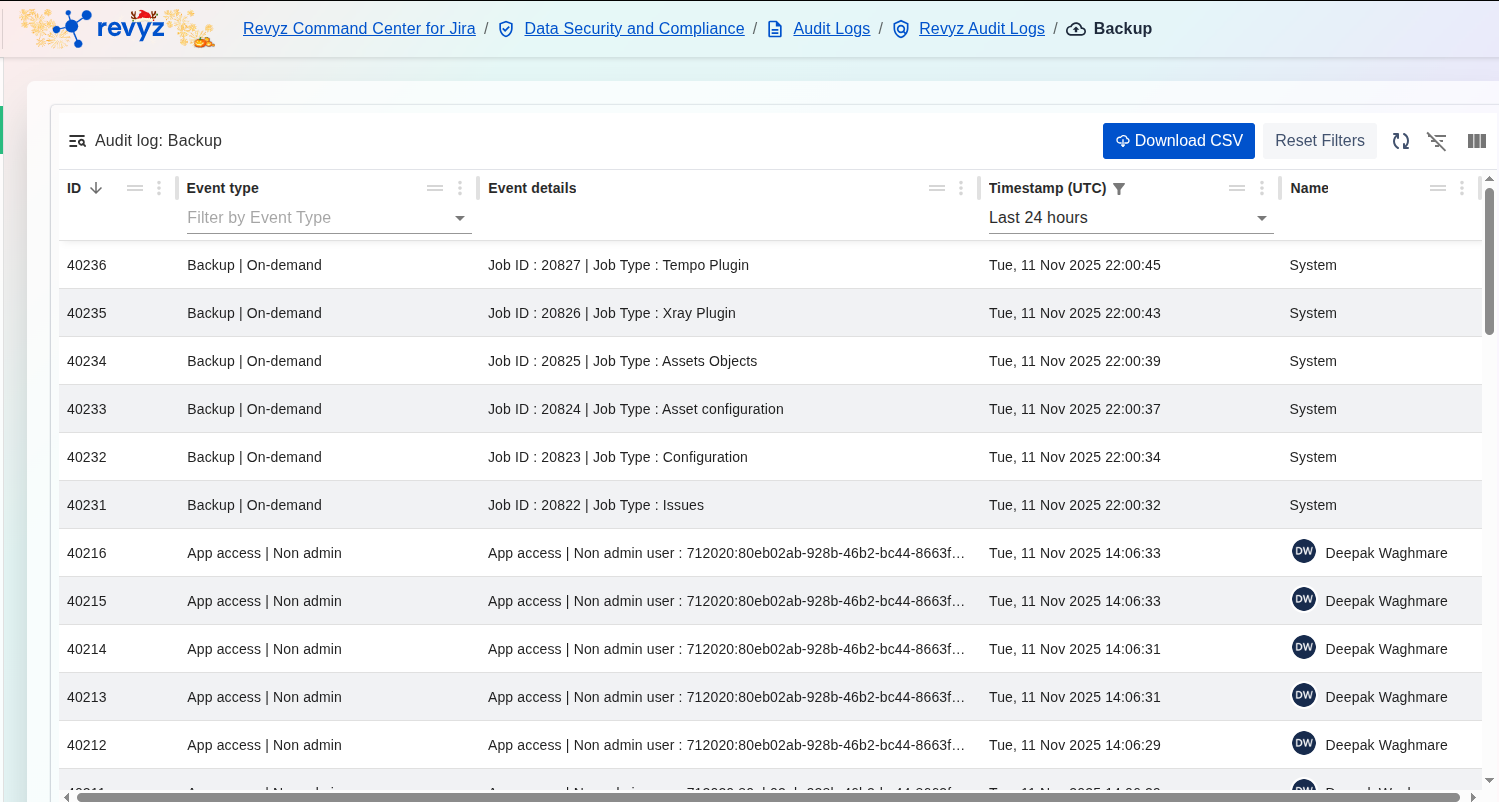
-
Navigation: Access the logs by following the breadcrumb path: Revyz Command Center for Jira > Data Security and Compliance > Audit Logs > Revyz Audit Logs > Backup (or the relevant tool/area).
-
Filtering: You can easily find specific events using the filters:
-
Filter by Event Type: Use the dropdown under the
Event Typecolumn to narrow down the logs to specific actions (e.g., only show 'Backup | On-demand'). -
Timestamp Filter: The
Timestamp (UTC)column allows you to filter logs by time range, such as the Last 24 hours.
-
-
Exporting Data: The Download CSV button allows you to export the entire log or the currently filtered view for external analysis, reporting, or long-term archiving.
-
Reset Filters: The Reset Filters button allows you to clear any active filters and view the complete log data again.