
Skip table of contents

Projects Inclusion/Exclusion

About this Page

This page is about the Projects Inclusion/Exclusion feature, a detailed dashboard that lists every project in your Jira instance, showing its ID, name, and total issue count. It provides a simple toggle ("Issue backup") to individually select or deselect any project from your backup job.

What is the use case?

The primary use case is to give an administrator granular control over the backup scope. An admin can use this page to exclude large, non-essential, or archived projects to reduce backup time and storage costs, or to ensure that only mission-critical projects are included in the backup.
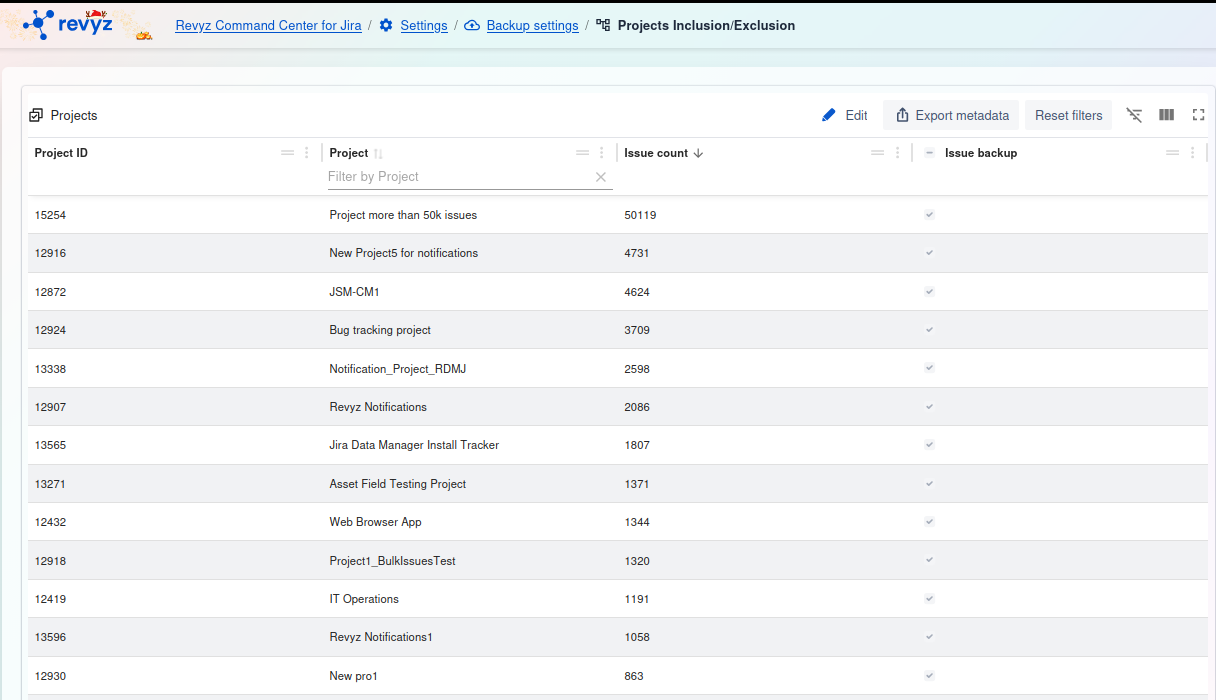
image-20251030-120014.png

Feature: Projects Inclusion/Exclusion

This feature is applicable to:

COMMAND CENTER FOR JIRA

This feature is a detailed dashboard that lists every project in your Jira instance, showing its ID, name, and total issue count. It provides a simple toggle ("Issue backup") to individually select or deselect any project from your backup job.

1. Management and Filtering
  • Edit: This is the primary action button. Click this to change the backup mode (e.g., "include all," "exclude selected," or "include selected") and modify the list of projects to be backed up.

  • Export metadata: Exports the complete list of projects and their details (issue count, status) as a file.

  • Reset filters: Clears any filters you have applied to the table, such as the filter on the Project name.

  • Table tools (right side): Use these icons to toggle the filter row, customize the visible columns, or enter a full-screen view.

2. Projects Table
  • (ID Column): The first column lists the unique internal ID for each project (e.g., 15254).

  • Project: The name of the project (e.g., JSM-CM1). You can filter this column by name.

  • Issue count: The total number of issues within that project (e.g., 50119).

  • (Status Column): The checkmark in the final column indicates the project's current backup status (e.g., Included).

JavaScript errors detected

Please note, these errors can depend on your browser setup.

If this problem persists, please contact our support.