
This is the Revyz Assets Data Manager, a lighter version of Revyz Command Center, your central platform for managing backup, restore, and data security for your Atlassian environment. Revyz Assets Data Manager provides specialized protection and configuration management for Jira Service Management Assets.
Use this document to familiarize yourself with the app's layout and user interface.
It covers the main components, including the left-hand navigation bar and breadcrumb trails, to help you confidently locate all the tools and features needed to protect and manage your data.
Some features of the Revyz Command Center for Jira are unavailable for Revyz Assets Data Manager for Jira.
To upgrade your version to Revyz Command Center for Jira, connect with support@revyz.io or install the app here.
Revyz Command Center for Jira: Home
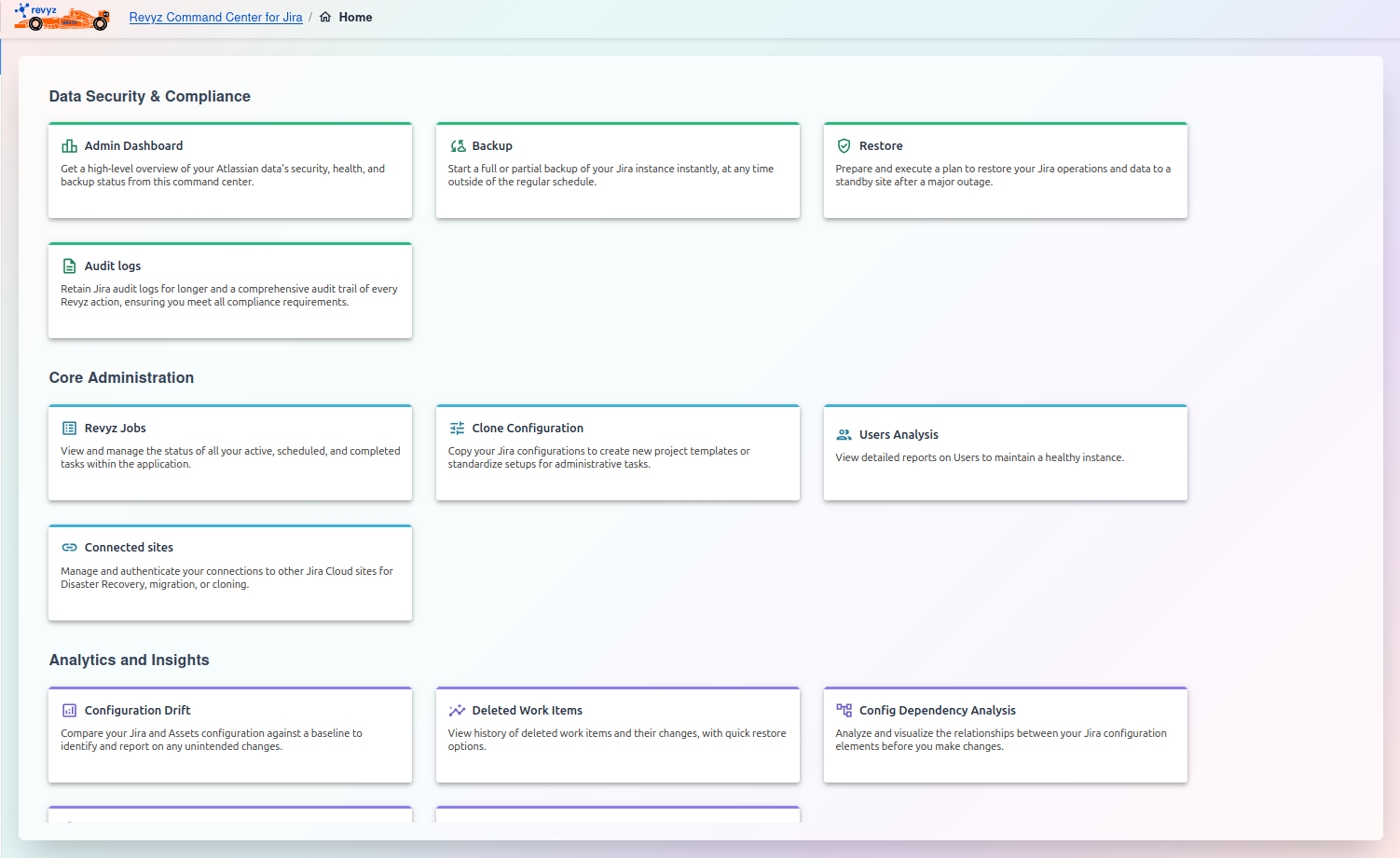
This screen is the main dashboard and central hub for the Revyz Command Center for Jira. It provides a high-level overview and quick access to all the primary functions of the application, which are organized into different categories:
1. Data Security & Compliance
This section is focused on the core data protection and governance of your Jira instance. It includes:
-
Admin Dashboard: A high-level overview of your data's security, health, and backup status.
-
Backup: Tools to perform on-demand (manual) backups of your Jira instance.
-
Restore: Features to execute a recovery plan, typically to a standby site after a major outage.
-
Audit logs: Access to detailed logs for both Jira and the Revyz app to ensure you meet compliance requirements.
2. Core Administration
This section contains the day-to-day administrative and configuration tools for managing both the app and your Jira setup. It includes:
-
Revyz Jobs: A dashboard to monitor the status of all active, scheduled, and completed tasks (like backups and restores).
-
Clone Configuration: Utilities to copy your Jira configurations, which is useful for creating project templates or standardizing setups.
-
Users Analysis: Reporting tools to analyze your user base, helping you maintain a healthy and secure instance.
-
Connected sites: A panel for managing secure connections to other Jira Cloud sites, which is necessary for disaster recovery and migration.
3. Analytics and Insights
This section provides powerful reporting and analysis tools to help you understand changes and dependencies within your Jira instance. It includes:
-
Configuration Drift: Compare your Jira and Assets configuration against a baseline to identify and report on any unintended changes.
-
Deleted Work Items: View history of deleted work items and their changes, with quick restore options.
-
Config Dependency Analysis: Analyze and visualize the relationships between your Jira configuration elements before you make changes.
-
Attachments Insights: Analyze your Jira attachments to get reports on storage usage and identify large or old files for cleanup.
-
Compare Automation rules: Compare your automation rules points in time to troubleshoot or standardize processes.
4. Reporting & Optimization
-
Site Health Reports: Generate comprehensive reports on your Jira and Assets configurations to find and fix potential issues.
-
Site Optimization: Optimize your Jira instance by identifying and cleaning up unused configurations like workflows, custom fields, and statuses.
5. Settings
-
Backup settings: Configure all aspects of your backup strategy, including what to back up, your schedule, and API credentials.
-
Restore settings: Define the default behaviors for your data recovery operations to ensure consistent and predictable restores.
-
Access control: Manage user roles and permissions to control who can perform sensitive operations in the application.
-
Disaster Recovery Connections: Configure and manage the secure connection details for your designated standby Jira instance for failover.
-
End-user portal
NEW: Maintain business continuity during a disaster or site outage by accessing and previewing your site data. Configure snapshots to view data, even from connected sites that are currently inaccessible. -
Notifications: Set up and manage alerts for critical events taken by Revyz such as backups, restores across your Jira instances.
6. Resources
-
Support: Access help, documentation, and learning materials to get the most out of the product and stay informed.
-
Data Manager for Confluence: Protect your Confluence data with our complementary backup and recovery solution.
-
Revyz YouTube Channel: Watch video tutorials, feature demonstrations, and webinars to learn how to use the product's features.
-
Atlassian tutorials by Dr. Jira: Get expert tutorials and best practices for your Jira administration from "Dr. Jira".
-
Revyz Blogs: Read our blog for data protection trends, data compliance & security requirements, Atlassian administration tips, company news, and feature spotlights.