
What is this feature?
This feature allows you to establish a secure disaster recovery connection between this site and another Jira Cloud site. This ensures that, in the event of an outage, you can pull data from the source site to the connected site.
-
Use Case: This is for emergency use only, such as when your primary source site is inaccessible. You activate this connection to recover critical data by pulling it from the inaccessible source site to your pre-configured standby (destination) site.
Disaster recovery connections Dashboard
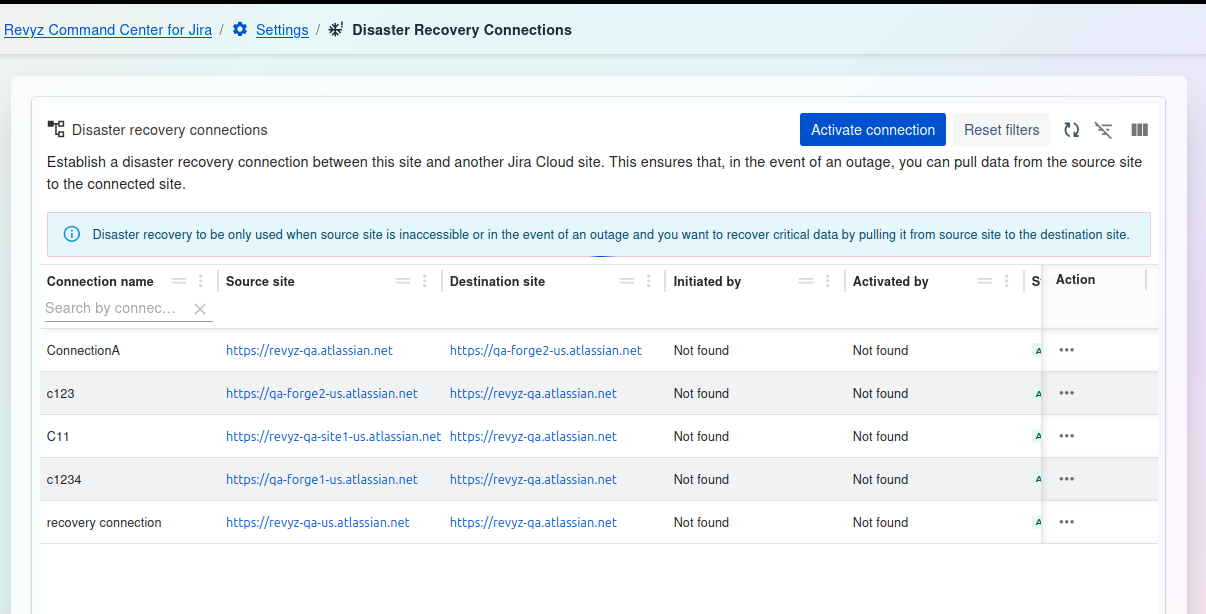
Management and Filtering:
-
Activate connection: This is the primary action in an emergency. Select a connection and click this button to initiate the data pull from the source to the destination.
-
Reset filters: Clears any filters you have applied to the connection list (e.g., on the "Connection name" field, which is scrolled out of view).
-
Table tools (right side): Use these icons to toggle the filter row, customize the visible columns, or enter a full-screen view.
Connections Table:
The main table provides a detailed list of all configured disaster recovery connections.
-
Connection name: (Scrolled out of view, but present) The unique name given to the DR connection.
-
Source site: (Scrolled out of view, but present) The URL of the primary Jira instance where the data originates.
-
Destination site: The URL of the standby or "recovery" Jira instance where the data will be pulled to.
-
Initiated by: The user who originally set up the connection (appears as "Not found" if the user is no longer available).
-
Activated by: The user who last activated the connection during a DR event (appears as "Not found" if the user is no longer available).
-
Status: (Column scrolled, but indicated by green "A") The current state of the connection (e.g.,
ACTIVE). -
Action: A "..." menu that provides additional options, such as editing or deleting the connection configuration.