Use cases
-
If a customer's Atlassian site is down, and they wish to spin up a new site, they can restore Assets configurations from the backup of the site that is currently down.
-
If site is not accessible and Revyz app is installed on that site and customer wants to restore everything on new site
Example - customer site is “SiteA.atlassian.net“ and revyz app is installed on this site. Now customer want to setup a new site to clone the data of old site which is “SiteB.atlassian.net“ so they can use Revyz app to restore “Asset Configurations“.
How it works through Revyz app
-
Generate Token (Source site)
-
Inside Settings → Disaster recovery connections. Generate Token button will be available.
-
Which will generate a token. User has to store it in secured location as it will be required at recovery process.
-
Recommendation: Whenever you install an app, please generate recovery token as soon as possible for future use if your site gets inaccessible / blocked.
-
-
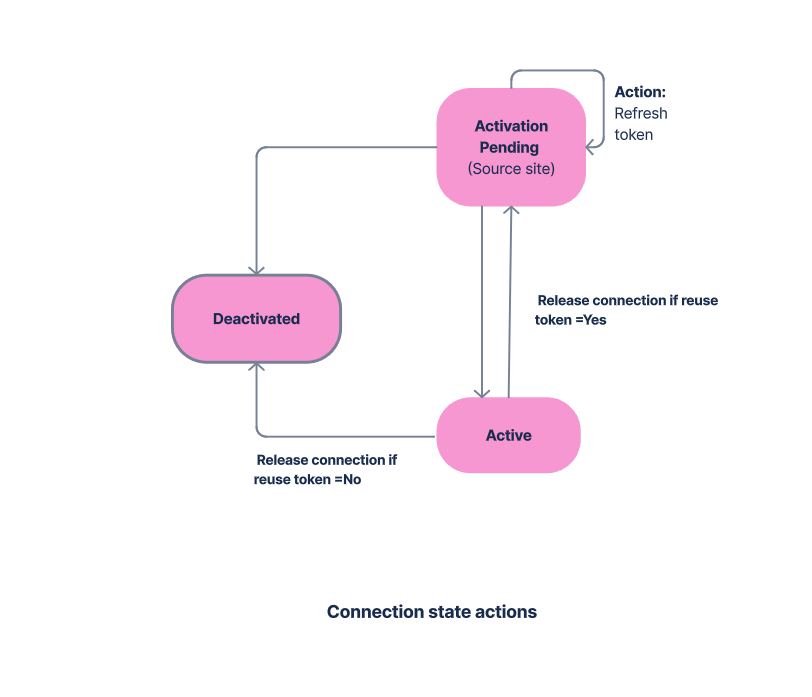
After token is generated, status would be “Activation pending“.
-
Activate Connection (Destination site)
-
The connection should be activated when your source / main site is inaccessible.
-
Create another site which will eventually become your main site and we will call it as destination site for further use.
-
Inside Settings → Disaster recovery connections - > On destination site, Click on “Activate connection“
-
Paste the Token which have copied on source site. Also enter the source site base URL.
-
-
Actions related to token / connections
-
Reset token
-
When it should be done: When your token is lost
-
What will happen: It will reset the toke. New token is generated for the same connection.
-
-
Refresh token
-
When it should be done: when status is in “Activation pending” state.
-
What will happen - After refreshing , it will generate the new token, the current token will no longer be valid.
-
-
Release connection
-
Yes - You can use the token in future.
-
No - Token can not be use in future. You have to generate a new token
-
-
Deactivate connection
-
Deactivate - You can not recover the source site data if connection is deactivated.
-