
What is this feature?
This feature deeply integrates the Revyz app's alerting system with your native Jira projects. It allows you to designate a specific project for all app notifications, automatically turning events like backup failures or restores into Jira issues and dynamically updating their status based on the Revyz job's progress.
Use case:
The primary use case is to automate incident management and operational awareness for your backup and restore processes. Instead of manually checking a separate dashboard, your team automatically gets a Jira ticket assigned for any 'Error' or other specified event, allowing you to use your standard Jira workflows to track, assign, and resolve critical incidents immediately.
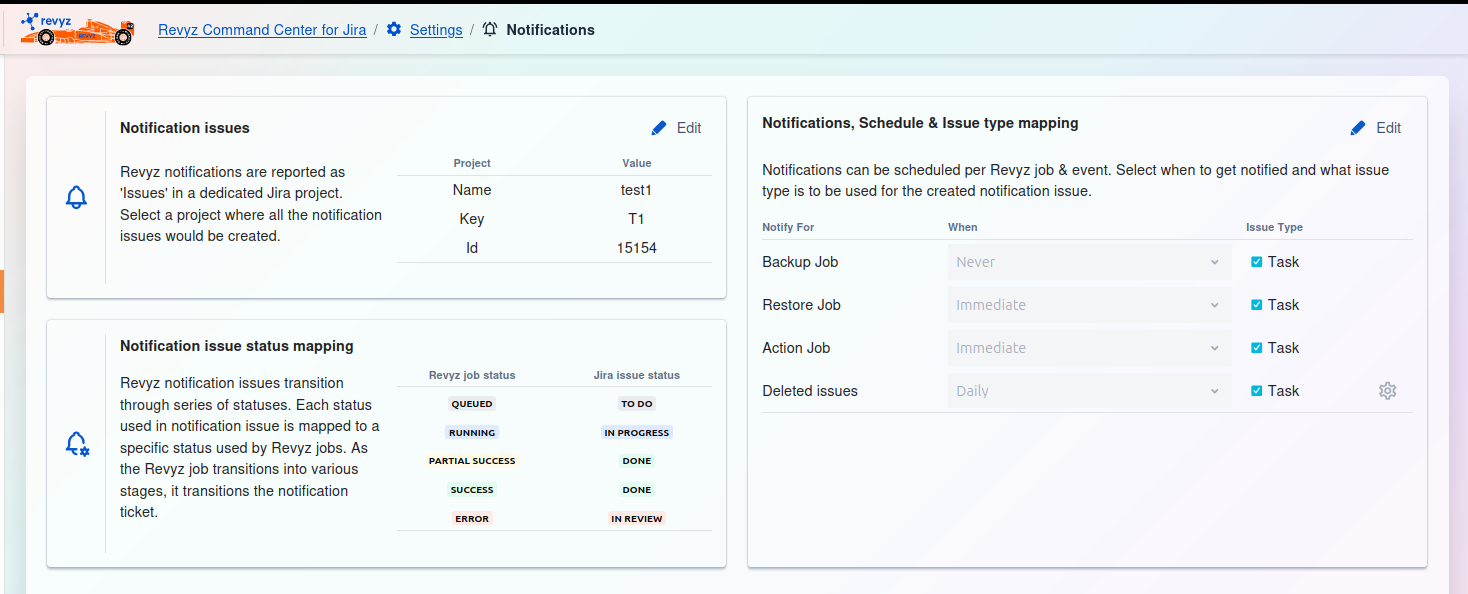
Notification issues
This setting lets you select a single, dedicated Jira project where all notification tickets from the Revyz app will be created. All app alerts and job status reports are logged as new issues within this designated project (e.g., "test1").
Notification issue status mapping
This feature automatically updates the Jira notification ticket's status to reflect the real-time status of the corresponding Revyz job. You map each app job status (like 'RUNNING' or 'SUCCESS') to a specific Jira workflow status (like 'IN PROGRESS' or 'DONE').
Notifications, Schedule & Issue type mapping
This section defines which app events (like 'Backup Job' or 'Deleted issues') will create a notification ticket in Jira. You can also control the timing for each alert (e.g., 'Immediate', 'Daily') and set which Jira 'Issue Type' (e.g., 'Task') should be used.