
What is this feature? This is a data recovery tool for your Jira Service Management (JSM) Assets database. It allows you to restore individual, specific objects or even entire object schemas from a previously created backup.
-
Use Case Use this to recover specific assets (like a server, laptop, or software license object) or a whole object schema that was accidentally deleted or corrupted, without performing a full site restore.
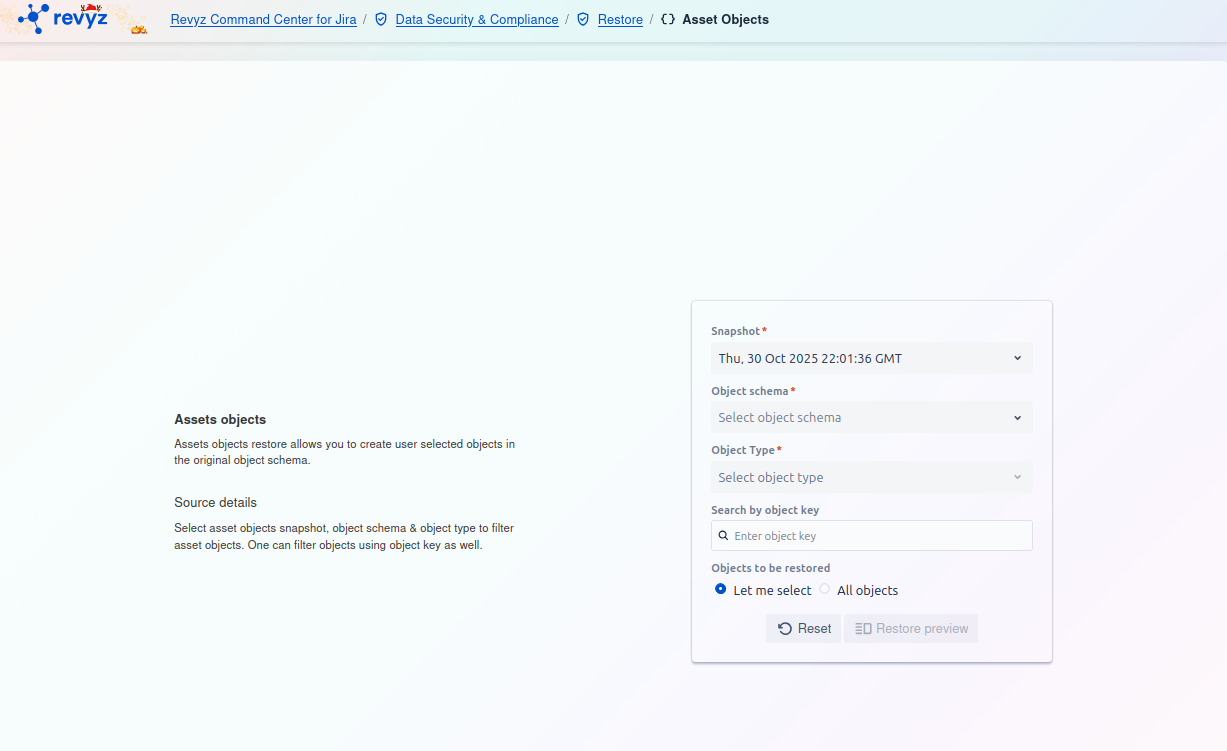
How to Restore Assets Objects: Step 1 - Find Objects to Restore
This page allows you to find and select the specific Assets objects you wish to restore. You must use the filters to build a search query and locate the objects within a backup snapshot.
Filter Card
On the right side of the screen, you must fill out the filter card to locate the objects.
-
Snapshot
*:-
This is a required field. Select the backup snapshot that contains the asset objects you want to restore (e.g.,
Fri, 03 Oct 2025 10:11:37 GMT).
-
-
Object schema
*:-
This is a required field. Select the object schema (e.g., "IT Assets," "Employees") that contains the objects you want to restore.
-
-
Object Type
*:-
This is a required field. Select the specific object type (e.g., "Laptops," "Servers") to further narrow your search.
-
-
Search by object key:
-
This is an optional filter. If you know the exact key of the object you want to restore (e.g.,
IT-123), enter it here for a direct search.
-
-
Objects to be restored:
-
This radio button selection determines how many objects you will restore from your filtered results.
-
Let me select: (Default) This option will take you to a preview screen where you can hand-pick individual objects from the search results to restore.
-
All objects: This option will restore all objects that match your filter criteria (Snapshot, Schema, Type).
-
-
Actions
-
Reset: Click this button to clear all the filter fields and start your search over.
-
Restore preview: After you have set your filters, click this button (currently disabled) to run the search. This will show you a list of matching objects to select from (if "Let me select" is chosen) or a confirmation summary (if "All objects" is chosen).