
What is this feature?
-
This is a management dashboard that allows you to create, view, and authenticate secure connections between your current Jira Cloud site and other Jira Cloud sites.
-
Use Case Use this to set up the necessary links for cross-site operations. These connections are a prerequisite for performing Disaster Recovery, migrating projects, or cloning configurations and data between different instances.
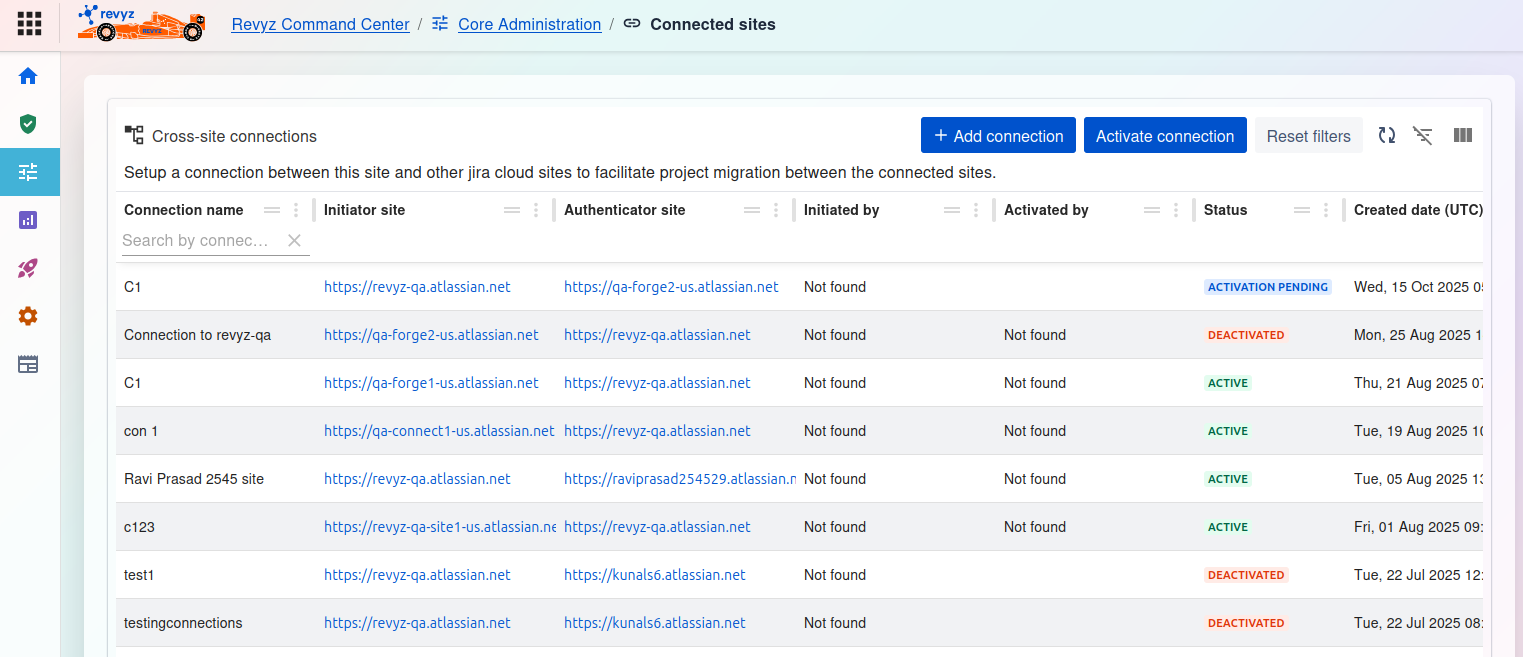
Cross-site connections Dashboard
This page displays a list of all existing cross-site connections and allows you to manage them. The purpose is to set up a connection between this site and another Jira Cloud site to facilitate project migration between them.
Available Actions
At the top right, you have several management options:
-
+ Add connection: Click this button to start the process of creating a new connection to another Jira Cloud site.
-
Activate connection: Select an existing, pending connection from the list and click this button to activate it.
-
Reset filters: Click this to clear any filters you have applied to the connection list.
-
Filter/View Icons: Use these icons to toggle the filter row or customize the columns visible in the table.
Connections Table
The main table provides a detailed list of all configured connections. You can filter each column to find a specific connection.
-
Connection name: The unique name given to the connection for identification.
-
Initiator site: The URL of the Jira site that started the connection request.
-
Authenticator site: The URL of the Jira site that must approve or authenticate the connection.
-
Initiated by: The user who created the connection request (appears as "Not found" if the user is no longer available).
-
Activated by: The user who approved the connection (appears as "Not found" if the user is no longer available).
-
Status: The current state of the connection.
-
ACTIVE: The connection is live and can be used for migration or cloning.
-
DEACTIVATED: The connection was previously active but is now disabled.
-
ACTIVATION PENDING: The connection has been initiated but is waiting for authentication from the other site.
-
-
Created date (UTC): The date and time when the connection was first created.