
What is this feature?
-
This feature allows you to replicate your core Jira configurations, including workflows, custom fields, and permission schemes. It's a tool for copying these complex settings from a source to a new destination.
-
Use Case: Use this to migrate your core settings from one instance to another, such as from a staging to a production environment. It's also perfect for standardizing a new, separate instance to match your primary one.
This feature of the Revyz Command Center for Jira is unavailable for Revyz Assets Data Manager for Jira. To upgrade your version to Revyz Command Center for Jira, connect with support@revyz.io or install the app here.
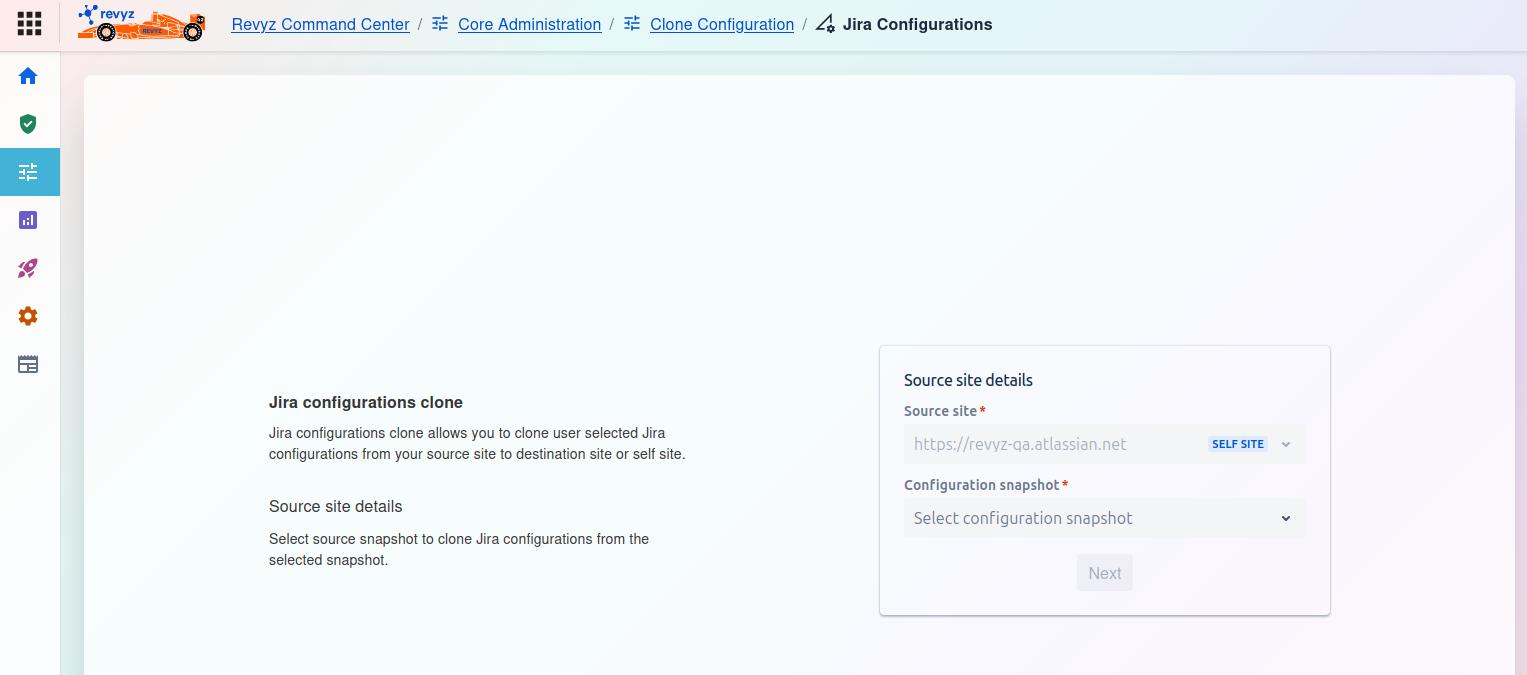
How to Clone Jira Configurations
This is the first step in the Jira configurations clone process. This feature allows you to copy selected Jira configurations from a source site and apply them to a destination site or even the same (self) site.
Source site details
On the right side of the screen, you must complete the Source site details card:
-
Source site
*:-
This is a required field. Click the dropdown to select the Jira instance you want to clone from.
-
In the screenshot,
https://revvz-qa.atlassian.netis selected, which is tagged as theSELF SITE(the current instance).
-
-
Configuration snapshot
*:-
This is a required field. After selecting a source site, this dropdown menu will populate.
-
You must select the specific backup snapshot that contains the configurations you wish to clone.
-
Once you have selected both the Source site and the Configuration snapshot, the Next button will become active. Click it to proceed.