
About this Page
The Spaces Inclusion/Exclusion page is a granular data management tool that allows administrators to define the exact scope of their automated backup jobs. By selecting which Confluence spaces to protect or ignore, you can optimize your backup performance and focus resources on your most critical organizational data.
What is the Use Case?
-
Strategic Data Protection: Ensure that high-value spaces are explicitly included in daily backup routines to prevent data loss.
-
Resource Optimization: Exclude large, non-essential, or "junk" spaces to reduce total backup time and storage consumption.
-
Compliance Management: Maintain an accurate record of protected data by using the Export metadata feature to audit your current backup scope.
-
Environment Cleanup: Identify spaces with high page counts that may require archival rather than active backup.
Features
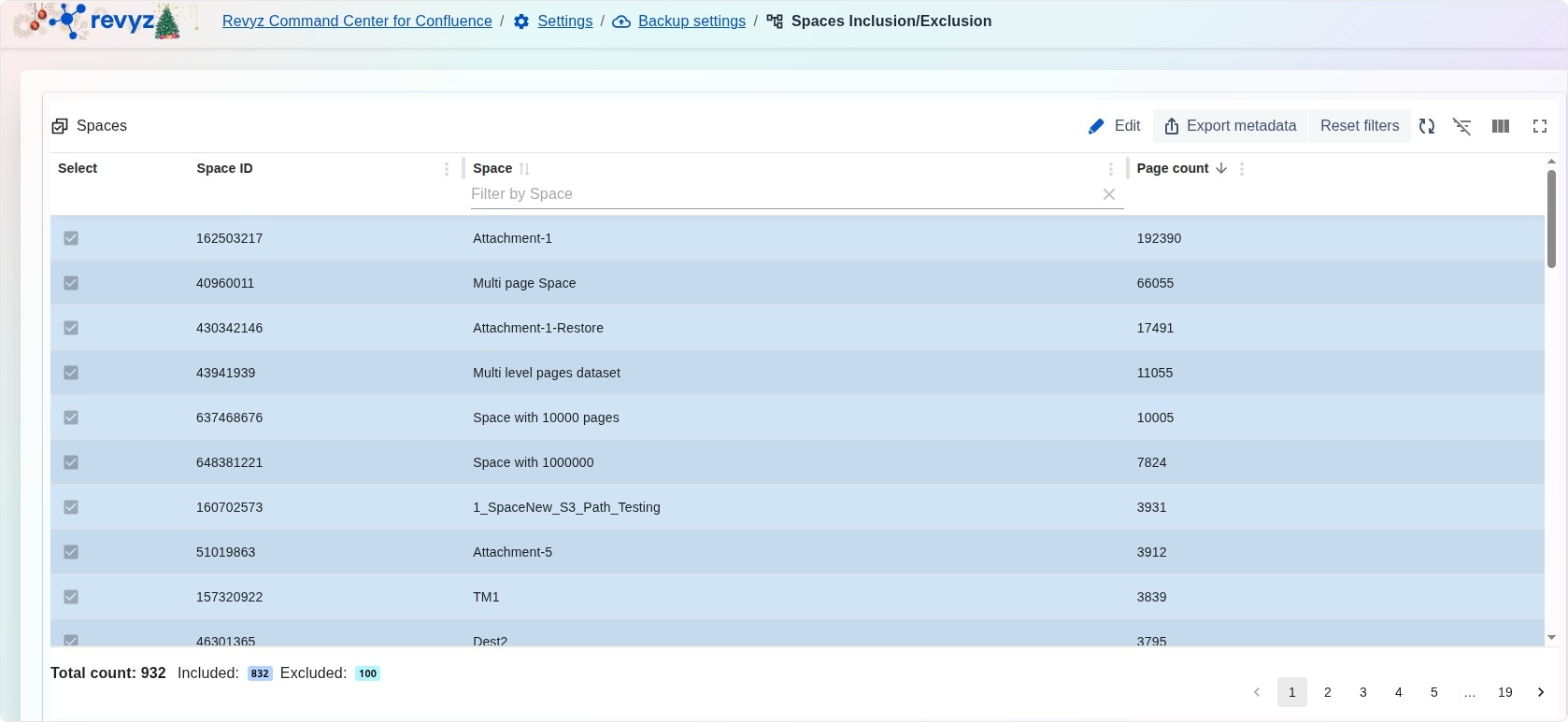
The interface provides a comprehensive list of all spaces within your Confluence instance for easy management:
-
Selection Checkboxes: Use individual or bulk selection to mark spaces for inclusion or exclusion in the backup job.
-
Space ID & Space: Displays the unique numeric identifier and the display name for every space on the site.
-
Page count: Lists the total number of pages within each space (e.g., 192390), helping you assess the relative size and impact of backing up that specific space.
-
Inclusion Statistics: Monitor the overall status of your site through the Total count, showing exactly how many spaces are Included versus Excluded.
Management Tools
-
Edit: Enter the modification mode to change the selection of spaces currently being backed up.
-
Export metadata: Generate a CSV or similar report of your space list and their current backup status for offline auditing.
-
Filter by Space: Rapidly find specific spaces by typing their name into the integrated search bar.
-
Reset filters: Clear all search parameters to view the complete list of spaces across all pages.