
About this Page
The Revyz Command Center for Confluence serves as a centralized dashboard for managing the protection of your Spaces, Pages, and Attachments through a categorized, card-based interface. It provides quick access to automated backups, granular restores of critical documentation, and detailed site insights to ensure your Confluence knowledge base remains resilient and secure.
Product Tour
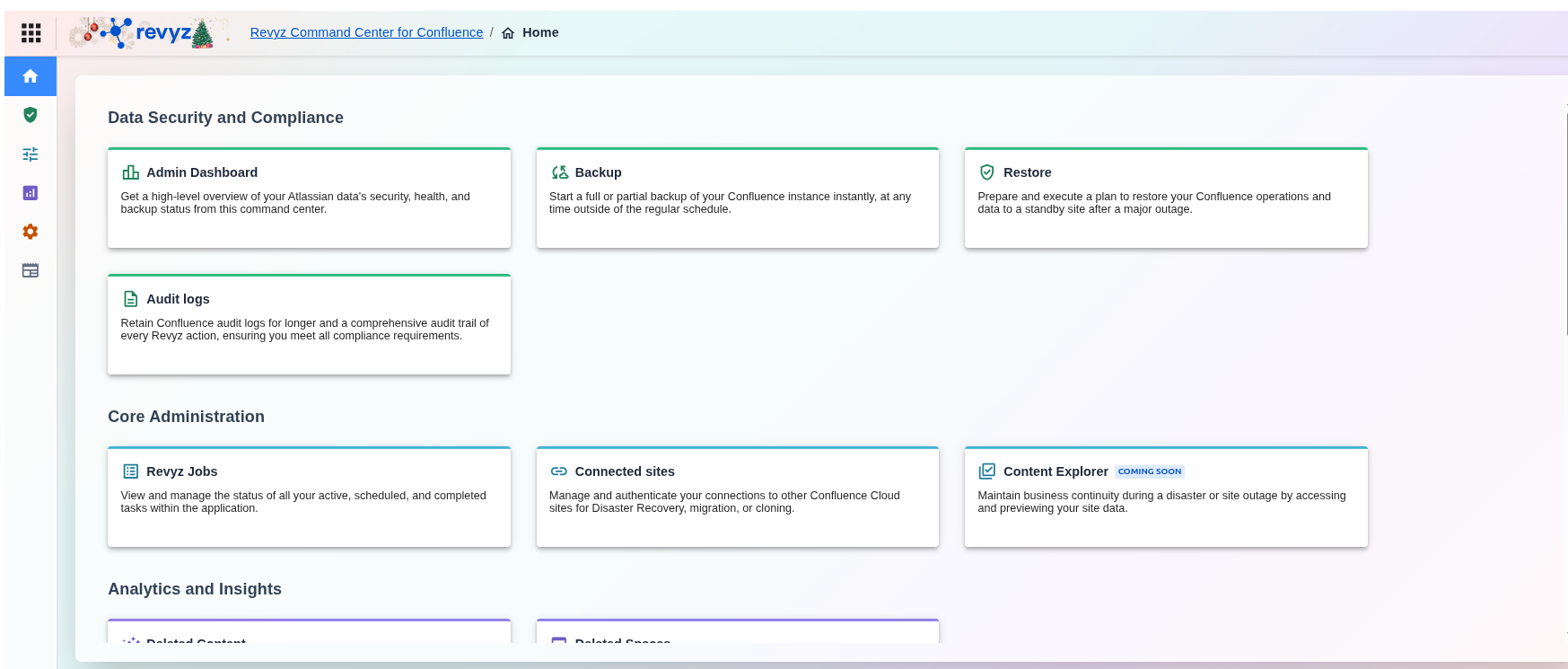
Dashboard Overview
A. Data Security and Compliance
This section is the core of the Revyz protection engine.
-
Admin Dashboard: Replaces the general "Home" overview. It provides a high-level visual of Atlassian data security, health, and current backup status.
-
Backup: Allows for immediate manual (on-demand) backups of the Confluence instance.
-
Restore: Dedicated area for disaster recovery and restoring operations to a standby site after an outage.
-
Audit logs: Expanded for compliance; it now emphasizes longer retention periods for Confluence logs and tracking Revyz-specific actions.
B. Core Administration
These tools are for managing the app's internal operations and cross-site connectivity.
-
Revyz Jobs: The central hub to monitor the progress of active, scheduled, or completed tasks (Backups/Restores).
-
Connected sites: Manages the authentication and links to other Confluence Cloud sites, which is essential for Disaster Recovery (DR), migrations, or cloning.
-
Content Explorer: A new feature that will allow users to browse and preview site data even during a live outage.
C. Analytics and Insights
This section focuses on data visibility and recovery of specific deleted items.
-
Deleted Content: Specialized view for identifying and recovering individual deleted items.
-
Deleted Spaces: Specifically for managing the recovery of entire Confluence Spaces.
D. Settings
This section allows administrators to customize how the application operates within their Confluence environment.
-
Backup settings: The central control panel for defining your backup strategy, including selecting data to back up, setting schedules, and managing API credentials.
-
Access control: A security feature that manages user roles and permissions to ensure only authorized personnel can perform sensitive operations like data restores or cleanup.
-
Notifications: Configure automated alerts for critical events such as job completions, failures, or restores across your Confluence instances.
-
End-user portal: An upcoming feature designed to maintain business continuity by allowing users to preview data from site snapshots during active outages.
E. Resources
The Resources section connects you with documentation and complementary tools to maximize your use of the Revyz ecosystem.
-
Support: Direct access to help documentation, learning materials, and the technical support desk.
-
Command Center for Jira: A link to Revyz’s backup and recovery solution for Jira Software, JSM, and Assets.
-
Revyz YouTube Channel: Video tutorials, webinars, and feature demonstrations to help visualize complex workflows.
-
Atlassian tutorials by Apetech Tech Tutorials: Expert-led guides and best practices specifically for Confluence administration.
-
Revyz Blogs: Regular updates on data protection trends, security tips, and the latest product releases.