
About this Page
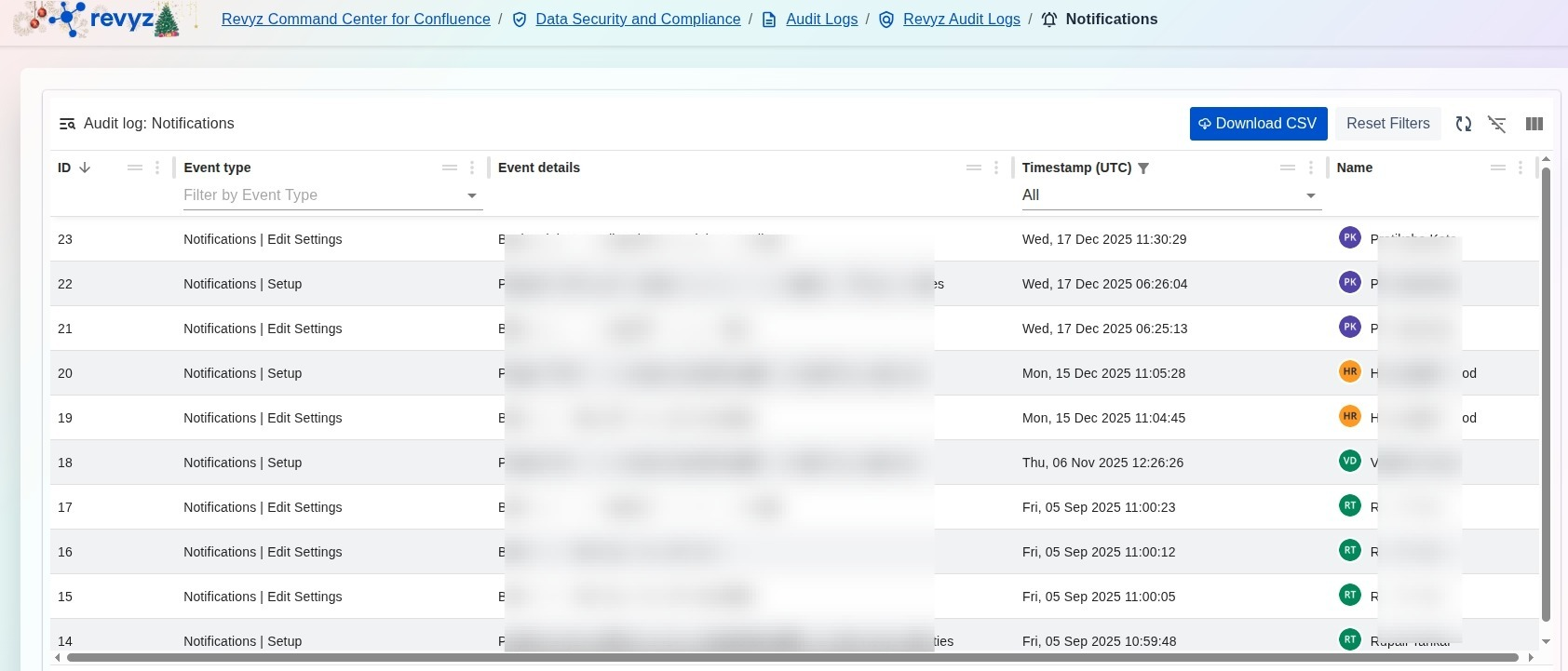
The Audit log: Notifications page provides a centralized historical record of all configuration changes and activities related to system-generated notifications within the Revyz application. This immutable log tracks who modified notification parameters and when these changes were enacted, ensuring a transparent trail for system alerts.
What is the Use Case?
-
Alert Configuration Oversight: Monitor modifications to alert settings, such as Notifications | Setup or Notifications | Edit Settings, to ensure critical system alerts are configured correctly.
-
Compliance & Change Management: Maintain a verifiable record of "Who, What, and When" for every change made to notification rules, which is essential for internal security audits.
-
Troubleshooting: Review historical notification events to correlate changes in system alert behavior with specific administrative actions.
-
Security Auditing: Identify unauthorized attempts to alter notification settings that could potentially silence critical data security alerts.
How to View Audit Logs for Notifications
-
Navigate to the Data Security and Compliance section in the Revyz Command Center and select Audit Logs.
-
Select the Revyz Audit Logs card to access logs specific to the Revyz application.
-
Click the Audit Logs for Notifications card to open the specialized notification log view.
-
Review the Event type column to identify specific actions like "Notifications | Setup" or "Notifications | Edit Settings".
-
Check the Timestamp (UTC) and Name columns to see the exact time of the change and the administrator responsible.
-
(Optional) Click Download CSV to export the notification audit history for your formal security documentation.