
About this Page
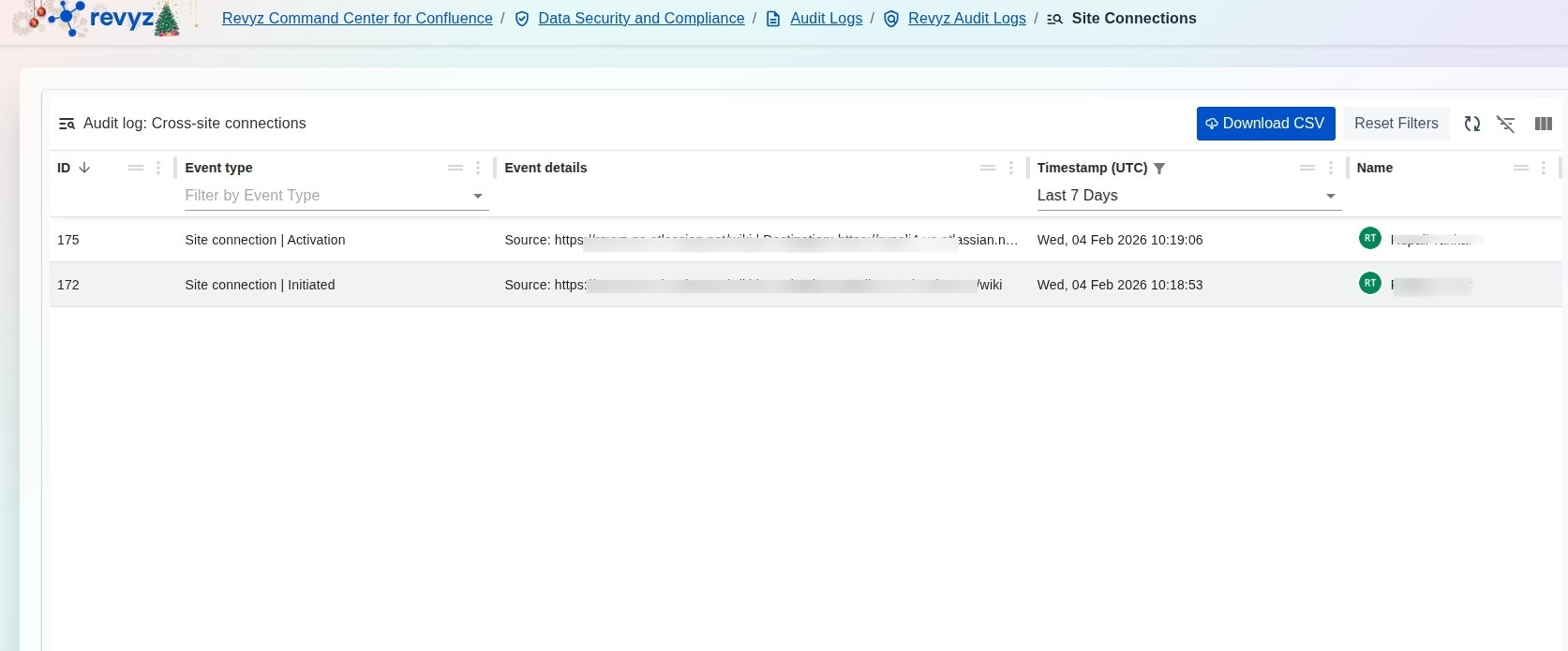
The Audit log: Cross-site connections page provides a dedicated administrative record of all activities involving the linking and interaction between different Confluence sites. This log ensures that every step of the site-to-site connection process is documented, from initial request to final activation.
What is the Use Case?
-
Connection Verification: Confirm that cross-site links between a source and destination URL have been successfully initiated and activated.
-
Security Auditing: Monitor which users are initiating site-to-site connections to prevent unauthorized data exposure between environments.
-
Configuration Tracking: Maintain a historical timeline of environment linking, which is essential for managing complex restoration workflows across multiple connected sites.
How to View Audit Logs for Cross-site Connections
-
Navigate to the Data Security and Compliance section in the Revyz Command Center and select Audit Logs.
-
Select the Revyz Audit Logs card to access application-specific logs.
-
Click the Audit Logs for Cross-Site Connections card to open the specialized connection log view.
-
Use the Timestamp (UTC) filter to narrow the list to a relevant timeframe, such as the "Last 7 Days".
-
Review the Event type column to identify specific actions like "Site connection | Initiated" or "Site connection | Activation".
-
Check the Event details for the specific source and destination URLs involved in each connection event.
-
(Optional) Click Download CSV to export the record for your organization's compliance documentation.