
About this Page
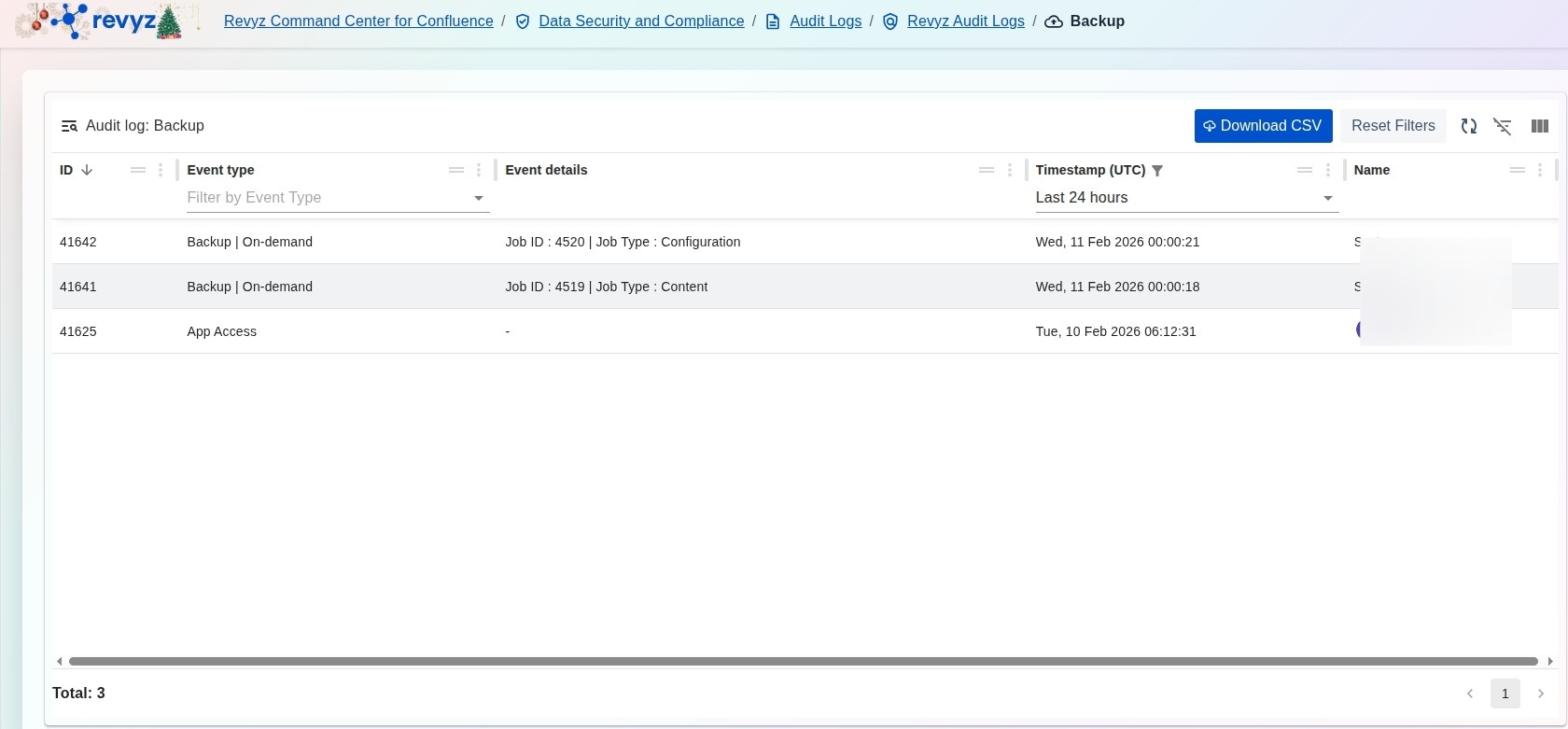
The Audit log: Backup page provides a detailed, chronological record of all backup-related operations and application access events within your Revyz environment. This interface allows administrators to track the execution of on-demand backups, monitor backup job types (such as Content or Configuration), and verify which users are accessing the application.
What is the Use Case?
-
Operational Oversight: Verify that scheduled or on-demand backups are completing successfully at the intended times.
-
Security & Compliance: Monitor App Access events to maintain an audit trail of which administrative users have logged into the Revyz application.
-
Troubleshooting: Use unique Job IDs found in the event details to cross-reference specific backup tasks with the Restore and Deploy Jobs dashboard.
-
Historical Reporting: Export backup activity data via CSV for internal audits or regulatory compliance reviews.
How to View Audit Logs for Backup Activities?
-
Navigate to the Data Security and Compliance section in the Revyz Command Center and select Audit Logs.
-
On the main Audit Logs landing page, click the card labeled Revyz Audit Logs.
-
Locate and click the Audit Logs for Backup Activities card to open the specialized backup log view.
-
Use the Timestamp (UTC) filter to narrow down results (e.g., "Last 24 hours") or use the column headers to filter by specific Event types like "Backup | On-demand".
-
(Optional) Click Download CSV to save a copy of the filtered log for your records.