
Revyz Command Center for Confluence
Breadcrumbs

Notifications

About this Page

The Notifications page is the configuration hub for managing how system alerts and operational updates are delivered and tracked. This interface allows you to integrate Revyz notifications directly into Jira as 'Work items', ensuring that backup and restore events are managed within your existing team workflows.

What is the Use Case?

  • Automated Alerting: Set up immediate notifications for critical events, such as the completion or failure of Backup Jobs and Restore Jobs.

  • Workflow Integration: Automatically create notification tickets in a dedicated Jira space to ensure visibility for technical teams.

  • Status Synchronization: Map Revyz job statuses (e.g., RUNNING, SUCCESS, ERROR) to corresponding Jira work item statuses (e.g., IN PROGRESS, DONE, IN REVIEW) for seamless tracking.

  • Task Management: Assign specific work types, such as Task, to system-generated notifications to categorize operational maintenance within Jira.
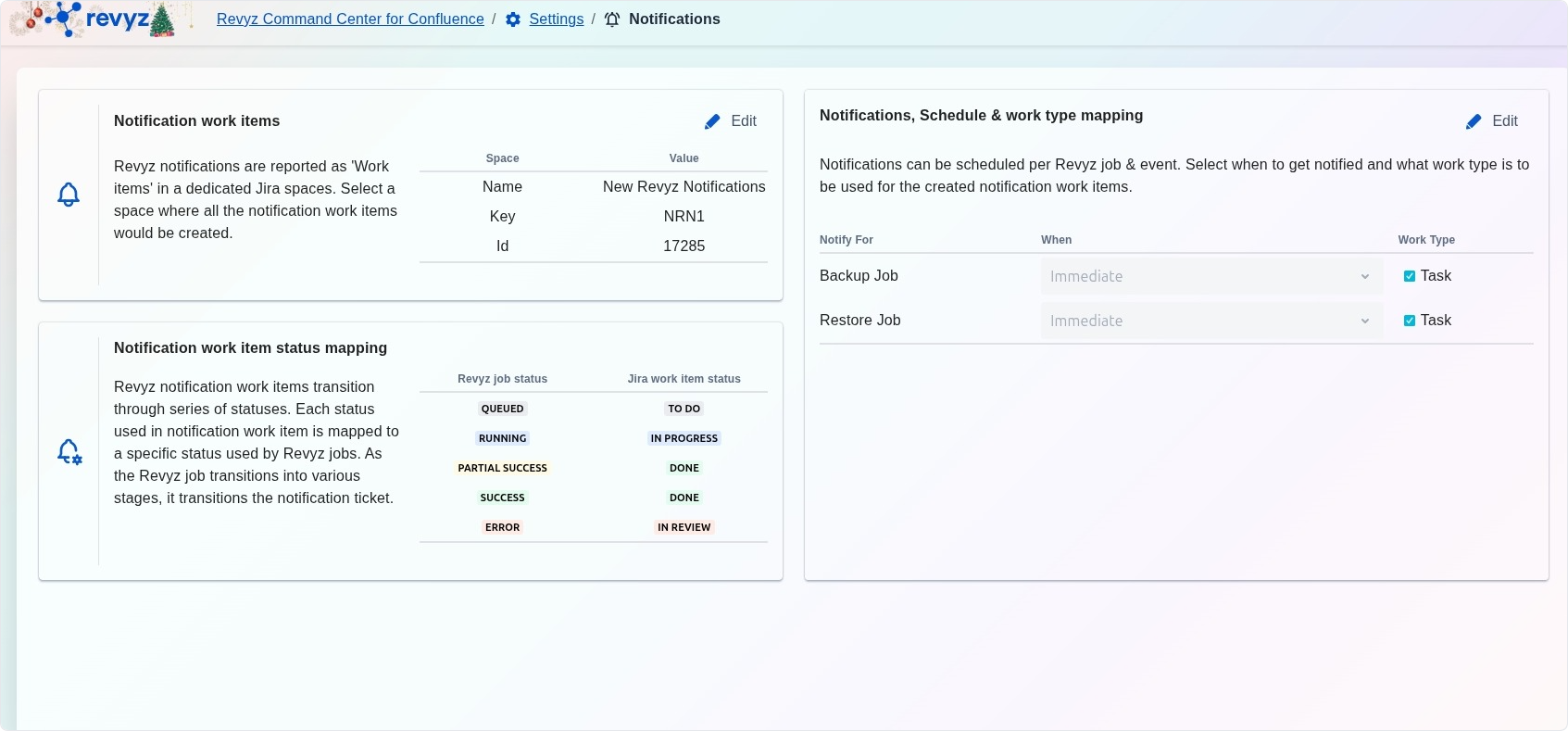
image-20260212-162130.png

Features

Click to expand...
  1. N
    otification work items: Select the specific Jira space (Name, Key, and ID) where all Revyz notification work items will be created.

  2. Notification work item status mapping: Define how the transition of a Revyz job status updates the status of the associated Jira notification ticket.

    • QUEUED maps to TO DO.

    • SUCCESS maps to DONE.

    • ERROR maps to IN REVIEW.

  3. Notifications, Schedule & work type mapping: Configure when notifications should be triggered (e.g., Immediate) and what Jira work type should be used for each job category.

How to Configure Notifications

Check Settings
  1. Navigate to Settings and select the Notifications card.

  2. Click Edit in the Notification work items section to choose your destination Jira space.

  3. In the Schedule & work type mapping section, select the dropdown for Backup Job or Restore Job to set the notification timing.

  4. Ensure the Task checkbox is marked to define the work item category.

  5. Review the status mapping to confirm that system events will correctly update your Jira tickets.