
About this Page
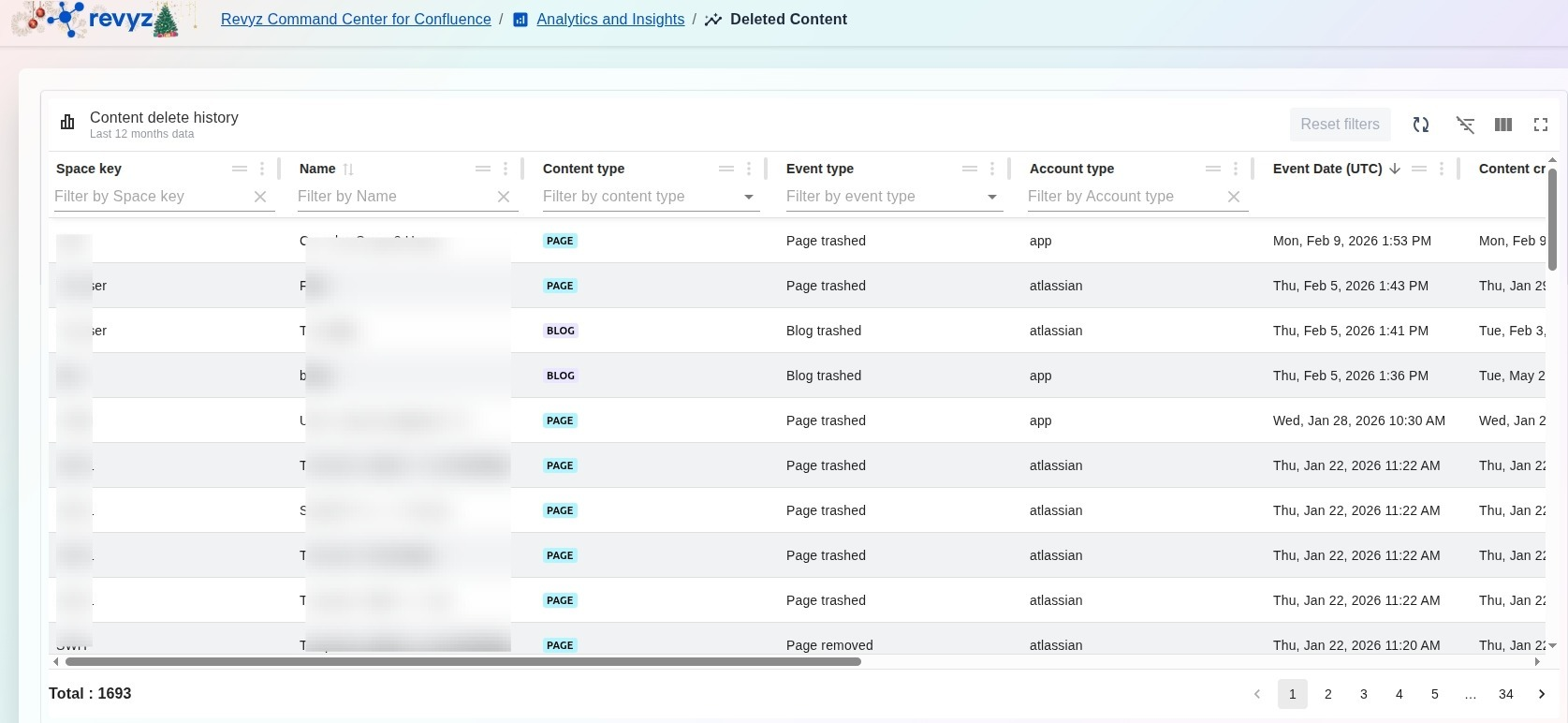
The Deleted Content page is a specialized analytical dashboard that provides a granular history of all items removed from your Confluence instance over the last 12 months. This interface tracks the lifecycle of deleted data, capturing essential metadata such as who performed the deletion and which space the content belonged to, facilitating rapid data recovery.
What is the Use Case?
-
Targeted Data Recovery: Quickly identify and recover specific pages or blogs that were accidentally trashed or permanently removed.
-
Administrative Oversight: Audit the Account type and the specific user responsible for trashing content to maintain security and accountability.
-
Temporal Analysis: Use the Event Date (UTC) to correlate data loss with specific project milestones or organizational changes.
-
Trend Monitoring: Track the volume of deleted items to understand site usage patterns and data cleanup activities.
How to view Deleted Content?
The dashboard organizes deletion events into a detailed, searchable table:
-
Space key: Identifies the specific Confluence space where the deleted content was originally located.
-
Name: Displays the title of the deleted page, blog, or custom content item.
-
Content type: Categorizes the removed item (e.g., PAGE or BLOG) for easier filtering.
-
Event type: Specifies the exact nature of the deletion, such as Page trashed, Blog trashed, or Page removed.
-
Account type: Indicates whether the action was performed by a standard atlassian user account or an automated app.
-
Event Date (UTC): Records the precise timestamp when the deletion event occurred.
Management Tools
-
Quick Restore: Provides immediate recovery options directly from the history list to return content to its original location.
-
Multi-Column Filtering: Narrow down the history by searching for specific Space keys, Names, or filtering by Content type and Event type.
-
Refresh and Reset: Use the Refresh icon to update the log with the latest deletions or Reset filters to clear all active search parameters.