
About this Page
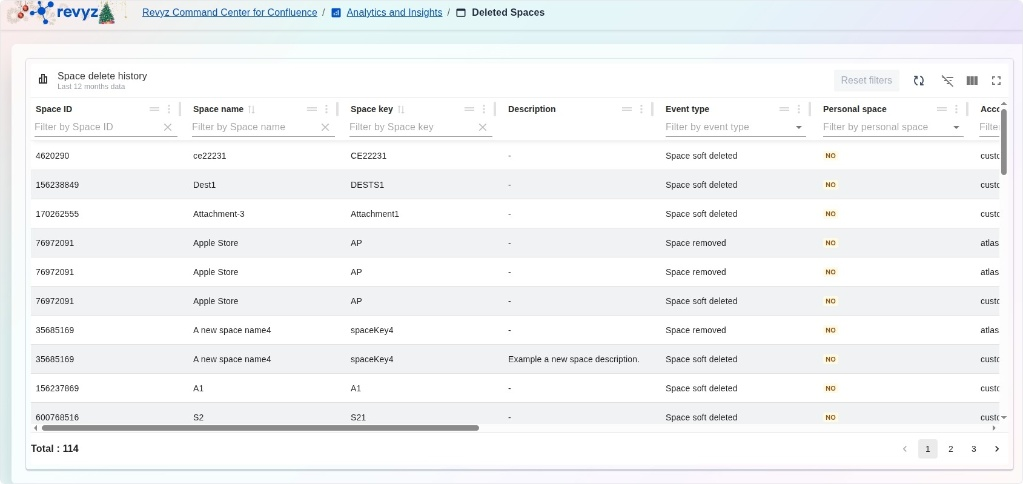
The Deleted Spaces page is a specialized analytical dashboard within the Analytics and Insights section that provides a comprehensive history of space-level deletions over the last 12 months. This interface tracks the full removal lifecycle of Confluence spaces, allowing administrators to audit when a space was removed and by whom, while providing options for immediate recovery.
What is the use case?
-
Instant Space Recovery: Effortlessly restore entire deleted spaces and their associated content, including pages and blogs, directly from the history list.
-
Deletion Auditing: Review the Event type to distinguish between a Space soft deleted (recoverable) and a Space removed (permanent) to understand the status of your data.
-
Security & Accountability: Identify the specific Account type responsible for deleting a space to maintain organizational oversight.
-
Compliance Tracking: Access a long-term record (up to one year) of all deleted spaces, including Space ID, Name, and Key, for internal governance and regulatory reporting.
How to View Deleted Spaces
The dashboard features a detailed table capturing critical metadata for every deleted space:
-
Space ID & Space name: Displays the unique identifier and title of the space that was removed.
-
Space key: Lists the short, unique key used to identify the space within Confluence.
-
Event type: Categorizes the action taken, such as Space soft deleted or Space removed.
-
Personal space: Indicates with a "YES" or "NO" whether the deleted item was a user's personal space or a global organizational space.
-
Description: Shows any descriptive text that was associated with the space before its removal.
-
Account type: Specifies the type of user account that initiated the deletion.
Management Tools
-
Instant Restore: Use the built-in recovery options to immediately bring a deleted space back into your live Confluence environment.
-
Filtering & Search: Rapidly find specific events by filtering the list by Space ID, Space name, Space key, or Event type.
-
Log Totals: Monitor the volume of deletion events (e.g., "Total: 114") to track environmental changes over time.