
About this Page
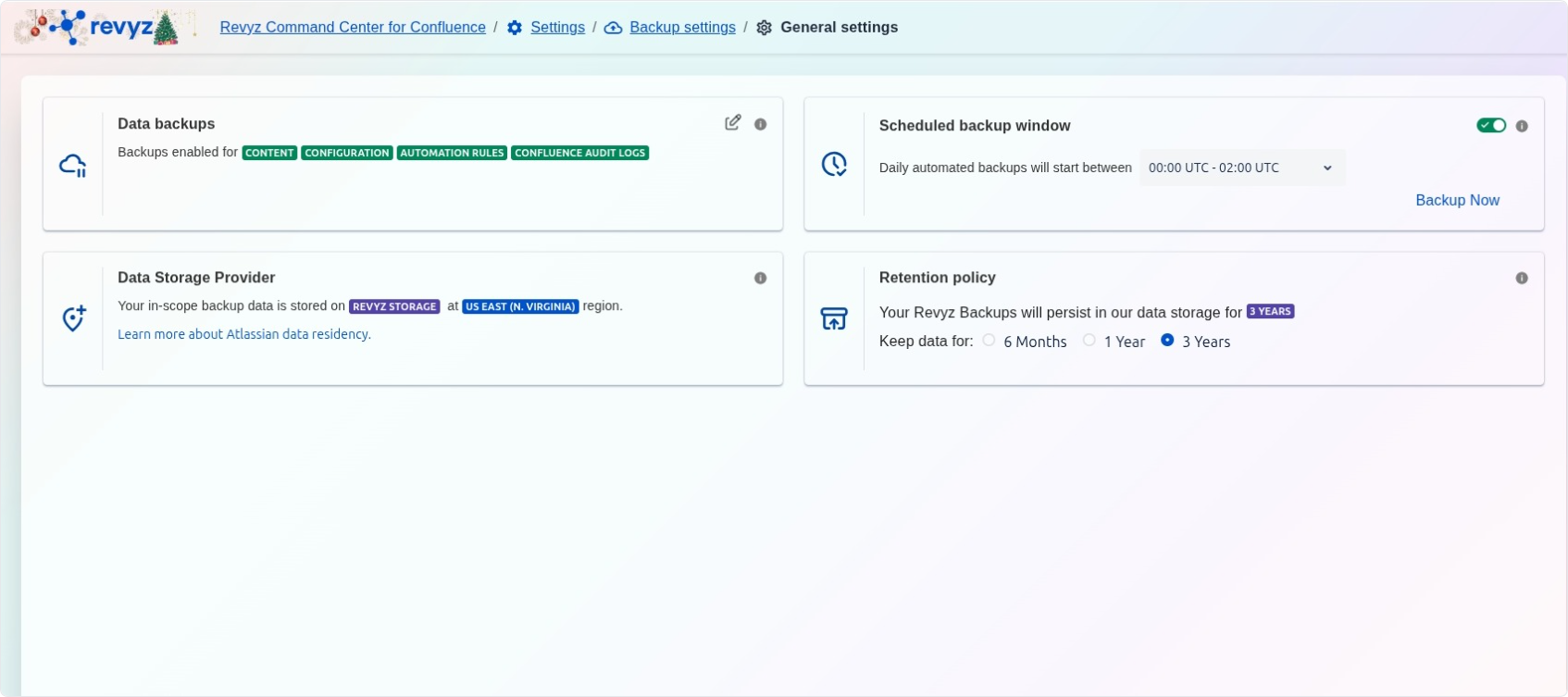
The General settings page is the primary configuration dashboard for defining the fundamental parameters of your data protection strategy. Within this interface, administrators can enable specific backup types, establish automated scheduling windows, and set long-term data retention policies to meet organizational compliance requirements.
What is the Use Case?
-
Strategic Backup Coverage: Select and enable specific data categories for protection, including CONTENT, CONFIGURATION, AUTOMATION RULES, and CONFLUENCE AUDIT LOGS.
-
Resource Optimization: Schedule daily automated backups to occur during off-peak hours (e.g., 00:00 UTC - 02:00 UTC) to minimize impact on site performance.
-
Compliance and Lifecycle Management: Define exactly how long your backed-up data will persist in storage, with options ranging from 6 Months to 3 Years.
-
Data Residency Verification: Monitor the specific region where your in-scope backup data is stored to ensure compliance with regional data sovereignty laws.
Features
The dashboard is divided into four critical configuration modules:
-
Data backups: Provides a toggle to enable or disable backups for various Confluence data types, ensuring all essential components are captured in every job.
-
Scheduled backup window: Allows you to define the start time for daily automated backups and provides a Backup Now button for immediate, on-demand data preservation.
-
Data Storage Provider: Displays the storage location and region (e.g., REVYZ STORAGE at US EAST (N. VIRGINIA)) for your encrypted backup data.
-
Retention policy: A lifecycle management tool where you can select the duration for which backups are kept, 6 Months, 1 Year, or 3 Years, before they are automatically purged.