
What is this feature?
This feature allows you to select one or more existing Jira issues and roll them back to a previous state. It uses a selected backup snapshot to find that past version and overwrite the current issue data with it.
Use Case Use this to undo incorrect or accidental changes made to an issue, such as a deleted description, a wrong status change, or corrupted data. It's a surgical fix that avoids restoring the entire project.
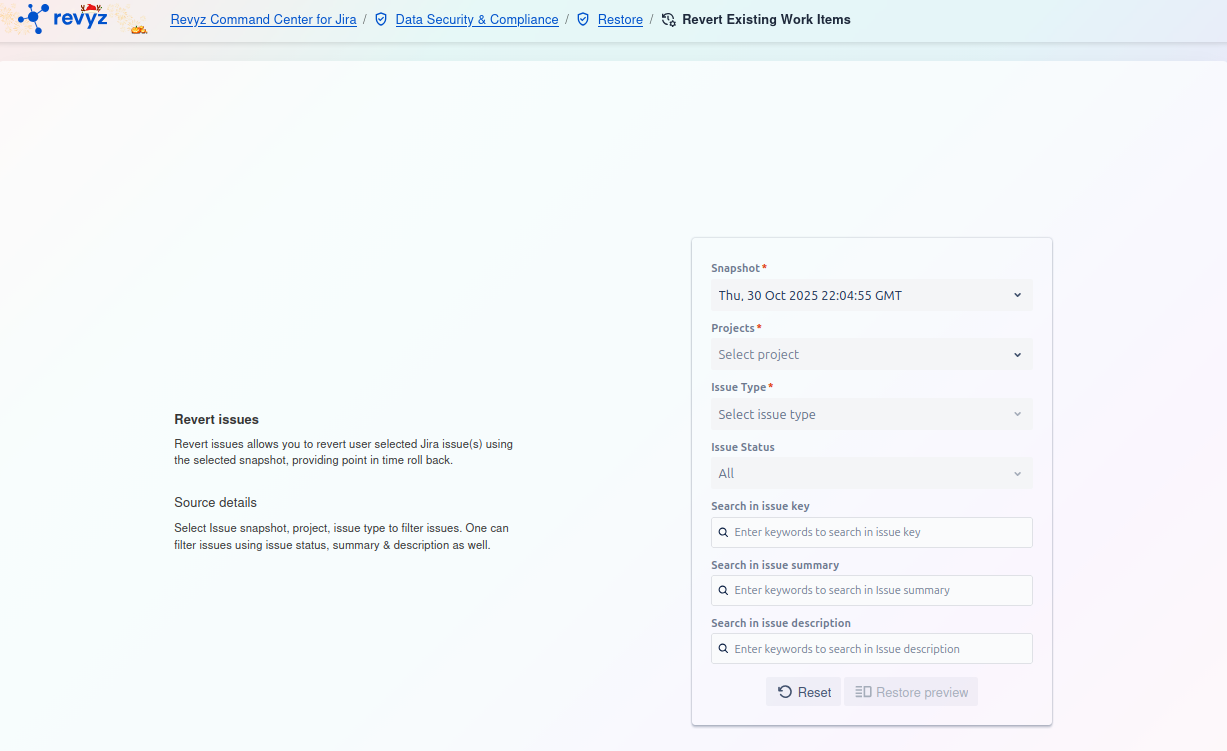
How to Revert Issues: Step 1 - Find Issues to Revert
This page allows you to find and select the specific issues you wish to revert. You must use the filters to build a search query.
Source details
On the left, the page explains that you will select an issue snapshot, project, and issue type to filter. You can further refine your search using issue status, summary, and description.
Filter Card
On the right side of the screen, you must fill out the filter card to locate the issues.
-
Snapshot
*:-
This is a required field. Select the backup snapshot that contains the "correct" historical state you want to revert to.
-
-
Projects
*:-
This is a required field. Select the project that contains the issue(s) you want to revert.
-
-
Issue Type
*:-
This is a required field. Select the issue type of the item(s) you are looking for (e.g., Bug, Task, Story).
-
-
Issue Status:
-
This is an optional filter. You can narrow your search by the issue's current status (e.g., "In Progress," "Done"). The default is "All."
-
-
Search in issue key:
-
An optional text field. This is the most direct way to find a specific issue. Enter the full issue key (e.g.,
PROJ-123).
-
-
Search in issue summary:
-
An optional text field. Enter keywords to search within the issue's summary (title).
-
-
Search in issue description:
-
An optional text field. Enter keywords to search within the issue's main description.
-
Actions
-
Reset: Click this button to clear all the filter fields and start your search over.
-
Restore preview: After you have set your filters, click this button (currently disabled) to run the search. This will show you a list of matching issues, allowing you to select which ones to revert before finalizing the action.