
What is this feature?
This feature is a comprehensive suite of restore tools that allow you to recover lost or corrupted data. It provides multiple levels of recovery, ranging from a "Full site restore" for catastrophic data loss down to granular options for restoring individual projects, single issues, or even just a specific attachment.
Use case
The primary use case is disaster recovery and correcting human error. An admin would use "Full site restore" to recover the entire instance after a major failure. More commonly, they would use granular tools like "Projects restore" to recover a project that was accidentally deleted, or "Work items restore" to bring back a single critical issue that a user mistakenly erased.
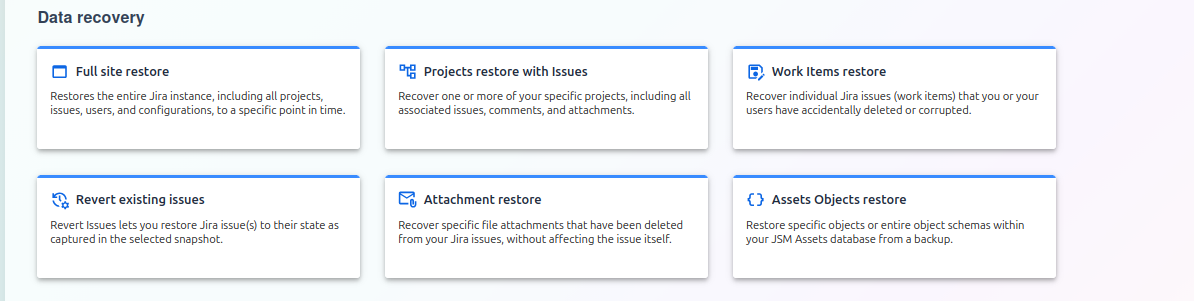
Choosing a Data Recovery Method
The Data Recovery screen is your central hub for all restore operations. From this page, you can select the type of recovery you need to perform, ranging from a complete site-wide restore to recovering a single attachment or object.
Each option opens a dedicated wizard to guide you through the specific steps for that recovery type.
Recovery Options
Here is a detailed breakdown of each available recovery method.
Recovery Options
1) Full site restore
This option restores the entire Jira instance, including all projects, issues, users, and configurations, to a specific point in time. This is a comprehensive, large-scale recovery typically used for disaster recovery.
2) Projects restore with issues
Use this feature to recover one or more of your specific projects in their entirety. This includes all associated issues, comments, and attachments for the selected projects.
3) Work Items restore
This allows for the granular recovery of individual Jira issues (work items) that you or your users have accidentally deleted or corrupted.
4) Revert existing issues
This feature lets you select one or more existing Jira issues and revert them to a previous state as captured in a selected backup snapshot. This is useful for undoing unwanted changes to an issue.
5) Attachment restore
Recover specific file attachments that have been deleted from your Jira issues. This process restores the files without affecting the issue itself (e.g., comments, status, or other fields).
6) Assets Objects restore
Restore specific objects or entire object schemas within your JSM Assets database from a backup. This allows you to recover lost or corrupted CMDB data.