
What is this feature?
This feature is a high-availability setting that allows you to establish a trusted, pre-authenticated connection between two separate Jira Cloud sites. It provides a dashboard to activate and manage these links, which authorize a "destination site" to pull data from a "source site" in an emergency.
Use case:
The use case is for a "cold-standby" disaster recovery strategy. An administrator uses this to link their primary Jira instance to a secondary, standby instance. If the primary site becomes completely inaccessible due to a major outage, this trusted connection allows the admin to log into the standby site and initiate a "pull" to recover critical data and restore operations.
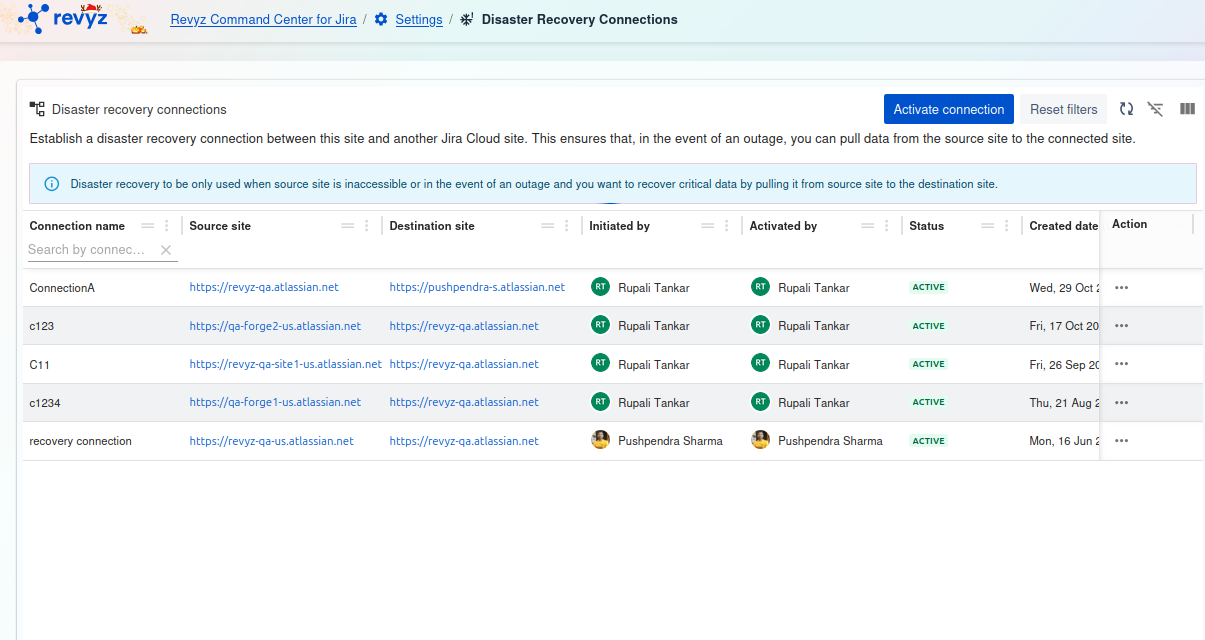
Disaster Recovery Connections
This page is the central hub for managing the connections between your primary Jira Cloud site and another site for the purpose of data migration or disaster recovery.
Page Description
The goal is to establish a secure link between this site and another Jira Cloud site. This ensures that in the event of an outage, you can pull data from the source site to the connected site.
Connection Types
There are two ways to connect your Jira Cloud sites, each serving a different purpose:
-
Cross-site connection:
-
This feature sets up a connection between two sites and is primarily designed to facilitate the migration of projects.
-
It is especially useful when you need to move or clone projects, workflows, issues, and configurations from one site to another (e.g., from a staging site to a production site).
-
-
Disaster recovery connection:
-
This feature is designed specifically to provide a backup solution in case of an unexpected outage or failure on your source site.
-
If the source Jira instance becomes unavailable due to server issues, data corruption, or any other disruption, this connection allows the organization to access and recover critical data by pulling it from the source site to the connected standby site.
-
Available Actions
At the top right of the screen, you will find two main actions:
-
+ Add recovery connection: Click this button to begin the process of setting up a new disaster recovery connection to another Jira Cloud site.
-
Activate connection: This button is used to activate an existing, pre-configured connection, typically during a migration event or a disaster recovery scenario.