
What is this feature?
This feature is a specific health report that scans your JSM Assets database from a selected backup snapshot. It analyzes your Assets configurations to find issues like empty object types or schemas.
-
Use Case: Use this to improve the performance and hygiene of your JSM Assets. It identifies unused or "empty" configuration items (like object types that contain no objects) which can be safely reviewed and removed to declutter your instance.
This feature of the Revyz Command Center for Jira is unavailable for Revyz Configuration Manager for Jira.
To upgrade your version to Revyz Command Center for Jira, connect with support@revyz.io or install the app here.
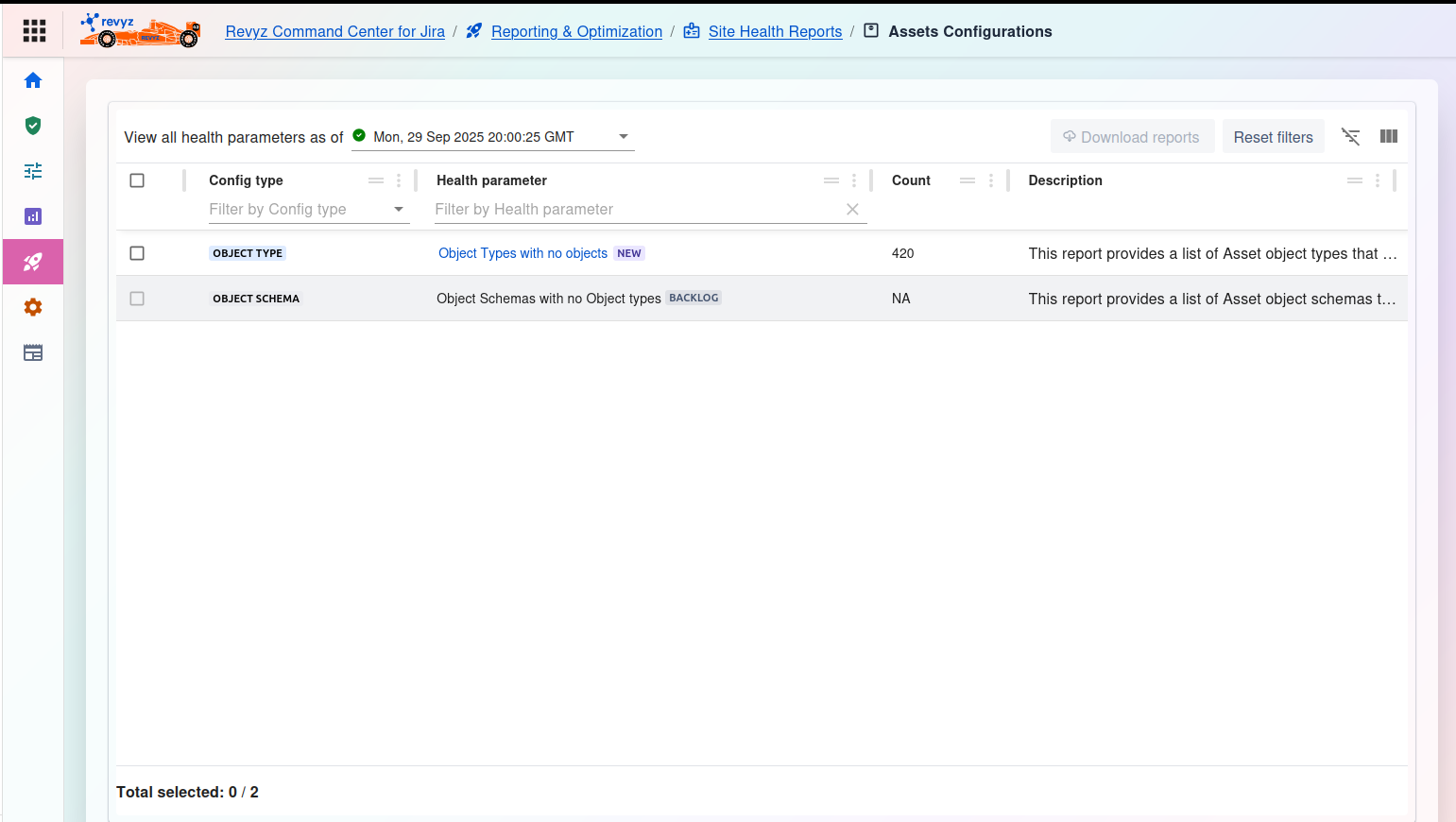
Assets Configurations Health Report
This page allows you to run health checks against your Assets configurations from a specific point in time.
1. Select Snapshot
-
View all health parameters as of
*: This is a required first step. Click the dropdown menu to select the specific backup snapshot (e.g.,Mon, 29 Sep 2025 20:00:25 GMT) you want to analyze. The table will then populate with the health check results from that snapshot.
2. Manage Reports
-
Download reports: (Currently disabled) This button will allow you to export the detailed health reports for your records or for sharing with your team.
-
Reset filters: Clears any filters you have applied to the table below.
-
Table tools (right side): Use these icons to toggle the filter row or customize the visible columns.
3. Health Report Table
The main table lists the available health checks and their results from the selected snapshot.
-
Checkbox: Select a specific health check to download its detailed report.
-
Config type: The category of the Assets configuration being analyzed (e.g.,
OBJECT TYPE,OBJECT SCHEMA). -
Health parameter: The specific check being performed.
-
Example:
Object Types with no objects- This check finds all object types that exist but have 0 objects in them. -
Example:
Object Schemas with no Object types- This check finds schemas that are empty.
-
-
Count: The result of the scan. This number shows how many items matched the health parameter (e.g.,
420object types were found with no objects).NAmay mean the check is still inBACKLOGor not applicable. -
Description: Explains what the report for that row provides.
To see the detailed list of the 420 "Object Types with no objects," you would typically select that row and click "Download reports" or click the row itself to drill down.